

New text perspective is off
Hey all,
Have had this problem for a while, have looked for fixes and am unable to find any solutions. I just downloaded the Photoshop version 20.0.7 and the issue is still there.
Issue:
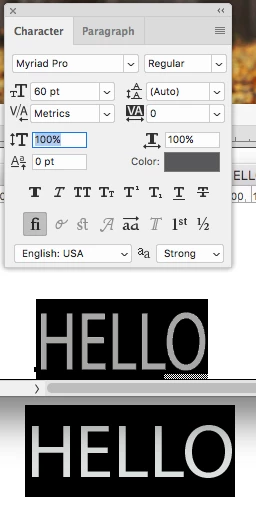
When adding text to a new image, my fonts are always skewed...they look taller and more narrow than they should. This is with both horizontal and vertical scale set to 100%. Doesn't matter what the font is, I have to change the perspective to like 95% vertical and 105% horizontal to get the font to look correct. I've attached an example with a word typed in InDesign with Myriad Pro regular and the font looks normal. I type the same word in Photoshop and the letters are too narrow/tall. This is driving me crazy. I figured with a new version this might be resolved but it isn't! Any ideas?


 AdChoices