


Kathy5FFA
Inspiring
July 14, 2026
Answered

new update cant turn off show extras

  • July 14, 2026
  • 3 replies
  • 36 views

After a recent update, I can no longer permanently turn off “Show Extras” and layer/selection edges. I don’t want any edges, bounding boxes, etc showing. How can I turn these off globally and permanently like I could before? When I close all files, those options under View are greyed out.

    Correct answer c.pfaffenbichler

    Please post meaningful screenshots to illustrate what you are talking about. 


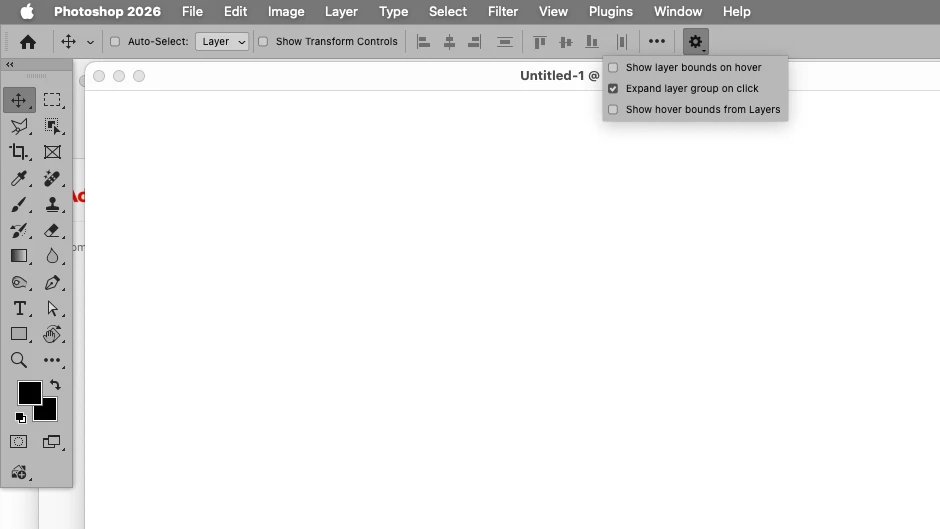
    What are the Move Tool’s settings? 


    3 replies

    Kathy5FFA
    Kathy5FFAAuthor
    Inspiring
    July 14, 2026

    I think I figured out the problem. You were right about the move tool settings. I found the ones I needed to turn off and it did remove the bounding boxes. It’s always challenging when a new update changes all of your custom settings back to default. I would suggest Photoshop having an option to save user settings like InDesign does. If it does, please let me know how to locate it. Thanks for your help.

    c.pfaffenbichler
    Community Expert
    Community Expert
    July 14, 2026

    I found the ones I needed to turn off and it did remove the bounding boxes. 

    I had posted a screenshot … 

    Kathy5FFA
    Kathy5FFAAuthor
    Inspiring
    July 14, 2026

    Thank you. I would like the checkmark to be off for Extras and <Selection Edges> persistently for all documents. The Move Tool settings don’t seem to affect this.

    Kathy5FFA
    Kathy5FFAAuthor
    Inspiring
    July 14, 2026


    c.pfaffenbichler
    Community Expert
    c.pfaffenbichlerCommunity ExpertCorrect answer
    Community Expert
    July 14, 2026

    Please post meaningful screenshots to illustrate what you are talking about. 


    What are the Move Tool’s settings?