Hi All, my new Adobe Photoshop 2026 upgrade has my Bridge Program,. and Photoshop 2026, but also there is a third window that shows old and deleted files. this keeps on popping up and it throws me, that and this new Imac Sequoia 15.5 that changed the shape of windows when i move them aside, andalso draws “selection” type blue boxes around “items” (open folders etc), even when they are sent to edges so i can use my old method of putting up two open folders side by side, split across a screen so i can compare, and drag & drop files.
what is this new photoshop windoes called and how the heck can i stop it totaly driving me bats.?
regards, Sandy
Correct answer justlearnskills
@Sandy27239270ouhp is your third screen shows old and deleted files? This may be your home screen. I actually have my ‘recents’ not shown, only because when I am teaching my students or if I am working in a client’s office, I do not want others to see what I am working on in the past. So, in Photoshop preferences (Command K for the Mac, or Control K for PC), I turn that off - File Handling - Recent File Contains - Enter ‘0’ files.
Personally, I like having my Home Screen open so that I can my mini dashboard. You could have a blank slate and turn that off as well, Photoshop preferences (Command K for the Mac, or Control K for PC), I turn that off - General - Uncheck ‘Auto show the home screen’ - Click OK when done
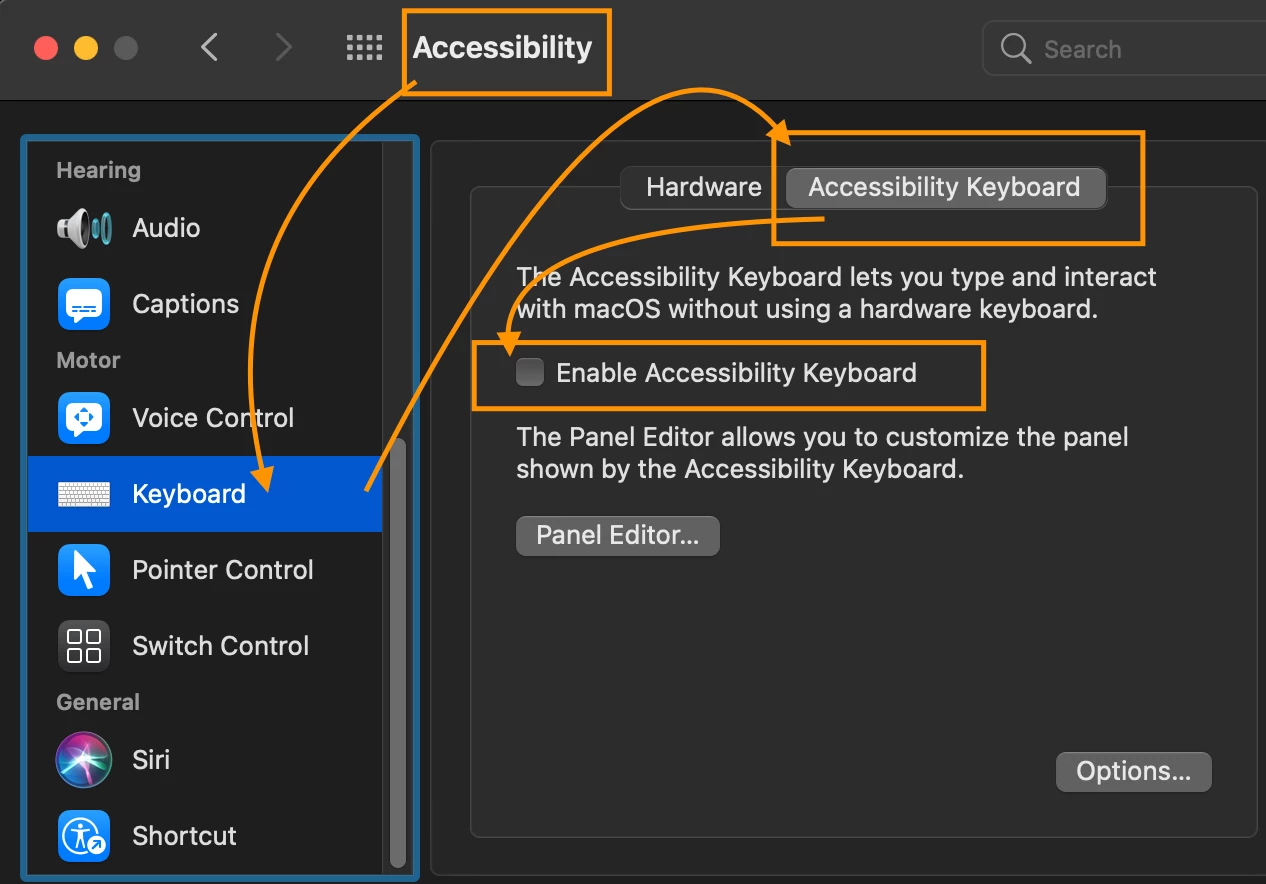
Second question: The blue boxes around items? That’s an accessibility feature. Helps those who may need it. Mine is off. Somehow, or maybe, that got activated when you updated PS? Open System Preferences - Accessibility - Keyboard - Uncheck Enable accessibility keyboard
Third question: You should be able to open two folders and have it side by side. Open up the System Preferences again - Desktop & Dock - Windows - turn off the option labeled Tile by dragging windows to screen edges to stop the OS from automatically resizing your folders when you move them. You could also turn off Tiled windows have margins, as this is the specific setting responsible for that weird gap and shape change that occurs when windows try to snap together.
Fourth question: Hopefully this works. There is absolutely nothing wrong in going ‘batty’ except, don’t eat bats like Ozzy Osbourne!
wow.thanks the info.. man all this ‘new stuff to learn’ is getting a bit much for this old (very old) 74 year old… My rant ages ago when bridge would only allow one open screen DID result in action by adobe who eventually bowed to the support i got and next model allowed several pages.. (I use bridge like a visual finder.. Been shooting images since i was 8..) I just dont speak the new hip terms that are the common tech language today…. getting very lost.. Greatly appreciate you help.. Regards, Sandy
wow, thanks for that.. did knot know what it was called to look it up. i was into photoshop when it was only B&W.. long time ago, and not it is becoming complicated. greatly appreciate your help. regards, Sandy
@Sandy27239270ouhp is your third screen shows old and deleted files? This may be your home screen. I actually have my ‘recents’ not shown, only because when I am teaching my students or if I am working in a client’s office, I do not want others to see what I am working on in the past. So, in Photoshop preferences (Command K for the Mac, or Control K for PC), I turn that off - File Handling - Recent File Contains - Enter ‘0’ files.
Personally, I like having my Home Screen open so that I can my mini dashboard. You could have a blank slate and turn that off as well, Photoshop preferences (Command K for the Mac, or Control K for PC), I turn that off - General - Uncheck ‘Auto show the home screen’ - Click OK when done
Second question: The blue boxes around items? That’s an accessibility feature. Helps those who may need it. Mine is off. Somehow, or maybe, that got activated when you updated PS? Open System Preferences - Accessibility - Keyboard - Uncheck Enable accessibility keyboard
Third question: You should be able to open two folders and have it side by side. Open up the System Preferences again - Desktop & Dock - Windows - turn off the option labeled Tile by dragging windows to screen edges to stop the OS from automatically resizing your folders when you move them. You could also turn off Tiled windows have margins, as this is the specific setting responsible for that weird gap and shape change that occurs when windows try to snap together.
Fourth question: Hopefully this works. There is absolutely nothing wrong in going ‘batty’ except, don’t eat bats like Ozzy Osbourne!
Hi, i have ‘un-selected’ home screen in the preference, but it still comes up… i am really hating this model photoshop now, as it does not behave like i am used to in the almost 30 yeras i have been using it...
a slight rant against programmers that think that users show only work the way they make a program, with out understanding that some have been working for many decades to suddenly have new “Ideas” foist upon the users with out the ability to turn off in preferences… wake up programmers..



 AdChoices