

Question
Nik Collection filters loading on Photoshop CC 2018 failure
Hi to all,
I've downloaded the Nik Collection from Google website and I installalled them on my Win pc succesfully.
Starting Photoshop CC 2018, I get the message " some plugin cannot be installed".
In the System information there are messages "no available version " for all the Nik modules like following
Analog Efex Pro 2 VERSIONE NON DISPONIBILE - - dal file “C:\Program Files\Google\Nik Collection\Analog Efex Pro 2\Analog Efex Pro 2 (64-Bit)\Analog Efex Pro 2.8bf”
the following floating windows appears on the PS desk
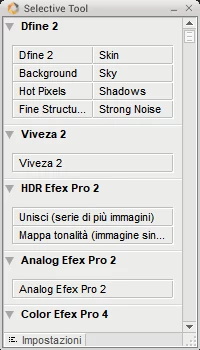
but trying to use it the system reply with the message " command "unknown" is not available"
How can I have the NIK COLLECTION filters pretty working on my PS ?
Thanks in advance for kindly help me.
Best regards
Gianvittorio
 AdChoices