


Participant
August 19, 2025
Question

No foreground to transparent option in gradient tool

  • August 19, 2025
  • 1 reply
  • 260 views

The option to use a foreground to transparent gradient in the 'Basics' folder of the gradient tool has disapeared. This is affecting both normal gradients as well as layer masks, making it so I can't make a layer fade out. It was fine until yesterday. The Basics folder in the image below previousy had 3 options, the third being transparent which is now gone.
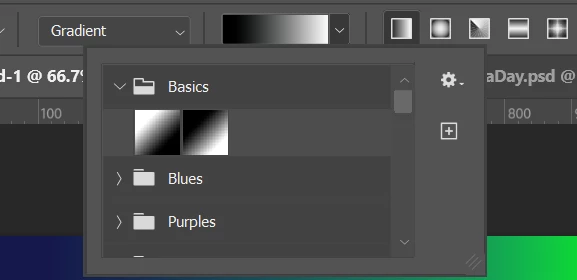


Re-installed the latest version but still missing. Using Windows 11. 


1 reply

Ged_Traynor
Community Expert
Community Expert
August 19, 2025

@simon_7005 have you tried manually resetting your Photoshop preferences
https://helpx.adobe.com/ie/photoshop/using/preferences.html#Manually
Remember to back up your settings before doing the preference reset
https://helpx.adobe.com/ie/photoshop/using/preset-migration.html

Participant
August 19, 2025

Hi @Ged_Traynor, I hadn't, but having now reset the preferences the issue is still occurring. 

Ged_Traynor
Community Expert
Community Expert
August 19, 2025

@simon_7005 go to Windows > Gradients and from the flyout menu select append default gradients, scroll down, and you should see another basic folder, you can delete the other top basic gradient folder that by ragging it to the bin