
Participant
December 4, 2023
Answered

No option to access CC libraries from Libraries panel
  • December 4, 2023
  • 1 reply
  • 355 views

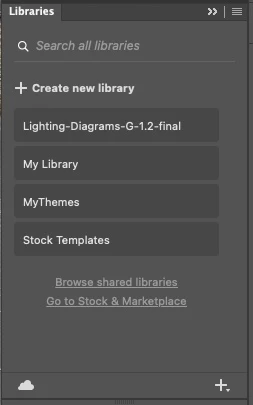
My Libraries panel above does not have the option to search in the Adobe Stock images library.  The panel does not look like the one shown on all of the Adobe pages about the Libraries panel. 

I have tried restarting Creative Cloud then Photoshop but no difference.

I have tried doing a CC Library manual install but it made no difference.

Is there a fix for this?


I am using Photoshop 25.2 on a Macbook Pro running Monterey 12.7.1.


This topic has been closed for replies.
Correct answer Myra Ferguson

Select any of the libraries in that panel. When that library opens, you'll see a search field that by default will prompt you to "Search current library." Use the dropdown menu to the right of that search field to change it to Search In Adobe Stock.

1 reply

Myra Ferguson
Community Expert
Myra FergusonCommunity ExpertCorrect answer
Community Expert
December 4, 2023

Select any of the libraries in that panel. When that library opens, you'll see a search field that by default will prompt you to "Search current library." Use the dropdown menu to the right of that search field to change it to Search In Adobe Stock.

Participant
December 4, 2023

Thank you so much Myra, that works. I couldn't find the information anywhere that you have to be in a library to get the dropdown.

Participant
December 4, 2023

... and when you know, it seems logical.