balanced_think01AC
Inspiring
July 12, 2026
解決済み

No Shape Tool Option for Shape - Only Frame

  • July 12, 2026
  • 返信数 3.
  • 76 ビュー

I’m trying to draw a solid shape in Photoshop 27.8.0. However, when selecting the Shape Tool and looking in the Options Drop Down, there are not options for Shape, Path or Pixels. All I see is a declaration that No Tool Presets defined for Current Tool. So, I’m dead in the water. Note, this issue is independent of whether I’m working with an existing file or creating a new one from scratch. 

    解決に役立った回答 Trevor.Dennis

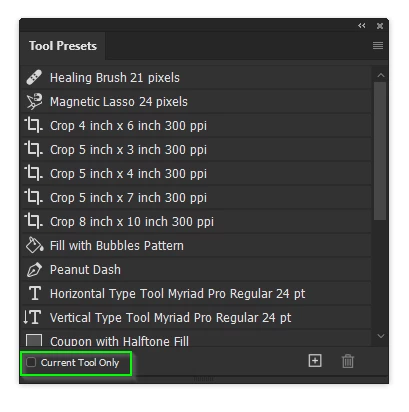
    Try opening the Tool Presets panel, and uncheck Current Tool Only

    If that doesn’t help, show us a full resolution screen shot of your entire workspace with one of the Shape tools selected.  The relative layer selected. The Tool presets panel visible.

    返信数 3

    balanced_think01AC
    Inspiring
    July 16, 2026

    I thought I’d responded earlier, but now can’t see it. So, I’ll say again. My issues stems from stupidly failing to recall that the rectangle tool is ‘behind’ the line tool. Once I use the correct tool - rectangle and not frame - everything works as it’s supposed to. Thanks for the ‘wake-up call’.

    Trevor.Dennis
    Community Expert
    Community Expert
    July 13, 2026

    That’s the Frame Tool.

    You need the Rectangle Tool

    With any of the Shape tools selected the Options bar will look like this.

    If it does not show Shape on the left, use the drop down to select it.

    Good luck.


    Trevor.Dennis
    Community Expert
    Trevor.DennisCommunity Expert解決!
    Community Expert
    July 12, 2026

    Try opening the Tool Presets panel, and uncheck Current Tool Only

    If that doesn’t help, show us a full resolution screen shot of your entire workspace with one of the Shape tools selected.  The relative layer selected. The Tool presets panel visible.

    balanced_think01AC
    Inspiring
    July 12, 2026

    I see lots of ‘presets’ but not the shape/path/pixel options that I expected. Here’s the screenshot.