
Inspiring
February 10, 2026
Answered

No thumbnail image in layers pane after pasting image

  • February 10, 2026
  • 2 replies
  • 18 views

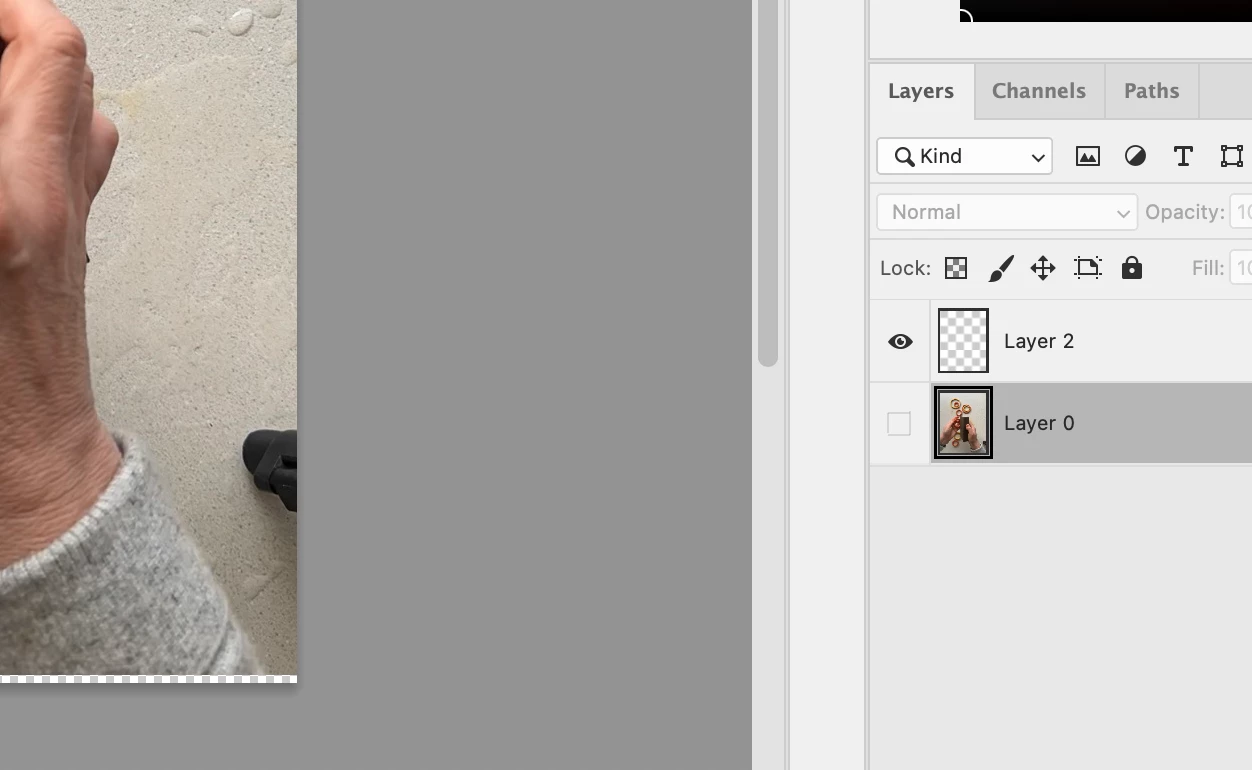
This just started happening. I haven’t changed any settings. I’m creating a multi-layer image. When I paste an image into a new layer, instead of the little thumbnail in the layers pane showing, it’s just a transparent thumbnail. (See screenshot).

Screenshot shows the image on that I put on Layer 2 but it won’t show up in the layers pane. Any ideas?
 

    Correct answer janepell

    Welp, in the meantime I restarted my computer. It cleared up the issue.

    And I apologize for being a bit confusing. The large image in my post IS the image on layer 2 even though it shows that background layer was selected.

    2 replies

    Community Manager
    February 10, 2026

    Hi ​@janepell 

    Thanks so much for reaching out! When you get a moment, could you let us know what version of Photoshop you’re using? It would also be really helpful if you could share a screenshot of the full Photoshop window.
    Let us know if this is happening with specific layers or if it seems to affect layers at random. You can also try pressing Ctrl/Cmd + T on the layer to check whether there’s any content there or if it’s truly empty.
    Thanks!
    Alek

    *(If you mention me with an @, like @Aleke, I’ll get a notification and can respond faster.)*
    janepellAuthorCorrect answer
    Inspiring
    February 10, 2026

    Welp, in the meantime I restarted my computer. It cleared up the issue.

    And I apologize for being a bit confusing. The large image in my post IS the image on layer 2 even though it shows that background layer was selected.

    janepellAuthor
    Inspiring
    February 10, 2026

    I’m having that problem but I DO have thumbnails selected in the layers pane.