


Non Wacom tablet issue with pen pressure and shift+brush straight line function
Seems like this is a relatively old issue but wanted to bring it up for further visibility as well as see if anyone in the community has a fix. A previous post from years ago can be referenced here: https://community.adobe.com/t5/photoshop-ecosystem-discussions/pressure-for-brush-size-ignored-when-holding-shift-for-straight-lines-dot2dot/m-p/11486511
Anyway, this wasn't an issue with my old Wacom Cintiq 13HD. I'm recently looking to upgrade and purchased a Huion Kamvas 16 gen 3 and I love everyhign about the hardware except this issue.
Basically, when you use the shift + brush function try to create a straight line, the initial click uses brush tip minimum pressure and the end click uses brush tip MAXIMUM pressure. This makes the function incredibly difficult to use without adjusting brush settings each time you want to use it. Most people sketch somewhere between min and max pressure and rarely hit those limits. So when you want to create a straight line stroke between two points, having one end use max pressure and the other use min pressure make the line unnatural.
This is probably a driver issue but I think Adobe can play a part in standardizing this function so that the initial and end pressure is respected like it is with Wacom. Based on the previous discussion and my own experience, I know at least XP-Pen and Huion have this issue. For this to be ongoing for over 5 years is disgraceful.
Some examples of what this looks like here: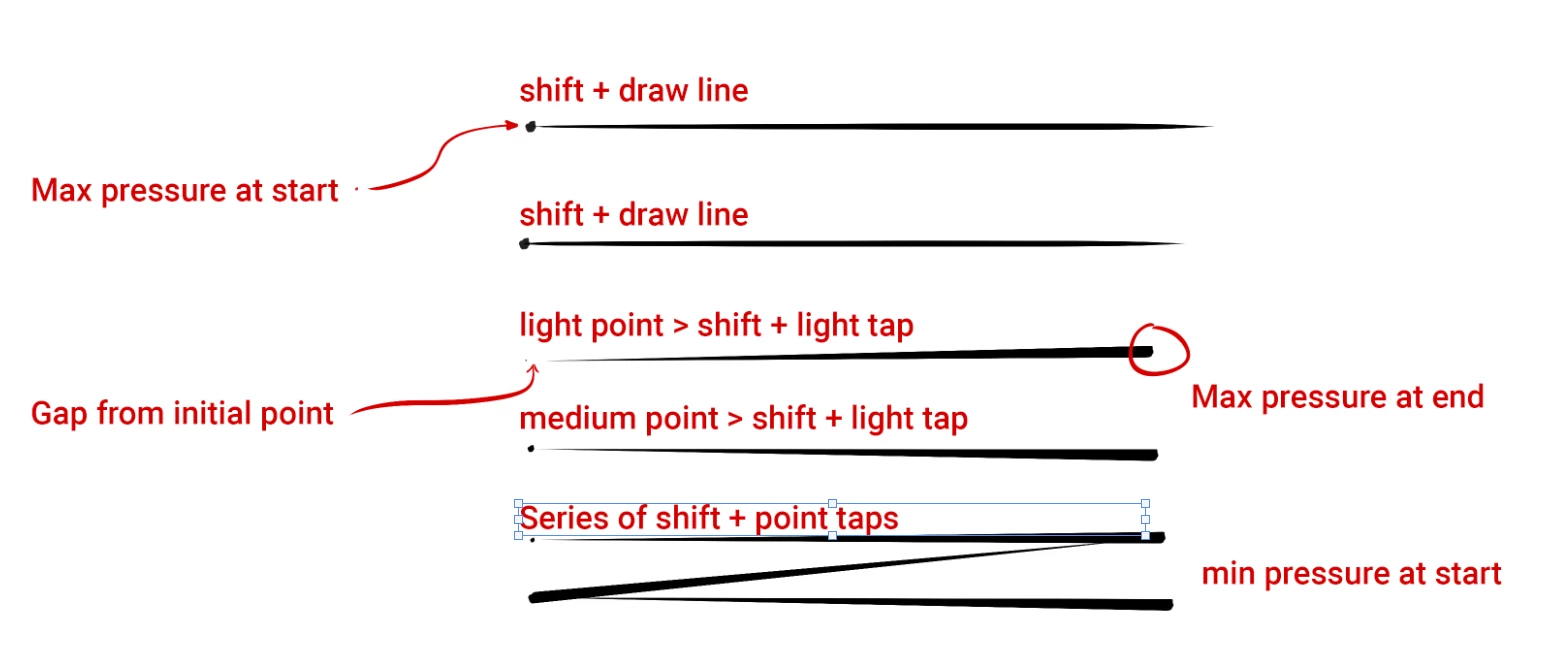
 AdChoices