


Not able to launch Photoshop at all
So, I've been plagued by a weird error today. I was working with some game textures using Photoshop, just some basic stuff with Intel's DDS plugin, as I've been for the last two months or something. Then, suddenly, I couldn't open files with Photoshop still open. I tried, but nothing.
So, I went and restarted my computer. Now, I literally couldn't launch Photoshop AT ALL. Nothing, no splashscreen, no error. On the task manager, I had the "Adobe Photoshop 2025" process running, and the "Crash Processor" as well, but nothing on my screen.
So, I went and tried uninstalling and reinstalling. No success. Also, in the process, I found that Creative Cloud had 191 error updating (which I solved by changing the main drive used for installation on Windows, so it's ok now).
In a last ditch effort, I downloaded the Creative Cloud cleanup tool, removed everything. Installed everything. Same error. Tried again, now removing all of my settings, everything. No success. Tried reinstalling my video driver from scratch, even though I had no updates. Can you guess? Nothing at all.
I tried installing Photoshop Beta, no success also. Right now, while writing this, I have a bunch of processes opened, seeing if they even bump a bit in memory usage, but they're all dead. Down below you can see all of them, and they've been like that for 5 minutess.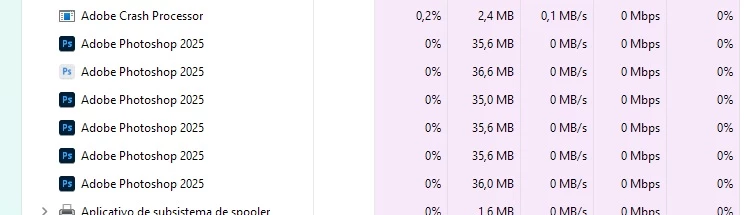
I've ran Avast and Malwarebytes to see if it's a malware but it seems ok (also memory, CPU and GPU usage are ok), and also tried disabling them to see if it could be that. Tried adding an exception for Photoshop in Windows Firewall, and, yes, running as admin. I'm honestly just COMPLETELY lost and hopeless now, and so so so so so frustrated..... lmao
So, a bit about my setup: I have Adobe Photoshop 26.9, running in Windows 11 24H2 on a Nvidia GTX 1650 and an Intel i5 13100F. Had no issues all day, and this happened out of the blue, literally. I was IN Photoshop, just working, and bam! Lost control of it. Please please please, someone help me, cause I'm desperate rn and Adobe Support in Brazil (my country) is really limited in its availability
 AdChoices