Tape99
Known Participant
July 18, 2022
Answered

Not Printing from new M2 MacBook Air

  • July 18, 2022
  • 2 replies
  • 1543 views

Setting up new MacBook Air w/ M2 processor.  My first print job, using Canon MG3600 airprint, from updated Photoshop was unsuccessful.  Job never went to a q.  Kept trying all suggestions I could find online and then just a test print which worked, but I am still unable to print from Photoshop.  Any ideas?

This topic has been closed for replies.
Correct answer NB, colourmanagement

"Airprint" uses a version of the free UNIX Gimp Print / Gutenprint, it’s a blessing to have that when one uses an old printer and no maker's driver is available for the OS version - but lots of standard driver features are missing. I tripped over this a while back working on a client on site and eventually discovering we were missing the actual manufacturer's paper names. At that time it was quite a task to get rid of it.

Using Airprint's not going to install the manufacturer's ICC profiles either. 

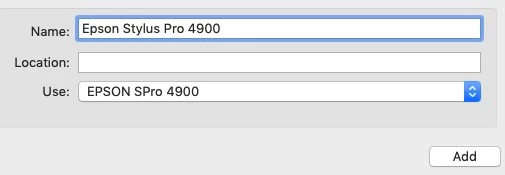
Better to download the actual manufacturer's printer driver [if there is one] and when you install be sure NOT to select "Airprint" under "use" - this screenshot is an Epson install, but you'll see what I mean:


I hope this helps
neil barstow, colourmanagement net :: adobe forum volunteer:: co-author: 'getting colour right'
google me "neil barstow colourmanagement" for lots of free articles on colour management


2 replies

NB, colourmanagement
Community Expert
NB, colourmanagementCommunity ExpertCorrect answer
Community Expert
July 18, 2022

"Airprint" uses a version of the free UNIX Gimp Print / Gutenprint, it’s a blessing to have that when one uses an old printer and no maker's driver is available for the OS version - but lots of standard driver features are missing. I tripped over this a while back working on a client on site and eventually discovering we were missing the actual manufacturer's paper names. At that time it was quite a task to get rid of it.

Using Airprint's not going to install the manufacturer's ICC profiles either. 

Better to download the actual manufacturer's printer driver [if there is one] and when you install be sure NOT to select "Airprint" under "use" - this screenshot is an Epson install, but you'll see what I mean:


I hope this helps
neil barstow, colourmanagement net :: adobe forum volunteer:: co-author: 'getting colour right'
google me "neil barstow colourmanagement" for lots of free articles on colour management

josephlavine
Community Expert
Community Expert
July 18, 2022

Have you tried installing the Canon driver? The Airprint driver is from Apple and often has less features.

You can go to your system preferences, delete the current driver, and install a new one.

warmly/j


Tape99
Tape99Author
Known Participant
July 18, 2022

josephlavine,

thank you for the suggestion. One of the things I had noticed was that on my macbook, the driver v. was 3.0 while on iMac it was 16.2....

I didn't see how to delete a driver, but I downloaded the latest from Canon and installed.  It works.