VelvetPaperPhoto
Participant
September 6, 2022
Answered

Nothing in Actions folder

  • September 6, 2022
  • 3 replies
  • 279 views

Photoshop is not saving actions created in photoshop anywhere on my computer. I am not looking for the ActionsPallette.psp file. Why won't photoshop save the .atn files to the presets>actions folder??? I've restarted multiple times. Run the actions multiple times. NOTHING. This is STUPID.

This topic has been closed for replies.
Correct answer Stephen Marsh
@VelvetPaperPhoto wrote:

Nevermind. I don't care. Don't reply. Delete this now. Thanks.


Your question may help somebody else though, so no need to ignore it or delete it!


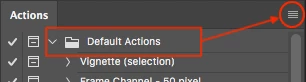
One should manually save out each action set "folder" individually to a .atn file using the menu on the upper right of the action panel window:


Where "should" one save these .atn files? Wherever you want, however, there are two "official" locations:


Mac:
/Applications/Adobe Photoshop CC 2022/Presets⁩/Actions

Win:
C:\Program Files\Adobe\Adobe Photoshop 2022\Presets\Actions


If the saved .atn file is saved to the default application/program presets folder as listed above, the action will be listed and available in the action palette menu. This allows an action to be easily restored if it is removed without having to manually find and load the original .atn file. If there are many actions, this menu may become unwieldy due to the length of the added action sets.


Note: by storing saved action .atn files in this default application/program location they will not be available to the built-in preset migration export tool (edit menu, presets, export/import presets).


For the built-in export/import presets feature to list saved actions for migration, they should be saved to a non-default location – the user level preset folder for actions:


Mac:

/Users/username/Library/Application Support/Adobe/Adobe Photoshop CC 2022/Presets⁩/Actions

Win:

C:\Users\username\appData\Roaming\Adobe\Adobe Photoshop 2022\Presets\Actions


(Note: Replace "username" with your OS account name. Depending on your OS settings, these locations may be hidden)


https://prepression.blogspot.com/2017/01/photoshop-custom-action-file-backup.html

 

3 replies

Chuck Uebele
Community Expert
Community Expert
September 6, 2022

As Stephen mentioned, action set have to be manually saved. Photoshop doesn't automatically save actions nor action sets.

Stephen Marsh
Community Expert
Stephen MarshCommunity ExpertCorrect answer
Community Expert
September 6, 2022
@VelvetPaperPhoto wrote:

Nevermind. I don't care. Don't reply. Delete this now. Thanks.


Your question may help somebody else though, so no need to ignore it or delete it!


One should manually save out each action set "folder" individually to a .atn file using the menu on the upper right of the action panel window:


Where "should" one save these .atn files? Wherever you want, however, there are two "official" locations:


Mac:
/Applications/Adobe Photoshop CC 2022/Presets⁩/Actions

Win:
C:\Program Files\Adobe\Adobe Photoshop 2022\Presets\Actions


If the saved .atn file is saved to the default application/program presets folder as listed above, the action will be listed and available in the action palette menu. This allows an action to be easily restored if it is removed without having to manually find and load the original .atn file. If there are many actions, this menu may become unwieldy due to the length of the added action sets.


Note: by storing saved action .atn files in this default application/program location they will not be available to the built-in preset migration export tool (edit menu, presets, export/import presets).


For the built-in export/import presets feature to list saved actions for migration, they should be saved to a non-default location – the user level preset folder for actions:


Mac:

/Users/username/Library/Application Support/Adobe/Adobe Photoshop CC 2022/Presets⁩/Actions

Win:

C:\Users\username\appData\Roaming\Adobe\Adobe Photoshop 2022\Presets\Actions


(Note: Replace "username" with your OS account name. Depending on your OS settings, these locations may be hidden)


https://prepression.blogspot.com/2017/01/photoshop-custom-action-file-backup.html

 

VelvetPaperPhoto
Participant
September 6, 2022

Nevermind. I don't care. Don't reply. Delete this now. Thanks.