
Question
NVIDIA and Photoshop crashes
I started having an issue with Photoshop freezing up and then not recognizing my NVIDIA GPU around July 1st, or maybe end of June.
I have a Dell Inspiron 7591 2-in-1 with integrated Intel and NVIDIA GeForce MX250.
CTRL ALT DEL to shut down Photoshop and upon restart PS it would give the "Your graphics processor is incompatible" and only detect Intel and not NVIDIA.
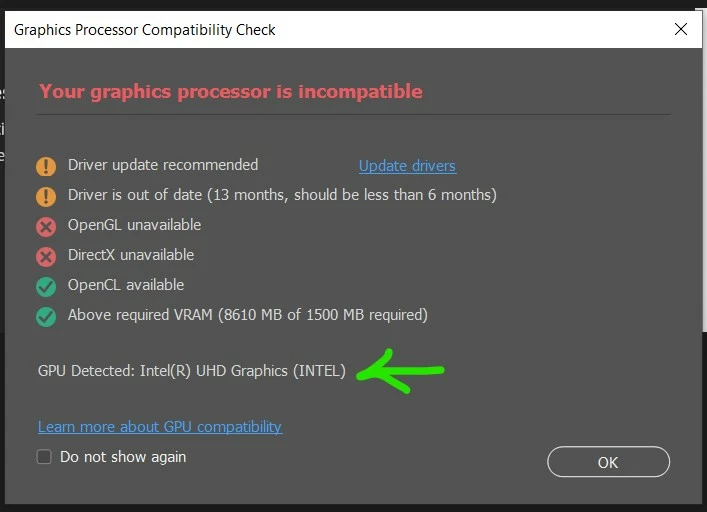
Here are all the things I've tried so far. About to start remote session with Dell, on day 5 of my ticket with them.
- Uninstalled Photoshop (23.4.1) and reinstalled a prior release (23.3.2). No dice. Updated back to 23.4.1
- NVIDIA Control Panel, set Preferred GP to Hi-Perf NVIDIA, and individual programs, set Photoshop to NVIDIA and sniffer to NVIDIA. Then noticed the "Windows OS now manages the selection of graphics processor. Open Windows graphics settings". Doh! This may be because it's Windows 10 Home and not Pro?
- In Windows Graphics Settings, set Photoshop and sniffer to High Performance.
- Dell had me uninstall NVIDIA Driver but NOT all Driver Software. Restart. Next day, using Photoshop, switch to Chrome for a bit, back to PS and it froze. NOTE: When this happens, NVIDIA GPU goes to 0% AND the temperature display disappears. (When working, it rarely goes above 10% and never above 60 degrees C.) Photoshop doesn't say it's not responding or anything, it's just inoperable and displays a bunch of screens all gobbled around. Also, sometimes when I walk away for a bit, I can't get my screen to come back up - it's just black and slightly back-lit. I have to to a hard restart via Power button.
- Next, Dell has me uninstall both Display Driver and both Monitor Drivers. Run the same BIOS update I already ran back in May. Restart and download and reinstall all drivers.
- Still, I can only use Photoshop for a few minutes and if I switch to another program at all, NVIDIA seems to die. Driver says it's working properly. Photoshop doesn't say it's Not Responding even. Just NVIDIA GPU goes to 0% and temperature display disappears. Restarting Windows is the only thing that fixes it.


 AdChoices