Known Participant
Jul 22, 2024 12:10 PM UTC
Answered

Object Selection Highlight driving me insane

How do I turn off the Object Selection Highlight in PS 2024 that covers the subject in purple whenever my curser nears it? It's hugely distracting and I can not find an option in Settings to adjust or disable it.


I'm not even sure what it's meant to do...

This topic is closed to new replies. Start a new post to keep the conversation going.
Ged_Traynor
Ged_TraynorCorrect answer
Community Expert
Jul 22, 2024 12:15 PM UTC

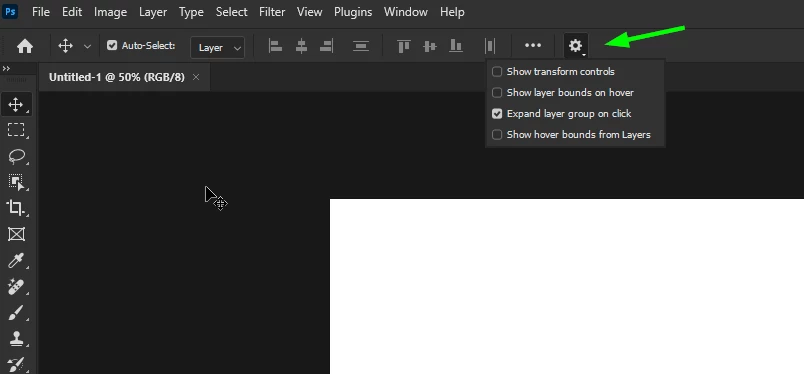
@JacktheMac you can disable it from here

3 replies

Ged_Traynor
Community Expert
Ged_TraynorCommunity ExpertCorrect answer
Community Expert
Jul 22, 2024 12:15 PM UTC

@JacktheMac you can disable it from here

Translate
Known Participant
Jul 22, 2024 12:22 PM UTC

Many thanks Ged, you have restored my sanity. Adobe offer no advice on this (that I can find) so that single click has saved the day.


All best


Jack

Translate
Ged_Traynor
Community Expert
Community Expert
Jul 22, 2024 12:24 PM UTC

I've yet to come across anybody that actually users it, it should be off by default IMHO

Translate