


Known Participant
October 6, 2026
Question

Occasionaly the save may leave out the Jpeg format. inconsistant results.

  • October 6, 2026
  • 3 replies
  • 29 views

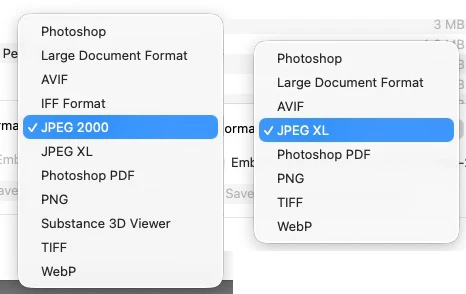
Hi. I opne small 200K to 1meg Jpeg and Jpg images, the upsize them byt 4 to 6 times in Gigapixel. resulting in images from 25 to 50 Megapixels. Norlay i save images in Photoshop Psd format, but when i want to run them images through other programs, i Save as plain Jpeg. problem is that several times the save format options does not display ordinary Jpeg or Jpg. i get the below options only. why.?

Regards, Sandy (photoshop 27.10.0., Mac Mini M4 Tahoe 26.6.2) (I do make very large prints, up to 1 Tb as i have a large format printer, but most in the 50 to 100meg)
 

    3 replies

    D Fosse
    Community Expert
    Community Expert
    October 7, 2026

    It’s very consistent: If you’re adding properties to the document that do not conform to the jpeg file format specification, jpeg is not in the list.

    The jpeg specification does not support layers of any kind, 16 bit depth, transparency or alpha channels. Few people realize what a limited format jpeg is - basically anything you can do to a file in Photoshop will put it outside the jpeg specification.

    Also, you do not need 300 ppi for large format prints, that’s a common myth. They will be seen from farther away, and the resolution requirement drops accordingly. A  billboard can be as low as 10-15 ppi and still look perfectly crisp and sharp.

    Upsampling will always degrade quality. Nowadays there is much buzz about AI resampling, but be aware that this will always produce an entirely new image, with added details that may be totally unrelated to the original. If authenticity matters, AI is not the way to go.

    Known Participant
    October 7, 2026

    Hi, yes i know that the jpeg format is dated and limited. but too many archives i deal with scanned/filed many of their images in it ages ago and have not updated since. as for large format printing 64” printers and many i know and have used for one of jobs have printers that dwarf that. (I owned 22 Photographers estates.. one alone was 60,000 large format negs, etc, tonage. I was brought up on 10”x8” Cameras” In the good old days i could make 20’ prints in the studio at night)

    i only use upsampelling for outside other archives images. and ‘double tapping’ with Gigapixel for a better improvement. but stiil only good for A3 images.

    as for my work i also scan big, using a epson 10000XL too many sacrifice quality for cheap equipment.. that is why i am on the front cover of a Kodak Magazine, and am a Honorarly life member of the Australia Instuture of Professional Photographers…

    i like people to be able to use a magnifier to look INTO my images…

    i have been a Professional retoucher since 1969…

    not being rude, but there is no need to tell me how to suck eggs… as all the ‘young’uns’ dont know how old a hand i am at this.

    Sandy Barrie.


    Known Participant
    October 7, 2026

    double tapping tunrned a good retouching job into ‘almost’ realistic..