traindevie
Participant
October 8, 2025
Question

One Key Shortcut, Multiple Shortcut for same command

  • October 8, 2025
  • 2 replies
  • 135 views

hi, i cant have one key shortcut in Photoshop if possible you guys make it available

also i cant have multiple shortcuts for the same command like in premier pro

please add this to Photoshop it will be nice to have

2 replies

Conrad_C
Community Expert
Community Expert
October 20, 2025

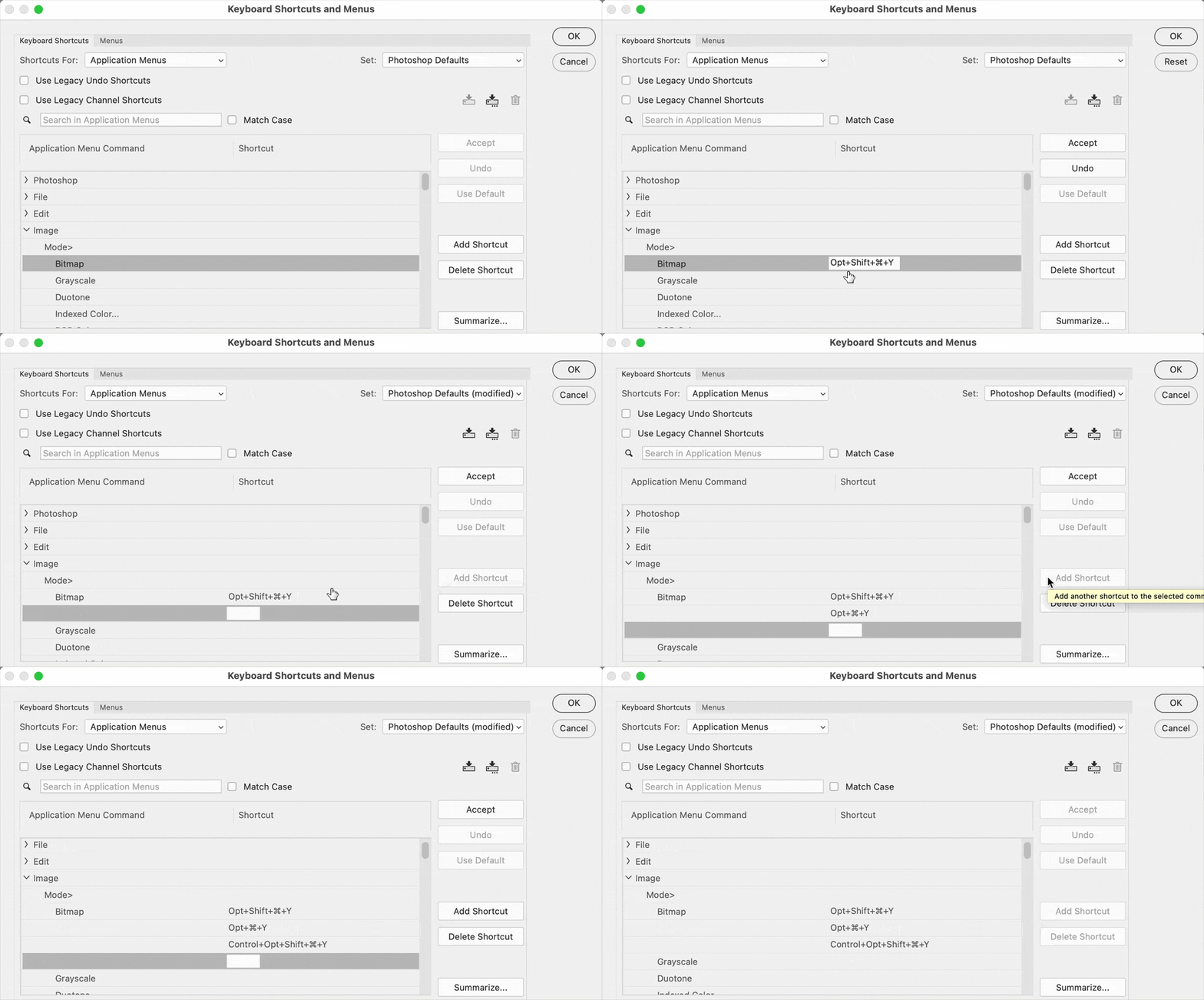
Yes, I agree that the Premiere Pro keyboard shortcut editor is much more powerful and flexible, but the Photoshop keyboard shortcut editor already lets you do what you are asking for. In the demo below of Photoshop, you can see that by clicking the Add Shortcut button, I can add three shortcuts for the Bitmap command, and they all work.

 

traindevie
Participant
October 20, 2025

okay thank you
but it still cant let me do one key, they ask me to use alt and ctrl, which i dont want to

i only want one key ( exemple : i have "-" in premier pro for save)

Conrad_C
Community Expert
Community Expert
October 20, 2025

It might not be possible to assign single-key shortcuts in the Photoshop keyboard editor. Until Adobe upgrades the Photoshop shortcut editor (we do not know when that might happen), the only workaround I can think of for now is to use a third-party keyboard shortcut utility that accepts a single-key shortcut and triggers a multi-key shortcut in Photoshop.


You can look in the Ideas section of this community to see if there is already an existing feature request for keyboard shortcut editor enhancements. If so, you can vote it up. If not, you can start a new feature request there.

creative explorer
Community Expert
Community Expert
October 20, 2025

@traindevie have you thought of creating your own custom Photoshop keyboard shortcuts? Unless it's being used by another keyboard shortcut, you can always over-write them, which I have in the past! 

m

