
JimBDuncan
Participating Frequently
Nov 4, 2018 4:13 AM UTC
Answered

Option Bar element (see image) grayed out. Why?
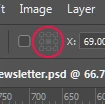
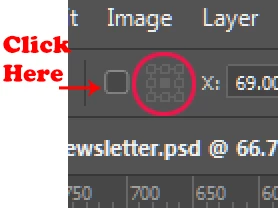
I don't know what it's called, but the 9-box position tool (circled in red) is permanently grayed out. I rely on it, so this is a problem. And it's something I never experienced until the most recent version of Photoshop. How do I use this tool now?

Jeff Arola
Jeff ArolaCorrect answer
Community Expert
Nov 4, 2018 6:19 AM UTC

Click on the small box to the left of the Reference Point Location

New and enhanced features | Latest release of Photoshop CC

3 replies

Jeff Arola
Community Expert
Jeff ArolaCommunity ExpertCorrect answer
Community Expert
Nov 4, 2018 6:19 AM UTC

Click on the small box to the left of the Reference Point Location

New and enhanced features | Latest release of Photoshop CC

Translate
JimBDuncan
Participating Frequently
Nov 4, 2018 6:16 PM UTC

I feel stupid, but I'm very grateful. Thank you! And thanks for the link, too. Obviously, I need to read!

https://forums.adobe.com/people/Jeff+Arola  wrote

Click on the small box to the left of the Reference Point Location

New and enhanced features | Latest release of Photoshop CC

k

Translate
Known Participant
Mar 21, 2025 10:58 PM UTC

Don't feel stupid. Because then I'll have to too. Same problem. Same solution. What I want to know, now in 2025, is how did that little checkbox get turned off to start with. Was it a new, hardly announced default with my last update? Pshop v 20.2 aka Adobe Photoshop 2025. Or did I simply mis-aim when trying to hit that Reference Point Location box? One false move can cost you a whole lot of time. I've been using Photoshop since it's earliest days and STILL....

Translate