Is there any way to disable this feature? I routinely convert flat backgrounds into layers by option-double clicking the layer, but that also resizes the whole document window. Older versions of Ps didn’t use to do this.
Correct answer Conrad_C
I’m not sure if there is a way to disable the behavior, which was apparently added in 2020. Option-double-clicking doesn’t resize the document window, it specifically fits the current layer’s content to the document window viewport. For example, this is useful to designers who want to instantly zoom into a small button they want to edit for a web page or device UX.
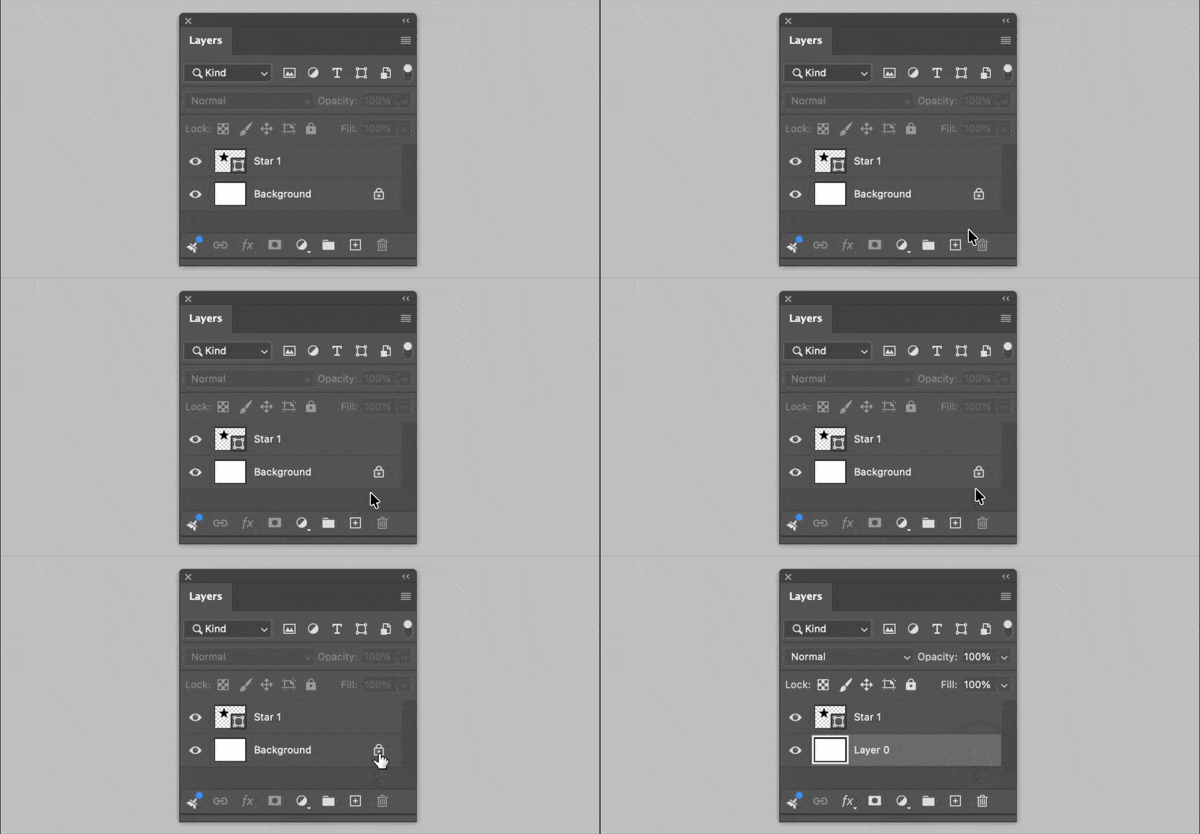
But consider updating your workflow to take advantage of another improvement they made: You can now convert a Background to a layer by clicking the lock icon on it. Notice that’s just one click. So instead of having to both hold down a key and click twice, you can now do the same thing by only clicking once without holding down any keys. Much simpler!
Now, if you really want to stick to the more complicated Option-double-click, it turns out there is an existing request here for disabling Fit Content to View. Adobe has actually tagged it “Under Review,” which is nice because a lot of feature requests don’t make it that far. If you want to add your vote or comment to that, here’s the link:
But in the meantime, you might find that clicking the Background lock icon is much simpler and easier anyway.
I’m not sure if there is a way to disable the behavior, which was apparently added in 2020. Option-double-clicking doesn’t resize the document window, it specifically fits the current layer’s content to the document window viewport. For example, this is useful to designers who want to instantly zoom into a small button they want to edit for a web page or device UX.
But consider updating your workflow to take advantage of another improvement they made: You can now convert a Background to a layer by clicking the lock icon on it. Notice that’s just one click. So instead of having to both hold down a key and click twice, you can now do the same thing by only clicking once without holding down any keys. Much simpler!
Now, if you really want to stick to the more complicated Option-double-click, it turns out there is an existing request here for disabling Fit Content to View. Adobe has actually tagged it “Under Review,” which is nice because a lot of feature requests don’t make it that far. If you want to add your vote or comment to that, here’s the link:
But in the meantime, you might find that clicking the Background lock icon is much simpler and easier anyway.
Wow thanks! Just clicking on the lock icon would work great for me. Funny how that icon has been there all this time but never once considered it to be something to interact with.



 AdChoices