


Participant
July 19, 2026
Answered

Option to uninstall not in dropdown menu

  • July 19, 2026
  • 2 replies
  • 43 views

As mention in a post yesterday I have an issue with Photoshop not opening files from Lightroom, I get a Disk Error message every time. I’ve run First Aid on all my disks and all appear fine.


None of the things I’ve tried, or have been suggested to me, have fixed this. The final option suggested is to uninstall and reinstall, however there lies another problem.

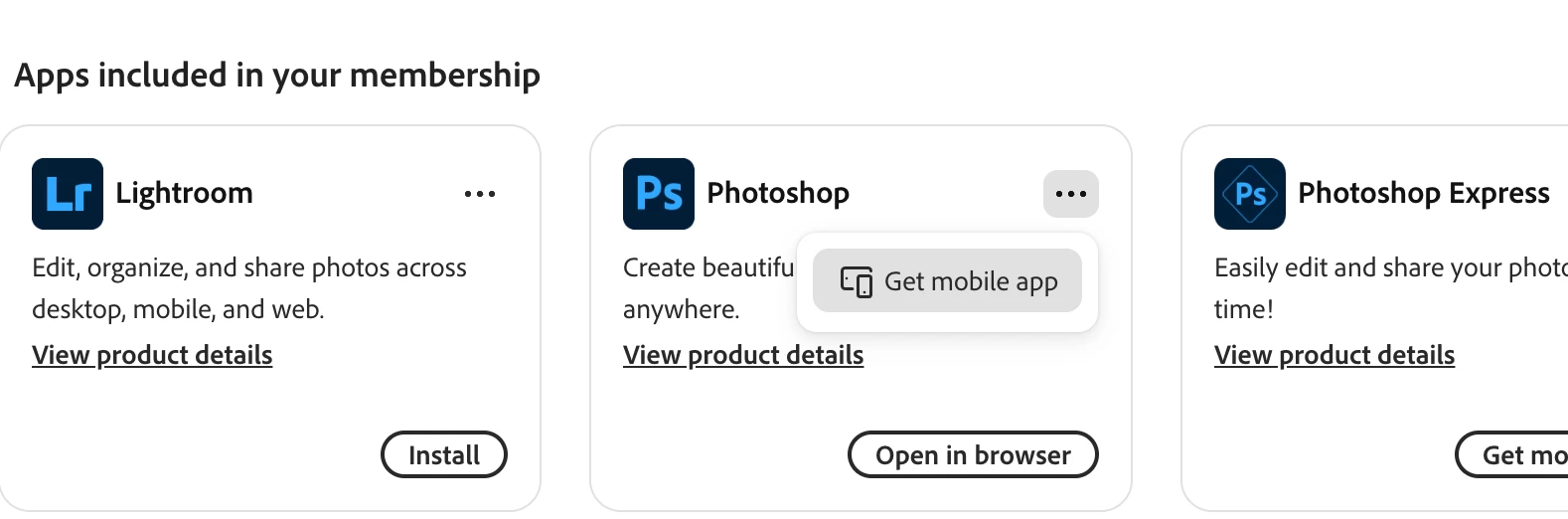
As instructed I opened Adobe Desktop and went to my apps. The step is to click More Options with the three dots … but the only item in the list, as you’ll see from the screenshot, is to add the mobile app. No ‘uninstall’. The same is true for Lightroom.

Is there another way around this or do I have to uninstall through my Finder - Applications?
 

    Correct answer LAMY2017

    daleslass,

    If you click View Product details, to see that is the Mobile app. Additional hints are 1) Open in browser, and the version number is not displayed.

    That is not the current Photoshop for the desktop. It’s not visible in when All Apps is selected. Try Your Apps.

    Creative Cloud’s display of apps is goofy.

    2 replies

    LAMY2017Correct answer
    Legend
    July 19, 2026

    daleslass,

    If you click View Product details, to see that is the Mobile app. Additional hints are 1) Open in browser, and the version number is not displayed.

    That is not the current Photoshop for the desktop. It’s not visible in when All Apps is selected. Try Your Apps.

    Creative Cloud’s display of apps is goofy.

    Larry
    daleslassAuthor
    Participant
    July 19, 2026

    Excellent. Thank you so much. I found it with your instructions.

    c.pfaffenbichler
    Community Expert
    Community Expert
    July 19, 2026

    Please post a more complete screenshot. 


    daleslassAuthor
    Participant
    July 19, 2026

    I’ve got it now. Thank you for trying to help.