Participant
October 24, 2024
Answered

Os problemas de sempre com as preferências e atalhos

  • October 24, 2024
  • 1 reply
  • 156 views

A adobe nunca foi boa em guardar os atalhos e as preferêcias de área de trabalho, mas ultimamente parece que piorou bastante, mesmo com as evoluções em IA. Eu sempre defino meus atalhos, e ele sempre acaba perdendo isso, qual a dificuldade da Adobe em salvar essas preferências em núvem?

Outra coisa que odeio, é que; sempre defino meu atalho de converter texto em curvas no Photoshop como CTRL+SHIFT+O. Mas ele perde as preferências, e esse atalho instala o Bridge SEM PERGUNTAR SE QUERO. Sempre achei o Bridge um lixo, poderia ao menos perguntar se eu quero instalar isso no meu computador.
Correct answer Imaginerie

Do you remember to set your preferences as transfering when you update?
That's a question that pops up when the app is updating and you should always say "yes" to it. If you've set automatic updates, it's possble that the "no" has been selected by default

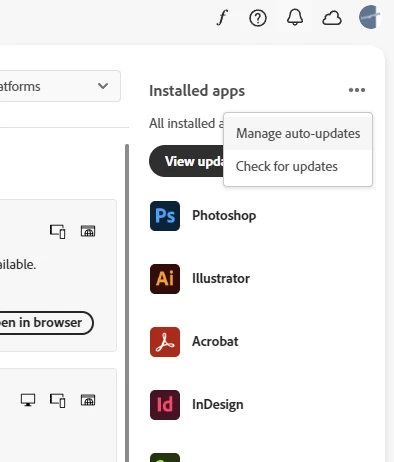
To check that, check your update settings


In your CC app

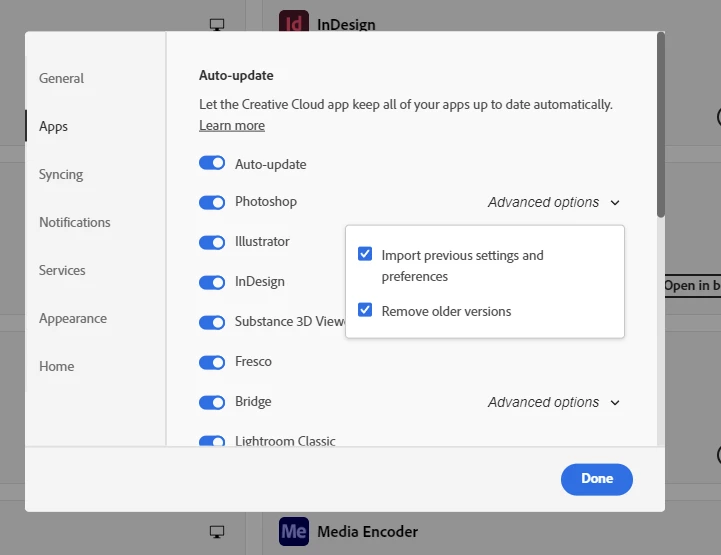
and see the "import previous settings and preferences" ticked in the "advanced option"
They should migrate the right way.
They do for me.


You can translate my answer by clicking on this button in my post


1 reply

Imaginerie
Community Expert
ImaginerieCommunity ExpertCorrect answer
Community Expert
January 16, 2025

Do you remember to set your preferences as transfering when you update?
That's a question that pops up when the app is updating and you should always say "yes" to it. If you've set automatic updates, it's possble that the "no" has been selected by default

To check that, check your update settings


In your CC app

and see the "import previous settings and preferences" ticked in the "advanced option"
They should migrate the right way.
They do for me.


You can translate my answer by clicking on this button in my post