


photopoeth
Inspiring
January 25, 2022
Question

Over lapping Home Screen

  • January 25, 2022
  • 8 replies
  • 779 views

I have undocked my tool panel and now it’s showing up in the homecreen. Any idea how to tell PS to stop this? I am using the PS version 23.1.0 under Windows 10 Pro (Build 19043.1415).


Here's a screenshot:
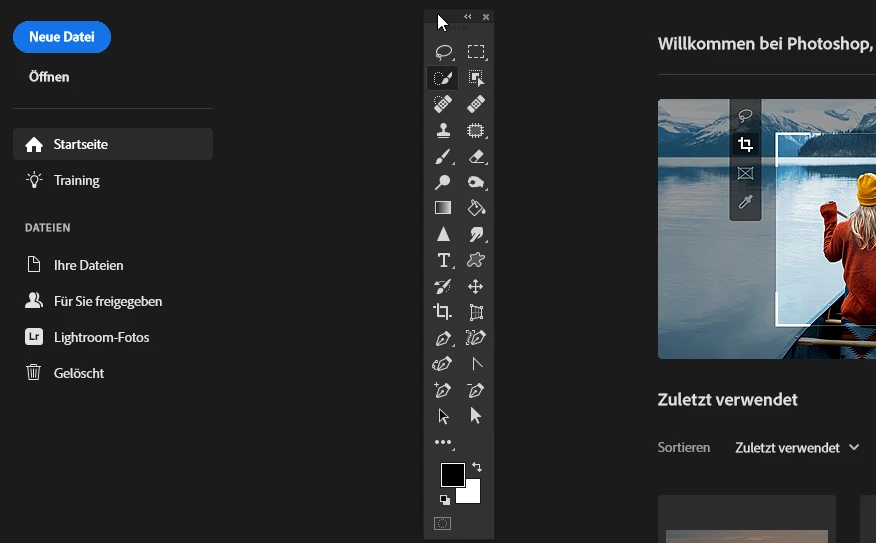
 

Any idea how to fix this?

BR


Tiltle renamed by Moderator


This topic has been closed for replies.

8 replies

photopoeth
Inspiring
January 25, 2022

I don't think that the panels make sense in the home screen. Maybe I am overlooking somethng here. But especially the Tools Panel is completely useless in the home screen. BR

photopoeth
Inspiring
January 25, 2022

Thanks. I cannot see that undocked panels floating in the homescreen are mentioned. I don't think it's intuitive why they show up there. BR

josephlavine
Community Expert
Community Expert
January 25, 2022

This is the standard behavior when you undock the Tools Panel.

https://helpx.adobe.com/photoshop/using/workspace-basics.html

warmly/j

photopoeth
Inspiring
January 25, 2022
Yes I have tried and nope - it didn't help. 😞

Seems as if this a feature, not a bug. Even if I lack the imagination why
this is meant to be this way.

BR
Ged_Traynor
Community Expert
Community Expert
January 25, 2022

@photopoeth 

Did you try my suggestion above

jane-e
Community Expert
Community Expert
January 25, 2022

Ged, does this happen to you when you have floating panels? It happens to me without fail.


Jane


Ged_Traynor
Community Expert
Community Expert
January 25, 2022

Hi Jane

I don't have access to Photoshop at the moment, but will try it when I get home from work

photopoeth
Inspiring
January 25, 2022
OK - I can't remember having seen this in the past. But obviously I'm wrong
(and I think it was a long time ago, when I had panels undocked).

But I had undocked it for a purpose: I decided to use the "2-column-style"
because it's more convenient using a pen (shorter ways), but it eats up a
lot of screen real estate when docked. That's why I undocked it. But i
don't like this behaviour of panels overlapping my homescreen. 😞

BR
jane-e
Community Expert
Community Expert
January 25, 2022

@photopoeth 

It happens to me every single time I have floating panels. To test, float some other panels.


One solution for you might be:

  • Set up your panels the way you want them
  • Create a custom workspace (Window > Workspace)
  • Create a keyboard shortcut for your custom workspace (Edit > Keyboard Shortcuts)
  • Close the annoying panels when they remain on top of the Home Screen
  • Use your shortcut when you reopen Photoshop


You can also create a feature request in this forum by tagging it as "Ideas" instead of "Discussions".


Jane


photopoeth
Inspiring
January 25, 2022
Thanks a lot for your feedback. Actually I am just working on the solution
using keyboard shortcuts. 😉

BR
jane-e
Community Expert
Community Expert
January 25, 2022

@photopoeth wrote:

I have undocked my tool panel...


When panels are floating ("undocked"), they will always show on top of your Home Screen when all documents are closed. The only way to stop this is to dock the panels.


To dock the panels:

  • Drag them back into the Drop Zone (blue line)
    or
  • Window > Workspace > Reset [current workspace]


https://helpx.adobe.com/photoshop/using/workspace-basics.html


Personally, I usually just close the panels when this happens and then reset my workspace the next time I have a document open.


Jane


Ged_Traynor
Community Expert
Community Expert
January 25, 2022

Hi

Try enabling this option in preferences and restarting Photoshop to see if it helps