


Participant
May 23, 2016 11:48 AM UTC
Answered

P: How to fix Photoshop Scratch Disks Full Error?

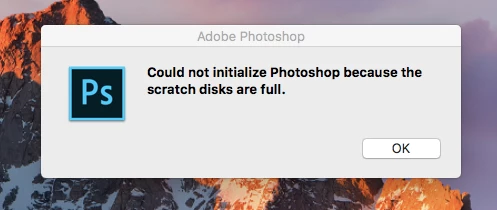
I am running Photoshop CC on my MacBook Air with macOS Sierra. Every time I attempt to open Photoshop through any means, the following message appears: "Could not initialize Photoshop because the scratch disks are full", and Photoshop does not open. I tried clearing space from my Mac in general including several GB worth of apps and removing several cache files, but nothing seems to work. I also tried holding down the command and option keys to reveal the Scratch Disk Preferences, and it lets me select the Startup and MacIntosh HD. Again, nothing worked. Anyone know how to fix this message, and/or clear scratch disk space?
 

{Moderator note: Edited the thread title PS-65057}

Mohit Goyal
Mohit GoyalCorrect answer
Community Manager
May 5, 2021 11:44 AM UTC

Hi all,


We're sorry for the scratch disk issue. Take a look at the following troubleshooting article which can help you to resolve the "Scratch disk is full" error: Troubleshoot scratch disk full errors in Photoshop


Please have a look and let us know if that helps.


Thanks,

Mohit

342 replies

Zylaris
Participant
Nov 2, 2022 4:08 PM UTC

I solved the problem I had: I found out that my Dropbox membership wasn't renewed and everything got copyed into my HDD filling it up and having no more room for anything else. I renewed it and everything got copied back online saving space in my HDD.

Translate
D Fosse
Community Expert
Community Expert
Sep 2, 2022 3:43 PM UTC

That doesn't solve the underlying problem of a disk that is almost full. It may work for a short while, but it will come back.


It cannot be emphasized enough: this is not a Photoshop setting or preference. It's real, physical disk space, and if you don't have enough of it, Photoshop can't function. Not to mention that your whole machine may freeze up. Clear out more space! that's the only real answer to this.

Translate
Participant
Jun 9, 2022 9:02 PM UTC

I am Unable To Use Adobe on my windows 10 can Any one can help me with that I am logo designer  but their is an error kindly please help me


[moderator removed an unrelated link. You can get banned by posting links here that are not related to your question or a solution]

Translate
Abambo
Community Expert
Community Expert
Jul 10, 2022 10:00 AM UTC

If you elaborated your error message, someone may be able to help.

Translate
ABAMBO | Hard- and Software Engineer | Photographer
Participant
May 24, 2022 12:55 PM UTC

basically this is the perfect con to drive people onto adobe cloud... photoshop cs4 was faster in everyway... youre going backwards adobe, expect users to jump ship as soon as they can!

Translate
Abambo
Community Expert
Community Expert
Jul 10, 2022 9:59 AM UTC
quote

basically this is the perfect con to drive people onto adobe cloud... photoshop cs4 was faster in everyway... youre going backwards adobe, expect users to jump ship as soon as they can!


By @Chris24581605id4g

Photoshop 4 (not CS4) was even faster… but the possibilities and features were as well less.


FYI: I even did word processing and database programming on machines having ram of 64kb (not Mb or Gb as I have now). I had one screen, only simple monochrome graphics, and a slow disk drive (not a hard disk!). They call it technological advances. My phone today has more resources as the mainframe I had access too at that time. Progress can't be stopped.


My first Photoshop was Photoshop 3 or 4, I do not even remember well.


BTW: My current computer, with a powerful CPU (not the most powerful CPU available), and a medium graphics card (as prices were off at the time I did build this system) is blazing fast (but I guess Photoshop CS4 would be faster, if I could still install and run it on this machine).

Translate
ABAMBO | Hard- and Software Engineer | Photographer
Participant
Jul 12, 2022 12:49 PM UTC

Thats the main reason I still use Photoshop 7. It has all the features I
need and runs very well in Windows 11 aside of having to make a virtual
drive for the scratch disk under 1tb every time I want to open it.

<>
Virus-free.
[moderator deleted antivirus spam link]
<>
<#DAB4FAD8-2DD7-40BB-A1B8-4E2AA1F9FDF2>

Translate
Participant
Apr 19, 2022 6:10 PM UTC

If you're getting an error message that the scratch disk is full, it usually means you need to clear some space on whatever drive is defined as the scratch disk in Photoshop Preferences, or add additional drives for Photoshop to use as scratch space.

Translate
Participant
Mar 11, 2022 12:03 AM UTC

Hi,


I have cleared my scratch disks with WinDirStat and it worked, but when I open a certain .PSB file, it goes back to the issue of scratch disks being full. 


For reference, I have about 20 GB of free space, and the file is about 1GB, but when I try to open it, my free space goes to just 6GB, and it won't open due to the scratch disk issue. 


I feel that it has something to do with the file. Any pointers would be much appreciated. 

Translate
D Fosse
Community Expert
Community Expert
Mar 11, 2022 6:41 AM UTC

It has indeed something to do with the file: it's big.


20 GB is not nearly enough. I'm sorry, but you really need at least ten times that to be reasonably safe. Personally I would never work with anything less than 500GB free space, but preferably more.


There is no way around this. It's not a "bug" or a fault in Photoshop - it's that raster image editing moves huge amounts of data around, and it has to go somewhere.

Translate
Participant
Mar 10, 2022 4:25 PM UTC
Hello Guys!
Please help me (picture attached), I have read the related article but have not had any success in fixing this issue, some instructions are way over my head 🙂
I use the new MacBook Air and the latest Photoshop, anyone got advice for me?
 
Many Thanks


Translate
Legend
Mar 10, 2022 4:38 PM UTC

To start with, how much free space do you have on your system disk? Many computers are sold with disks too small for Photoshop. Let us know if you're not sure how to find out.

Translate
Participant
Jul 29, 2021 1:36 AM UTC

I'm trying to use an external drive specifically for my scratch disks for Adobe Photoshop, but whenever I open the preferences to select my flash drive it doesnt show up. I've quit, logged out of, and even uninstalled photoshop and reinstalled it after my external drive connected to my computer but I still can't get it to show up as an option. Am I doing something wrong?

Translate
Participant
Jul 23, 2021 9:15 PM UTC

I was trying to load Watercolor Artist actions into my 2018 PS version.  I was able to load the Watercolor Artist and WCA Brushes, but I was not able to load the WCA Patterns.  It needed version 20, 21 or 22.  I updated (21.2.10), but now I am receiving "Scratch Disk Full" (Mac 10.13.6) and unable to open the application at all.   I am probably not going to be able to figure out how to change the settings.  Is there a way to at least restore my older PS version so I can still use?  Thank you for your suggestions.  

Translate
nikunj.m
Legend
Jul 23, 2021 9:43 PM UTC

Hi,


We're sorry about the trouble due to the Scratch disk issue while trying to launch Photoshop. The scratch disk is basically the amount of free space on the computers storage that Photoshop requires to create the necessary temporary files while launching and working on project files. How much free space do you have on your computers drive?


You can check out: https://helpx.adobe.com/photoshop/kb/troubleshoot-scratch-disk-is-full.html


Let us know if it helps!

Regards,

Nikunj

Translate
Participant
Jul 26, 2021 2:10 PM UTC

This helped! Thank you.--
Mindy McQueen, Guest Teacher
[Moderator deleted private information. Please do not post private information like e-mails and phone numbers]
Texas Certified
Prefer afternoons or Fridays

Translate
Mohit Goyal
Community Manager
Mohit GoyalCommunity ManagerCorrect answer
Community Manager
May 5, 2021 11:44 AM UTC

Hi all,


We're sorry for the scratch disk issue. Take a look at the following troubleshooting article which can help you to resolve the "Scratch disk is full" error: Troubleshoot scratch disk full errors in Photoshop


Please have a look and let us know if that helps.


Thanks,

Mohit

Translate
SAA ITD
Participant
Jun 10, 2021 9:18 AM UTC

HI,


I am running PS 2020 on a Windows 7 and I seemed unable to select my scratch disk from the edit> Preferences>Scratch Disk. I even tried to rename the PS settings folder in the user roaming profile and did a clt-alt keystroke before launching the program, but alas to no avail. 


Anyone has any suggestions?


Appreciate any help.


Thanks

newbie here 

Translate
D Fosse
Community Expert
Community Expert
Jun 10, 2021 10:13 AM UTC

Do you actually have another disk? If so, what kind, how is it connected? How is it formatted? If external, are you reconnecting it so that the drive letter changes? (that can be avoided by assigning a high letter).

Translate