
kathyv29656185
Participant
March 13, 2023
Answered

P: Photoshop 24.3 Strobes in Black and White when Opening files

  • March 13, 2023
  • 200 replies
  • 504715 views

when attempting to open a photo in Photoshop on my HP Laptop, details below, the photo appears in the layers tab bottom right, but not in the workspace /desktop: It is a constant Black / White strobe. The desktop /workspace flashes Black and white

.
Processor Intel(R) Core(TM) i7-8550U CPU @ 1.80GHz 1.99 GHz
Installed RAM 16.0 GB (15.9 GB usable)

System type 64-bit operating system, x64-based processor

Edition Windows 10 Pro
Version 21H2
Installed on ‎24/‎03/‎2021
OS build 19044.2604
Experience Windows Feature Experience Pack 120.2212.4190.0
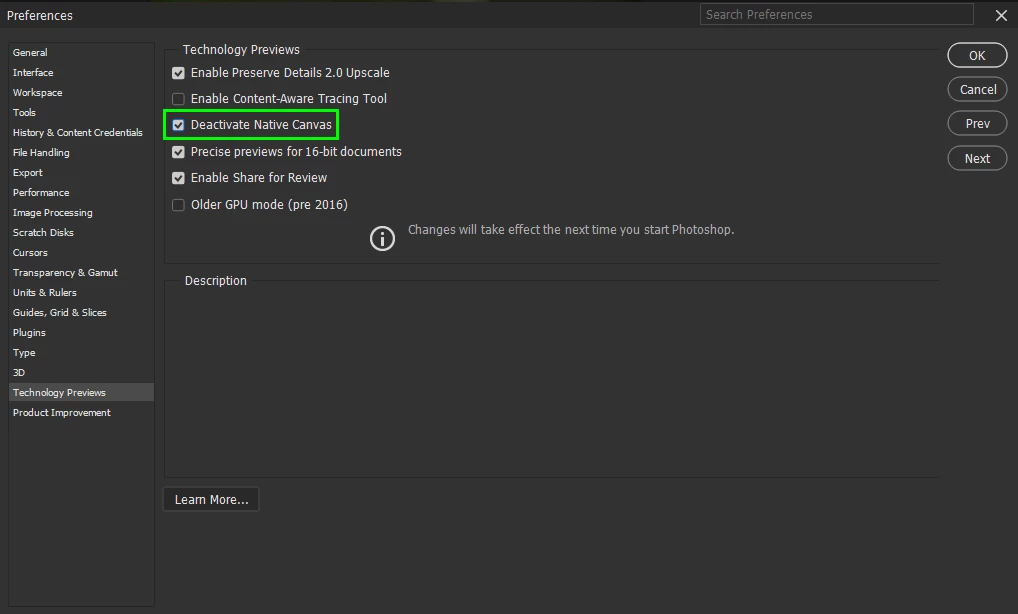
Correct answer Ged_Traynor

@Elisa29995820fb2q go to Edit > Preferences > Technology Previews and enable this option, then restart Photoshop

200 replies

barrys1618002
Participating Frequently
March 22, 2023
There have been several posts regarding this problem. For me, on Win 10, I simply reverted to the previous version and all was fine.

Barry
Participant
March 22, 2023

La dernière MAJ de Photoshop v 24.3 frait flasher l'image et on ne voit que du blanc qui clignote. Effet stroboscopique.

Participant
March 22, 2023

J'ai oublié : depuis le temps, c'est la première fois que ça se produit. J'ai eu des petits bugs (version française et certains points en anglais), mais rien d'aussi handicapant.

Inspiring
March 22, 2023

Launched Creative Cloud Suite and Photoshop automatically started to update. Photoshop updated to version 24.3.0.376. Whe I try to open a picture in Photoshop the Photoshop screen flashes white. What to do?

kglad
Community Expert
Community Expert
March 23, 2023

make sure your GPU drivers are updated.

Next, go to Photoshop Preferences/Technology Preview and check “Disable Native Canvas”. Then check “Use Older GPU Mode (2016)”. Restart Photoshop.


<moved from download&install>

Participant
March 22, 2023
Yes it worked! Thank you!

Envoyé de mon iPhone
CShubert
Community Manager
Community Manager
March 22, 2023

Hi @Julie29012076aw4p did you try the setting above, deactivate native canvas?


Participant
March 22, 2023

Hi, I just did the last update in photoshop 2023 version 24.3 on my pc ,  ( my plan is included with creative cloud) and I have a huge bug. 

When I try to open a file or any kind of images the screen start to flash like a stoboscop, black and white. I'm totally enable to work with it.. 

I tried to restart my computer but didn't fixed the problem. 

I need photoshop every day for work and this doesn't help at all, worked just fine before the update.


how do I fix the problem?

Participant
March 22, 2023

Many thanks to Cory Shubert. It solved the problem. Best personal regards.

Jorge Delacroix

Participant
March 22, 2023

Photoshop updated this morning and this afternoon when I tried to process some images it will not open any images either via Lightroom or directly imported from my my explorer files. They open in Camera Raw but just get a constanst white screen flashing in photoshop with the thumbnail of the image visible in the layers panel ?

Kevin Stohlmeyer
Community Expert
Community Expert
March 22, 2023

HI @steven5D55 try going to Photoshop Preferences/Technology Preview and check “Disable Native Canvas”. Then check “Use Older GPU Mode (2016)”.

Participant
March 22, 2023

I have just updated Photoshop to version 24.3. When I open a file, the only thing I see is a white/black flickering screen.

This appears only in the files, when you click on the taskbar, it stops.


Any ideas?


Thanks,

Johan

Ged_Traynor
Community Expert
Community Expert
March 22, 2023

@Cre_J enable this option in preferences and restart Photoshop

Participant
March 22, 2023

Thank you very much Cory. Resolved. Cheers!