
Participant
November 5, 2025
Answered

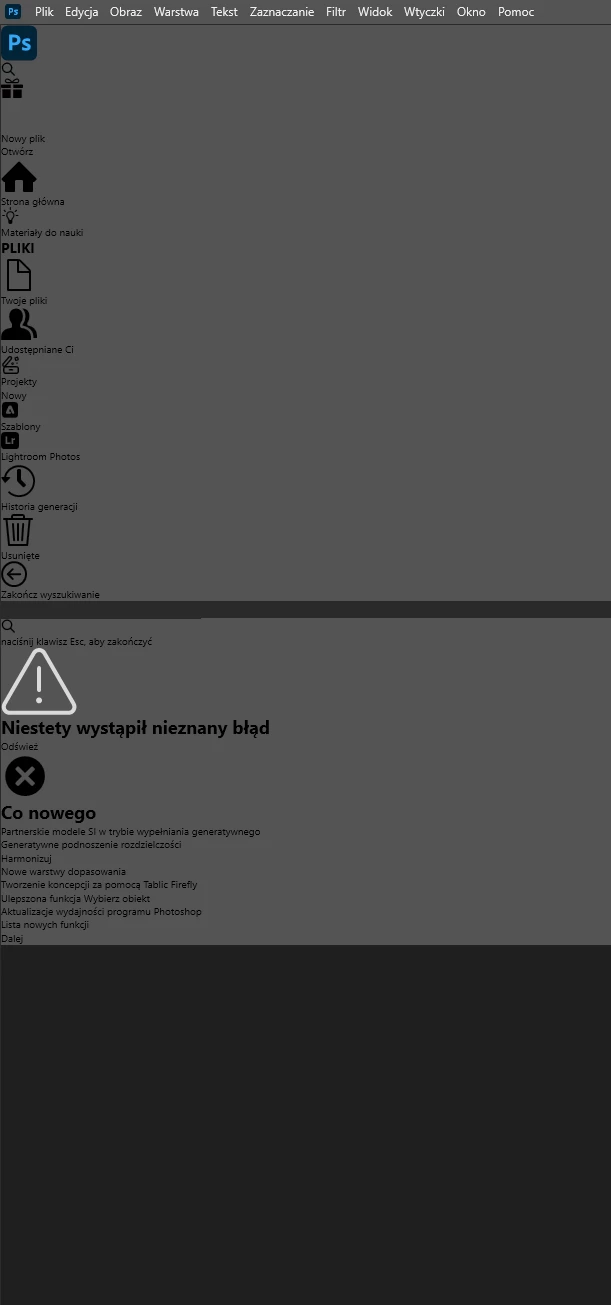
P: Photoshop 27.0: startup screen display error when clicking the Home button (Windows)
  • November 5, 2025
  • 11 replies
  • 424 views


I have a problem with the “home button” in Photoshop after updating to the latest version. Uninstalling and reinstalling didn’t help. Even installing the previous version doesn’t fix it anymore. A dark screen appears with a message about an unknown error. Apart from that, everything

works fine once I get into Photoshop itself to work.

 

Correct answer Anshul_Saini

Hi everyone,


Please try this quick UXP reset; it often fixes Home screen problems.
 • Quit Photoshop and the Creative Cloud desktop app completely.
 • Back up the UXP folder (optional): copy the folder to your Desktop.
 • Rename the UXP folder:
Windows: rename C:\Program Files\Common Files\Adobe\UXP to C:\Program Files\Common Files\Adobe\UXP_backup
macOS: rename /Library/Application Support/Adobe/UXP to /Library/Application Support/Adobe/UXP_backup
 • Restart Creative Cloud, then launch Photoshop and check the Home screen.
 • If the problem is fixed, you can delete the backup folder after a few successful launches. If not, quit Photoshop and rename the folder back to its original name to restore your previous UXP state.


Let us know how it goes.


Thanks,
Anshul Saini

11 replies

Participant
November 5, 2025

Ho installato photoshop 2026. all'apertura del programma mi appare la pagina iniziale di Adobe illustrator, che non ho


nikunj.m
Community Manager
Community Manager
November 5, 2025

Hi, thanks for reaching out! Could you please let us know if this is the first time you've installed Photoshop, or if you've had a previous version that you've upgraded from?

If you've updated from an older version, you can try to reset the preferences of Photoshop using the steps mentioned here: https://adobe.ly/48XQiZb

Please backup your settings prior to resetting the preferences. You can check: https://adobe.ly/48XQjMJ


Let us know how it goes!

Thanks,
Nikunj

jane-e
Community Expert
Community Expert
November 5, 2025


@default39xe6yia2o6c wrote: when I open the program I see the Adobe illustrator home page


I don't think this is the Illustrator home page — the PS icon is in the upper left.


What is your OS version?


Jane