Known Participant
October 8, 2026
Open for Voting

P: Photoshop Home screen Recent thumbnails show incorrect oversaturated/red colors on Windows with a wide-gamut display

Photoshop 27.11 正式版全新 Bug 驗收:畫布色彩已修正,但「首頁縮圖色彩溢位」與「第 41 行 Error 44 腳本錯誤」依然完全沒修!


各位好,

我是 Windows 11 平台的高階專業攝影用戶。得知官方釋出 Photoshop v27.11 正式發行版(Build: 20260929.r.26 8c16e56) 後,我第一時間使用專業廣色域硬體進行了實機驗收。

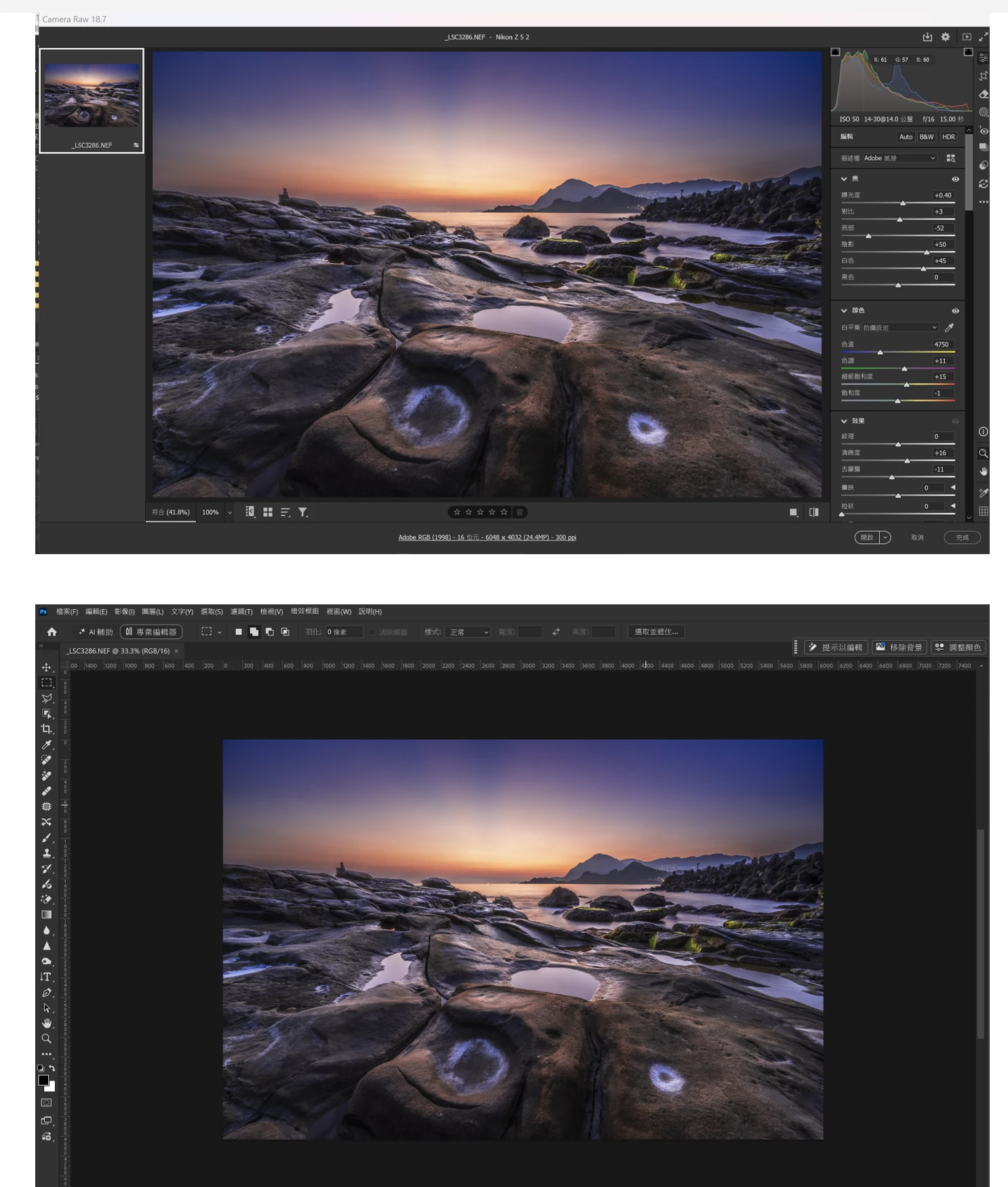
雖然這次更新確實修正了 Camera Raw (ACR 18.7) 轉入 Photoshop 畫布時的「GPU 色彩轉譯矩陣錯誤」(目前畫布內 Adobe RGB 紅色通道溢位已大幅改善,兩邊顏色趨於相近)。

但在這份正式 Release 版中,我先前詳細回報並被官方記錄的另外兩項重大核心 Bug,竟然原封不動地被遺留,整合測試令人極度失望:

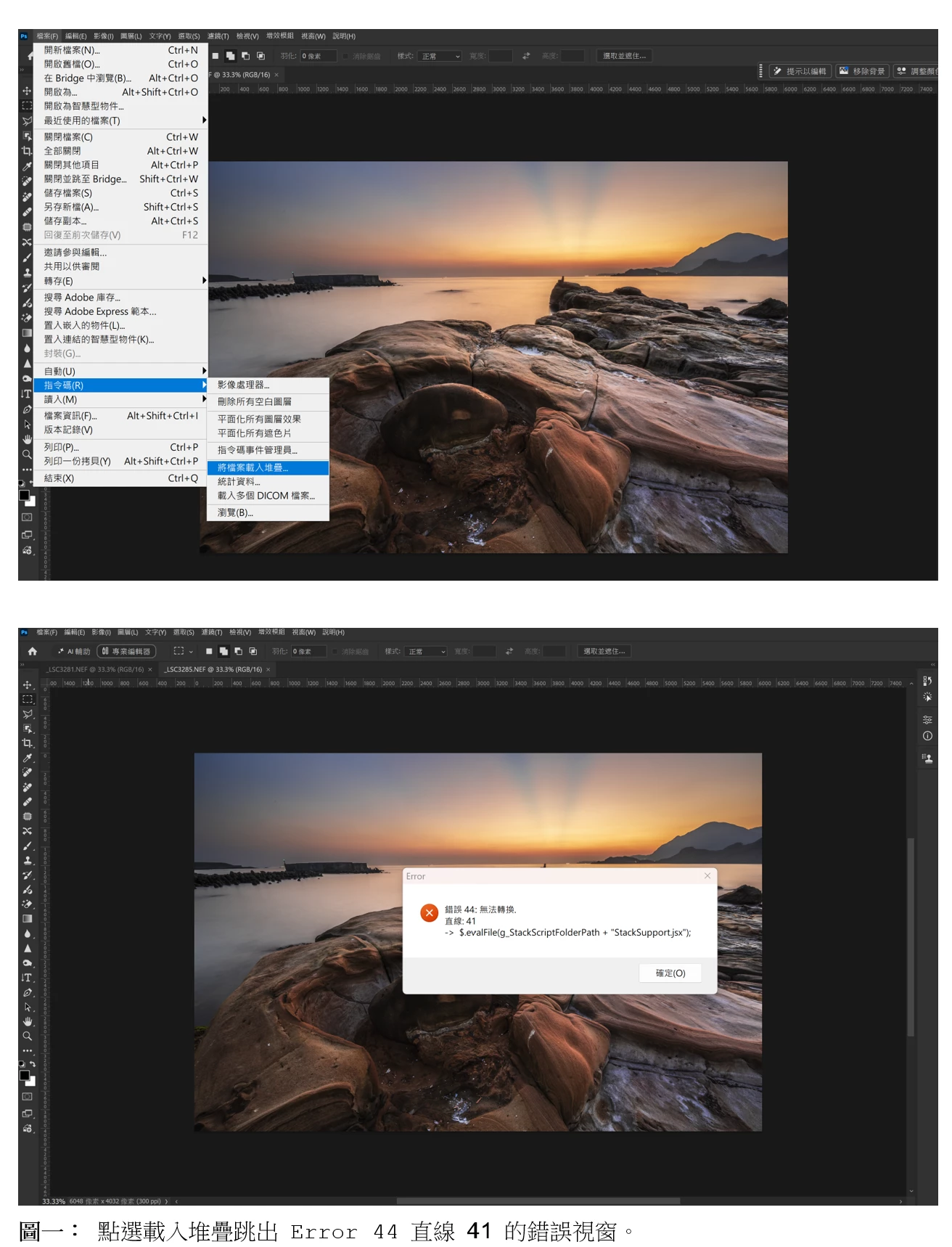
Bug 1. 自動堆疊功能依然癱瘓(Error 44 腳本錯誤未修)

  • 問題現象: 當我點選上方選單『檔案 > 自動 > 將檔案載入堆疊』時,主程式依舊跳出:「Error: 錯誤 44: 無法轉換。直線: 41 -> $.evalFile(g_StackScriptFolderPath + "StackSupport.jsx");」。
  • 觀測結論: 這可能是自動化腳本小組在修復代碼後在最後合併時遺漏、沒有被打包進 27.11 正式安裝檔中。

Bug 2. 首頁預覽縮圖色彩管理依然崩潰

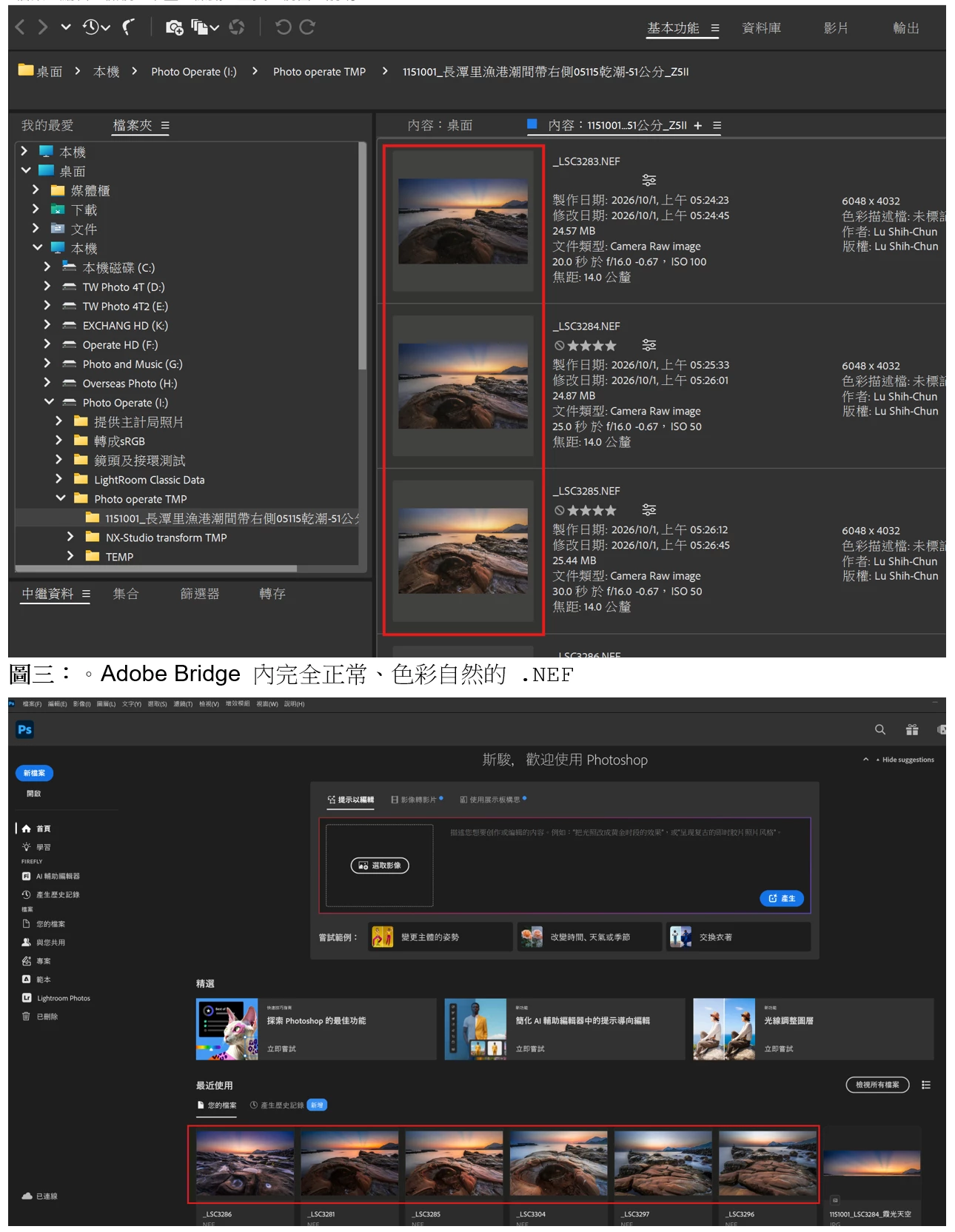
  • 問題現象: 如我附帶的對比截圖,同一個 Nikon Z5 II 的 .NEF 檔案,在 Adobe Bridge(圖四)裡讀取的朝霞色彩極其純正、過渡完全正常;然而一旦顯示在 Photoshop 27.11 的首頁『最近使用』列表中(圖三),預覽縮圖竟然依舊是一片死紅、死橘的嚴重過載渲染災難。
  • 觀測結論: 這鐵證如山!Photoshop 主程式首頁的快取生成模組,至今依然在圖省事、強行套用窄小的 sRGB 解碼,並直接硬推(Force Stretch)到我的廣色域螢幕上,完全漏掉了在 Windows 廣色域硬體下應調用(Call)色彩管理 Function 的底層邏輯。

💻 實機測試之系統與硬體環境資訊:

  • Photoshop 版本: 27.11.0 20260929.r.26 8c16e56 x64 (Final, Release)
  • 作業系統: Windows 11 (內部版本號:10.0.26300.9550)
  • 測試相機機型: Nikon Z5 II (.NEF)
  • 硬體配置: Intel CPU / 64GB RAM / 顯示卡 RTX 5060 Ti (驅動版本: 616.56)
  • 使用螢幕: ASUS PA279CRV (專業廣色域螢幕,已套用 2026 年 5 月標準 XYZLUT 格式 ICC 色彩描述檔,HDR 功能確認為關閉狀態)

由於自動化腳本持續癱瘓,且首頁預覽引擎依舊有嚴重色偏缺陷,我被迫再次退回 Photoshop v27.9.1 舊版本以求自保。請論壇管理員協助將此 27.11 的實機翻車案例與 4 張證據圖,再次提交給美國總部核心 ACE 色彩管理引擎團隊與產品架構小組!


    3 replies

    D Fosse
    Community Expert
    Community Expert
    October 13, 2026

    The Home screen isn’t color managed. Another reason not to use it.

    You won’t notice on a standard display, but it becomes very obvious on a wide gamut display.

    Translate
    Anshul_Saini
    Community Manager
    Community Manager
    October 13, 2026

    Hi ​@斯駿37001673zaot,

    Thank you for reaching out and for the detailed testing and screenshots. I’ve separated the remaining Photoshop Home screen thumbnail color issue into its own report so that we can investigate and track it independently from the Load Files into Stack / Error 44 issue.

    We have been investigating a separate color-rendering issue on Windows involving GPU acceleration and wide-gamut displays. Some fixes for that area have already been incorporated into newer builds, and additional work is ongoing. I don’t want to assume that your Home-screen thumbnail issue has the same underlying cause, but your configuration and the color difference you’re seeing make a couple of comparisons useful.

    Please test the below separately if possible so we know which change, if any, affects the result:

    1. Latest Photoshop Beta with your normal settings.
    2. Photoshop 27.11 with Use Graphics Processor disabled.
    3. Photoshop 27.11 with Precise Color Management for HDR Display disabled, if it was enabled. (The product team recommends this for displays that are used as a non-HDR display)

    There is no need to change or remove your monitor ICC profile. Please keep the existing wide-gamut display configuration intact, as it is important for reproducing the behavior.

    I’ll share the results and the comparison screenshots you already provided with the appropriate Photoshop team.

    Thanks again for helping us isolate this.

    Best,
    Anshul Saini

    Translate
    Known Participant
    October 8, 2026

    Photoshop 27.11 正式版全新 Bug 驗收:畫布色彩已修正,但「首頁縮圖色彩溢位」(和Bridge的縮圖色彩相比過度飽和)與「第 41 行 Error 44 腳本錯誤」依然完全沒修!


    Translate