Answered
Path Stroke Uses Wrong Brush
When using the pen tool to stroke a path, it always converts to the wrong brush. (1080 custom brush)
I'm trying to use a solid round brush, but it always converts back to the 1080 brush.
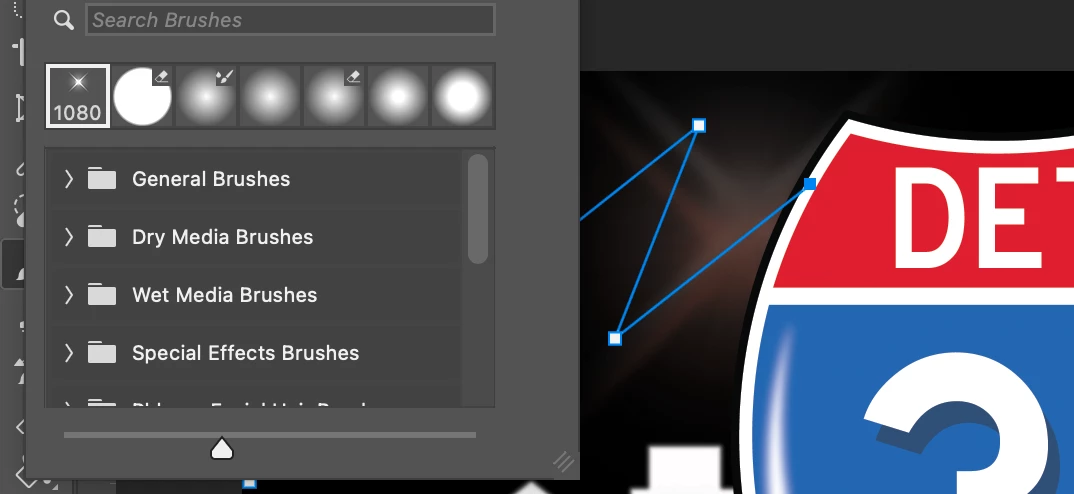


When using the pen tool to stroke a path, it always converts to the wrong brush. (1080 custom brush)
I'm trying to use a solid round brush, but it always converts back to the 1080 brush.
Hey @FliCityChris,
Can you share what version of Photoshop you're using? I'm unable to reproduce this issue—when I stroke a path, the same brush is used each time. A screenshot or screen recording would be helpful so we can better understand what you're seeing. In the meantime, try manually setting the brush before stroking the path: select the Brush Tool (B), choose your desired brush (like Hard Round), then switch to the Pen Tool. Right-click the path and choose Stroke Path > Brush.
^CM
Already have an account? Login
Enter your E-mail address. We'll send you an e-mail with instructions to reset your password.


 AdChoices