victoriapersephone
Participating Frequently
May 22, 2024
Answered

patterns missing from photoshop

  • May 22, 2024
  • 3 replies
  • 4547 views

a lot of my patterns have gone missing from photoshop recently. i have checked the presets folders of my previous versions on my laptop and there's nothing in the pattern folders. where are they? how do i get them back? i may need to edit or duplicate some work where i used those patterns and i'm concerned about not having them. working on pc ps 25.0.0  - also this version of ps has been kind of a pain since it came out so i'm almost not surprised.

Correct answer Trevor.Dennis

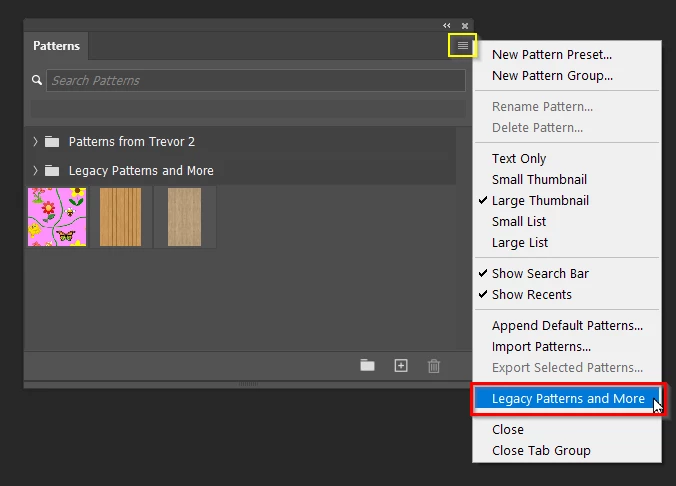
Hi Victoria.  I think Christoph interpreted 'My patterns' as patterns you had created.  I must admit I parsed it that way till reading your second post.  You can retrieve the default patterns by clicking on the four bars top right of the pattern menu.


If you do create your own patterns then you really do need to save them to avoid losing them with a major version update.


Select the pattern or Patterns.  They can be a new group or at the bottom of the panel.

Choose Export and give them a name.

This will save them to a .pat file that lives on your drive, and not somewhere in Photoshop Settings

We can see you are using Windows, so this is the file location (Note: I am using the beta version)

C:\Users\[Your User Name0\AppData\Roaming\Adobe\Adobe Photoshop (Beta)\Presets\Patterns


This applies to brush presets (,abr) Shapes, styles gradients etc.


3 replies

Participant
July 18, 2025

All my patterns (ones I created and saved in PSD) have disappeared.  There was no update done between yesterday when I had them all there, to this morning when I opened PSD and they are all gone!  And no, unfortunately I hadn't saved them elsewhere in that format.  I do have all my original pattern design files individually saved on my external drive which means I'll need to go an open each one up and 'define pattern' if I want easy access again to them all.  Very frustrating!  I'm on Apple Macbook with PSD 26.8.0 version.  Anyone else have this problem?

c.pfaffenbichler
Community Expert
Community Expert
July 19, 2025

How many patterns/files are you talking about? 

One could automate the Pattern-creation with a Script … 

Participant
July 19, 2025

All the patterns I've ever saved via 'define pattern' process in PSD are gone.  This is about 3-4 years worth of patterns I've created.  As I said, I still have the original pattern psd files so can open them individually and re-save the patterns, but it's just a pain not to have them readily accessible now via the patterns panel.  I'll definitely need to start saving them in future to a non-Adobe accessible location so they don't suddenly disappear. 

Participant
July 11, 2024

My PS 2023 are totally missing from PS 2024 - do you happen to know how to transfer them over? I created a PAT file from  PS 2023 and imported it into my PS 2024 Patterns but it won't open and show all its contents....

c.pfaffenbichler
Community Expert
Community Expert
July 12, 2024

Did you actually save the pat-file anew after adding the last custom pattern? 

Please post meaningful screenshots taken in both versions. 

Participant
July 12, 2024

Thank you - I called Adobe the fix was simple by only updating (in CC App) my PS 2024 and "Keep"ing prior settings. All my 2023 patterns rolled over to 2024.

c.pfaffenbichler
Community Expert
Community Expert
May 23, 2024

Did you ever actually save them as pat-file/s? 

victoriapersephone
Participating Frequently
May 25, 2024

why would i do that? these are the default patterns that came with photoshop. when i went to alter a layer, they popped up automatically every time until recently.

Trevor.Dennis
Community Expert
Trevor.DennisCommunity ExpertCorrect answer
Community Expert
May 26, 2024

Hi Victoria.  I think Christoph interpreted 'My patterns' as patterns you had created.  I must admit I parsed it that way till reading your second post.  You can retrieve the default patterns by clicking on the four bars top right of the pattern menu.


If you do create your own patterns then you really do need to save them to avoid losing them with a major version update.


Select the pattern or Patterns.  They can be a new group or at the bottom of the panel.

Choose Export and give them a name.

This will save them to a .pat file that lives on your drive, and not somewhere in Photoshop Settings

We can see you are using Windows, so this is the file location (Note: I am using the beta version)

C:\Users\[Your User Name0\AppData\Roaming\Adobe\Adobe Photoshop (Beta)\Presets\Patterns


This applies to brush presets (,abr) Shapes, styles gradients etc.