
Participant
December 4, 2023
Question

PDF Fading when embedding PDF

  • December 4, 2023
  • 2 replies
  • 170 views

I am trying to embed a PDF file into my Photoshop file. I have done this many times previously and it has worked fine and now for some reason it comes in faded.


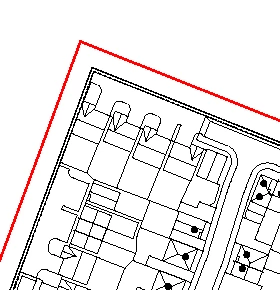
When I first click place embedded and pull in the file, it looks like this, which is what the PDF colouring looks like when open in acrobat:
 

However, as soon as I hit enter (commit transform) it looks like this:
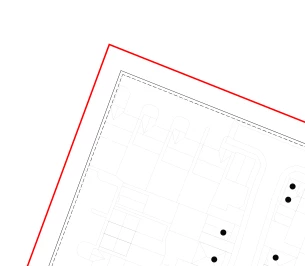


I assume I must have changed a setting somewhere down the line but I can't figure it out! Grateful for any help which can be provided. I have tried adding a stroke and editing it in Photoshop but this obviously isn't the ideal solution.

This topic has been closed for replies.

2 replies

c.pfaffenbichler
Community Expert
Community Expert
December 5, 2023

Could it be that the lines in the pdf have a width of 0pt? 

Can you provide the pdf? 

NB, colourmanagement
Community Expert
Community Expert
December 5, 2023

@Seren327332191x9s could it be that this PDF and the Photoshop document have different ICC colourspaces (different ICC profiles)? As it comes in as a layer when "place embedded" is used, maybe the layer opacity is not set to 100%


I hope this helps
neil barstow, colourmanagement net - adobe forum volunteer - co-author: 'getting colour right'
google me "neil barstow colourmanagement" for lots of free articles on colour management