
Participant
February 6, 2025
Question

Pen Pressure not functioning in photoshop v 26.3

  • February 6, 2025
  • 1 reply
  • 198 views

Hello,

I'm using window 11, a Huion Kamvas gt-191 display tablet and the standard pen it came with.

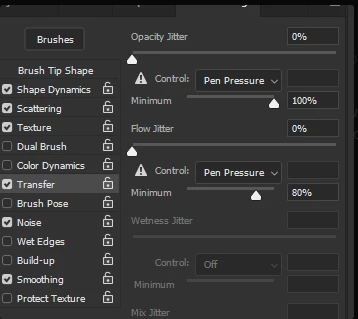
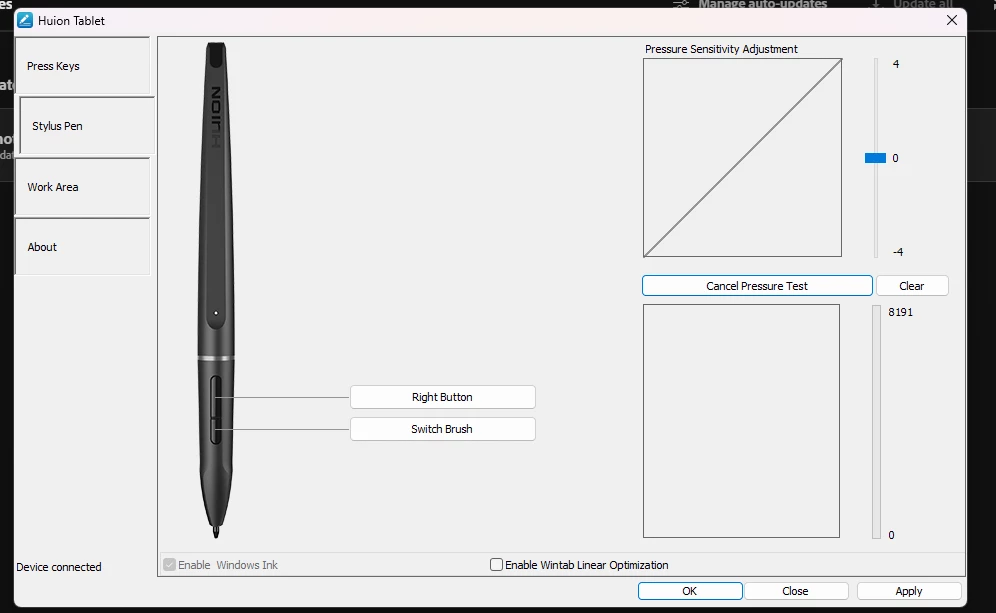
Recently, after the most recent update to V26.3, my pen pressure is not responding. Every driver is upto date and the pen pressure works in other programs, but not photoshop. Shape Dynamics is on, but has the alert sign (seen below) and every point in the slider changes nothing about this lack of response. It functions in the tablet testing screen, krita and windows Ink (which is enabled), however I am unable to find out why via google why this may be the case. I am perplexed as to why it works in other programs, but not PS. My research has lead me to conclude that there is an issue in PS itself. It has been 6 days and I need my PS working the way I need it to for my job as an artist. Please, help me. Thank you.


1 reply

Community Manager
February 6, 2025

Hi @defaultddjn25q3hc67! 👋 Welcome to the community! 


I understand the frustration. Just in case, can you try connecting your table to different USB ports and check if it behaves the same? 

If that doesn't help, can you try disabling WindowsInk from the Huion Driver software & create a config file for Photoshop following these steps:
1. Use Notepad to create a plain text file (.txt).

2. Copy the following text:
# Use WinTab
UseSystemStylus 0
3.  Save the file as "PSUserConfig.txt" to your Photoshop version settings folder: 

[Installation Drive]:\Users\[User Name]\AppData\Roaming\Adobe\[Photoshop_version]\[Photoshop_version]Settings\

4. Restart the computer 

Let me know if this helps. Thank you!
Alek

*(If you mention me with an @, like @Aleke, I’ll get a notification and can respond faster.)*