Participant
September 25, 2017
Answered

Pen Tool Invert Problem

  • September 25, 2017
  • 5 replies
  • 60992 views

Updated my Photoshop & now whenever I use my pen tool to make selection

It will only allow my to fill in the outside of my selection

I just want to be able to make a selection and color inside of it

Please help !!

Thanks

    Correct answer Bojan Živković11378569

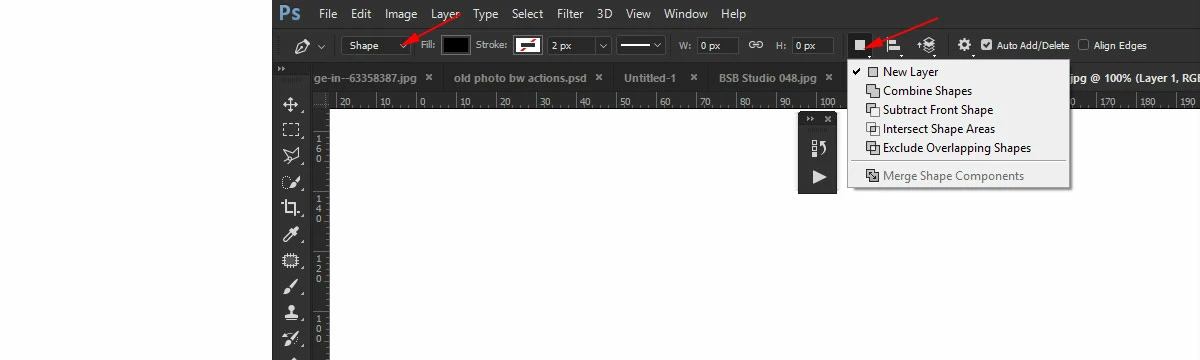
    When using Pen tool take a look at Options bar. From Path operations drop-down you should have New Layer (Shapes) or Combine Shapes (Path) selected. In parenthesis I have added tool mode which is available from the first drop down list in the options bar where you can choose to draw: Shape, Path or Pixels.

    5 replies

    AllCityLiveTV
    Participant
    February 4, 2022

    I just reset my pen tool and it fixed the problem, reverting back to original selection without have to invert your selection after creating a path. Hope this helps!

    Participant
    January 2, 2024

    This worked for me too.

    For anyone curious on how to reset the Pen tool:  select the tool, click on the gear (settings) in the Pen menu and select "Reset Tool"  I've been inverting all my selections for about a year and finally changed it lol

    Participant
    December 7, 2024

    Hi. I tried the "gear" and there was no reset option. Just 
    THickness
    Color
    Rubber Band 

    Im so frustrated at photoshop because I still get the stupid inverted selection.  


    Arvin Navarro Martinez
    Participant
    January 13, 2022

    I bey you're using laptop or keyboard that has a "fn" or Function Button. Try to press it, together with "+" (fn+). Pressing "-" or "+"  will invert the make selection tool. Hope this can help. God Bless

    Arvin Navarro Martinez
    Participant
    January 13, 2022

    bet*

    Participant
    January 25, 2023

    Yes! Fn with + was the ticket. Thank you, Arvin.


    Participant
    March 27, 2020

    I have the exact same Problem with Photoshop CS4

    Bojan Živković11378569
    Community Expert
    Community Expert
    September 25, 2017

    When using Pen tool take a look at Options bar. From Path operations drop-down you should have New Layer (Shapes) or Combine Shapes (Path) selected. In parenthesis I have added tool mode which is available from the first drop down list in the options bar where you can choose to draw: Shape, Path or Pixels.

    nickk68104675
    Inspiring
    October 22, 2018

    What if that option isn't available (grayed out)?

    Bojan Živković11378569
    Community Expert
    Community Expert
    October 22, 2018

    Which option exactly? Perhaps you do not have drawing tool active. Can you screenshot drop down with Layers panel also visible?

    Participant
    September 25, 2017

    My Selection has the object selected as  "Inverse"

    I can press Ctrl Shift I to fix my problem

    But how to I change that preset back to how it originally was?