December 20, 2025
Answered

Pentool Making a selection: becomes the eyedropper

  • December 20, 2025
  • 1 reply
  • 139 views

Hey I am just looking to make selection using the pentool.
I click outside the area I have outlined and when I right click I get make a selection menu. 
After clicking make selection: I get the eyedropper tool not a selection.

cheers

Nate

Correct answer Ged_Traynor

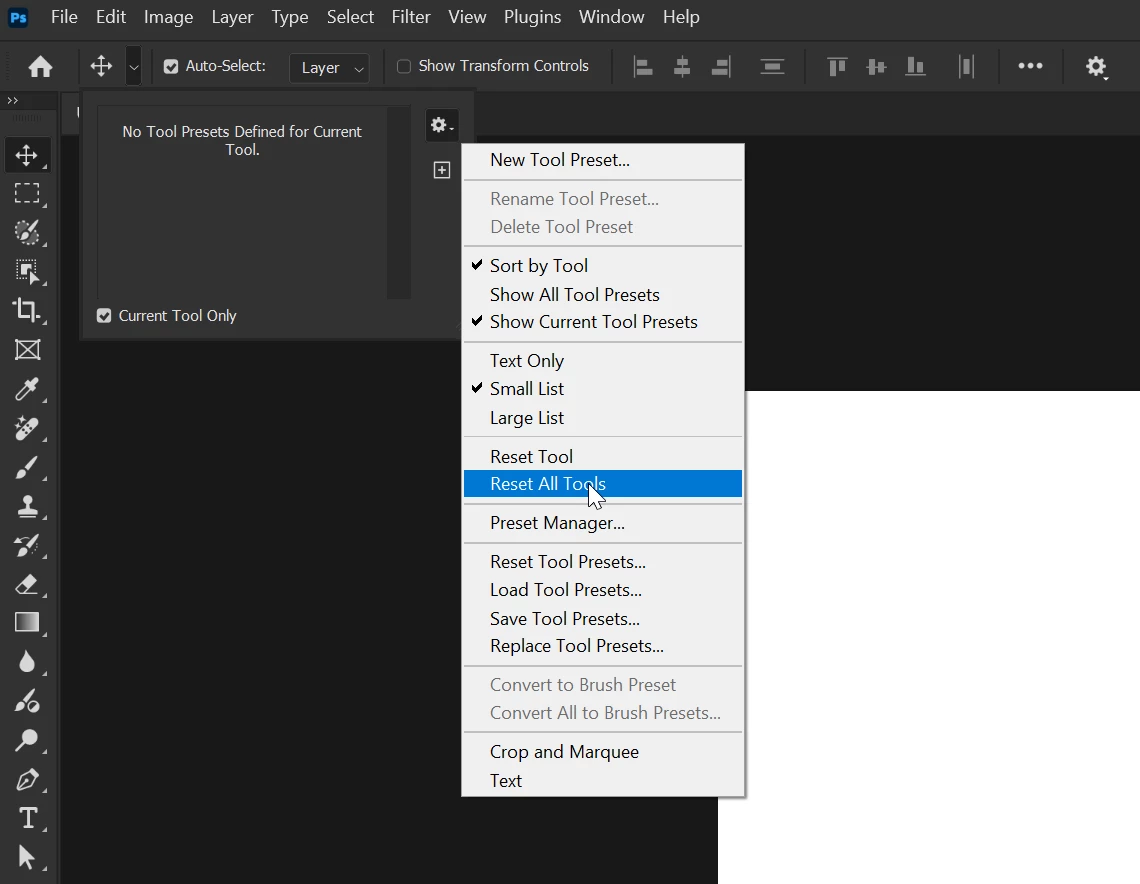
@Oh.N8 it's working as expected for me with Photoshop version 27.2 on Windows 11, have you tried resetting the tools

2025-12-21 11_28_11-Untitled-1 @ 100% (RGB_8) _.png

If that doesn't help, try manually resetting your Photoshop preferences
https://helpx.adobe.com/ie/photoshop/using/preferences.html#Manually
Remember to back up your settings before doing the preference reset
https://helpx.adobe.com/ie/photoshop/using/preset-migration.html

1 reply

Ged_Traynor
Community Expert
Ged_TraynorCommunity ExpertCorrect answer
Community Expert
December 21, 2025

@Oh.N8 it's working as expected for me with Photoshop version 27.2 on Windows 11, have you tried resetting the tools

2025-12-21 11_28_11-Untitled-1 @ 100% (RGB_8) _.png

If that doesn't help, try manually resetting your Photoshop preferences
https://helpx.adobe.com/ie/photoshop/using/preferences.html#Manually
Remember to back up your settings before doing the preference reset
https://helpx.adobe.com/ie/photoshop/using/preset-migration.html