Doc_Pit
Inspiring
December 6, 2025
Answered

Permanently disable "align" with clone stamp?

  • December 6, 2025
  • 2 replies
  • 148 views

In photoshop, with the clone stamp, if you inadvertently double click while pressing Alt/Option to set the clone source, align will get checked.  I do that constantly, always unaware that I'm doing it, and always having to uncheck the align box.  Is it possible to set some parameter that will disable (not turn off but disable) the align feature?  I'm guessing there isn't, but I thought I'd give it a shot.

Correct answer creative explorer

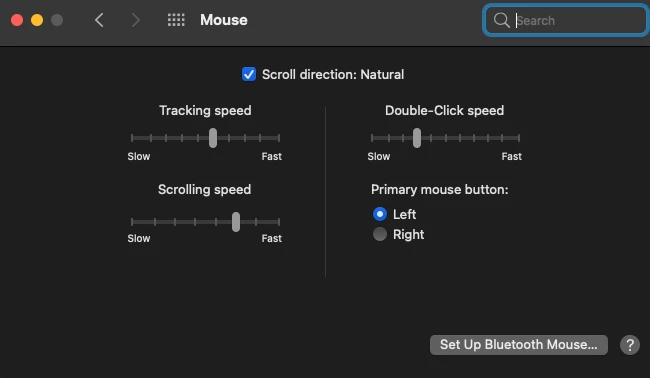
@Doc_Pit that double-clicked issue's been around for so long now! Officially, there is NO parameter that will disable (not turn off but disable) the align feature. But, you can totally trick the system here... by adjusting the double-click speed! Go into your operating system's mouse or trackpad settings. If you increase the required double-click speed (making it so you have to click faster for the OS to register a double-click), it will make it harder for your accidental taps to trigger the shortcut. Works like a charm and no more accidental '✔ Aligned' 

creativeexplorer_0-1765098445488.png


2 replies

Participant
December 10, 2025

Many thanks!  Much appreciated.

creative explorer
Community Expert
creative explorerCommunity ExpertCorrect answer
Community Expert
December 7, 2025

@Doc_Pit that double-clicked issue's been around for so long now! Officially, there is NO parameter that will disable (not turn off but disable) the align feature. But, you can totally trick the system here... by adjusting the double-click speed! Go into your operating system's mouse or trackpad settings. If you increase the required double-click speed (making it so you have to click faster for the OS to register a double-click), it will make it harder for your accidental taps to trigger the shortcut. Works like a charm and no more accidental '✔ Aligned' 

creativeexplorer_0-1765098445488.png


m