Participant
May 27, 2017
Answered

Perspective crop tool problem?

Perspective crop tool. In Photoshop CC. Applying desired adjustments causes the image to "disappear" That is it becomes a 1x1 pixel image. Have I got a setting wrong? Any suggestions?

JacksonMurphy
JacksonMurphyCorrect answer
Inspiring
April 29, 2025

Ah yes it's a funny little issue. 
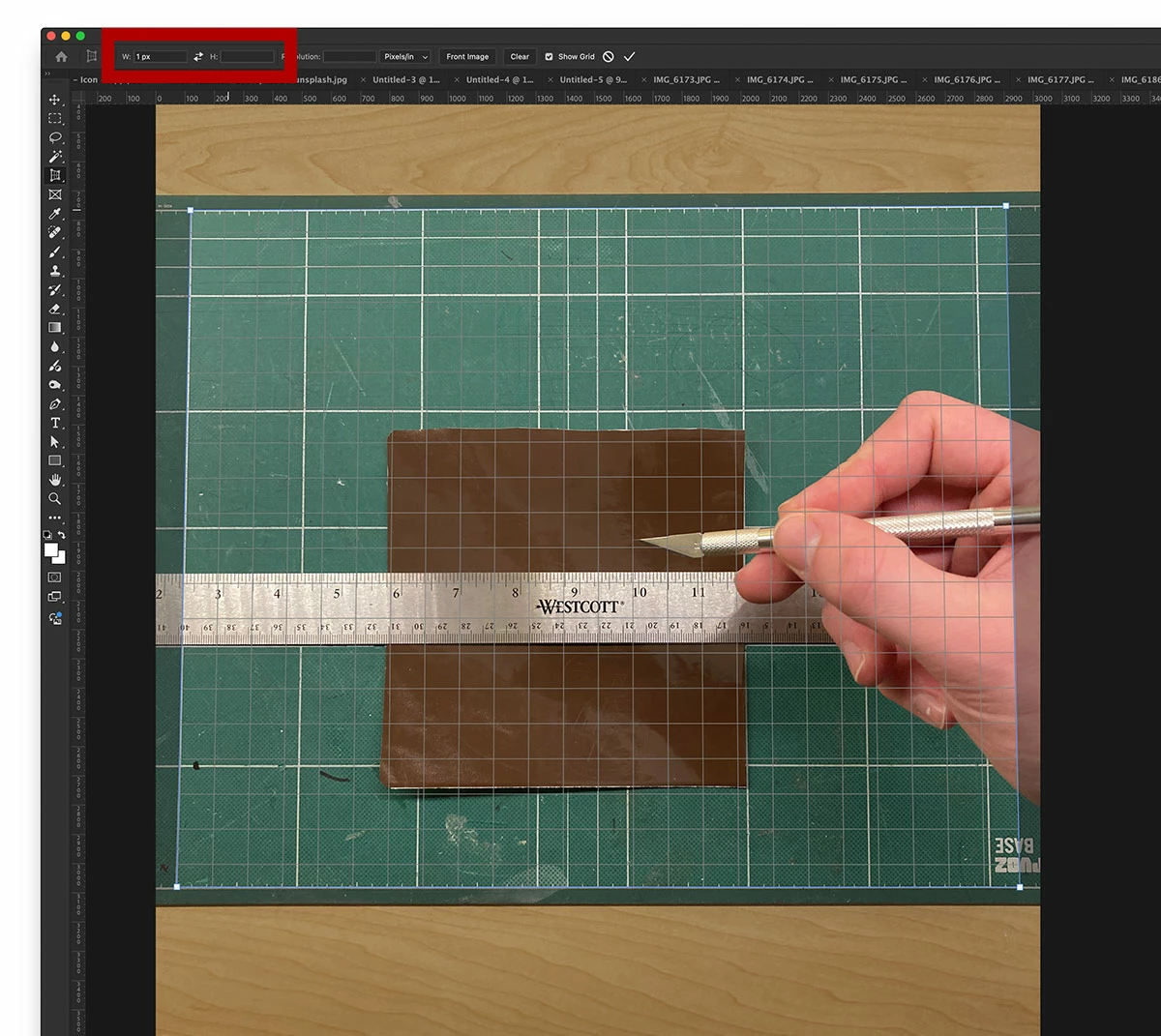
Somehow I (or the software) accidentally entered 1px into the width option when using the perspective crop tool. 
Clear the values in the width and height to avoid this issue. 


6 replies

JacksonMurphy
Inspiring
April 29, 2025

I've had this problem before and I'm having it again right now. I can't remember how I fixed it before. 
I'll update here if I figure something out.

Translate
JacksonMurphy
JacksonMurphyCorrect answer
Inspiring
April 29, 2025

Ah yes it's a funny little issue. 
Somehow I (or the software) accidentally entered 1px into the width option when using the perspective crop tool. 
Clear the values in the width and height to avoid this issue. 


Translate
JJMack
Community Expert
Community Expert
May 27, 2017

Translate
JJMack
Participant
May 27, 2017

Thanks for the answer. In your diagram I get to stage 3 in the 3rd image then press enter to apply the changes and I end up with an image 1 pixel by 1 pixel in size. I should add I have used the tool successfully probably 20 times in the last 2 weeks.

Translate
JJMack
Community Expert
Community Expert
May 27, 2017

If Photoshop is not working correctly have you tried resetting all tools and your Photoshop user ID's preferences?

Translate
JJMack