


Photo quality loss during export from Camera Raw to Photoshop
Good Evening to Everyone in the Adobe Support Community;
I'm a rookie in photo editing and I'd like to achieve a medium - high level in Photoshop knowledge in order to get better and better on it to be able to handle different kind of editing and workflows and I do it by exercising on the photos that I take.
From about one week I've been noting a "bug" during the editing of an image.
Features concerning the image:
- Image taken with a Canon EOS 6D Mk II;
- Lens: Tamron 24-70 f/2.8
- f/2.8
- ISO 3200
- Shutter Speed: 15 sec.
- Image format: RAW (.CR2)
- Image colour settings in the Camera: Adobe RGB 1998
- Ratio: 3:2
Then I imported the photo from my SD card to my PC and I began the Post Production process by following the next steps:
- I opened Photoshop;
- I chose the image I wanted to edit;
- The image got opened in Camera Raw;
- I applied all the modifications;
- I clicked on "Open Image" (to open it in Photoshop);
At this point I noticed that the image in Photoshop was completely different from the one I saw in Camera Raw before opening it in Photoshop (look at the uploaded image). By "completely different" I don't mean the colour 'cause they look identical, but it seems that the affected features concern mainly the sharpness and it also seems like it modifies some parameters by itself due to the fact that in the pic on the left (APS) there are more elements than the one on the right (ACR).
I've already spent days to understand what's wrong with it and I'm still looking for a solution.
Till now I've made the following attempts:
- Uninstalling and reinstalling Photoshop;
- Checking that all the colour settings are matching (Camera, Camera Raw, Photoshop);
- Importing the image in Photoshop without changing any parameter in Camera Raw (I obtained the same result);
- Checking the compatibility between Photoshop version and the Camera Raw plug-ins version;
- Importing the image changing only one parameter each time to see which one actually affects it;
None of the upwritten attempts worked, I hope that someone from the community may be able to help me out with it.
I remain available to provide you any information might be helpful to figure out this problem and I thank all the community members which will spend time to help me on it.
Thank You very much.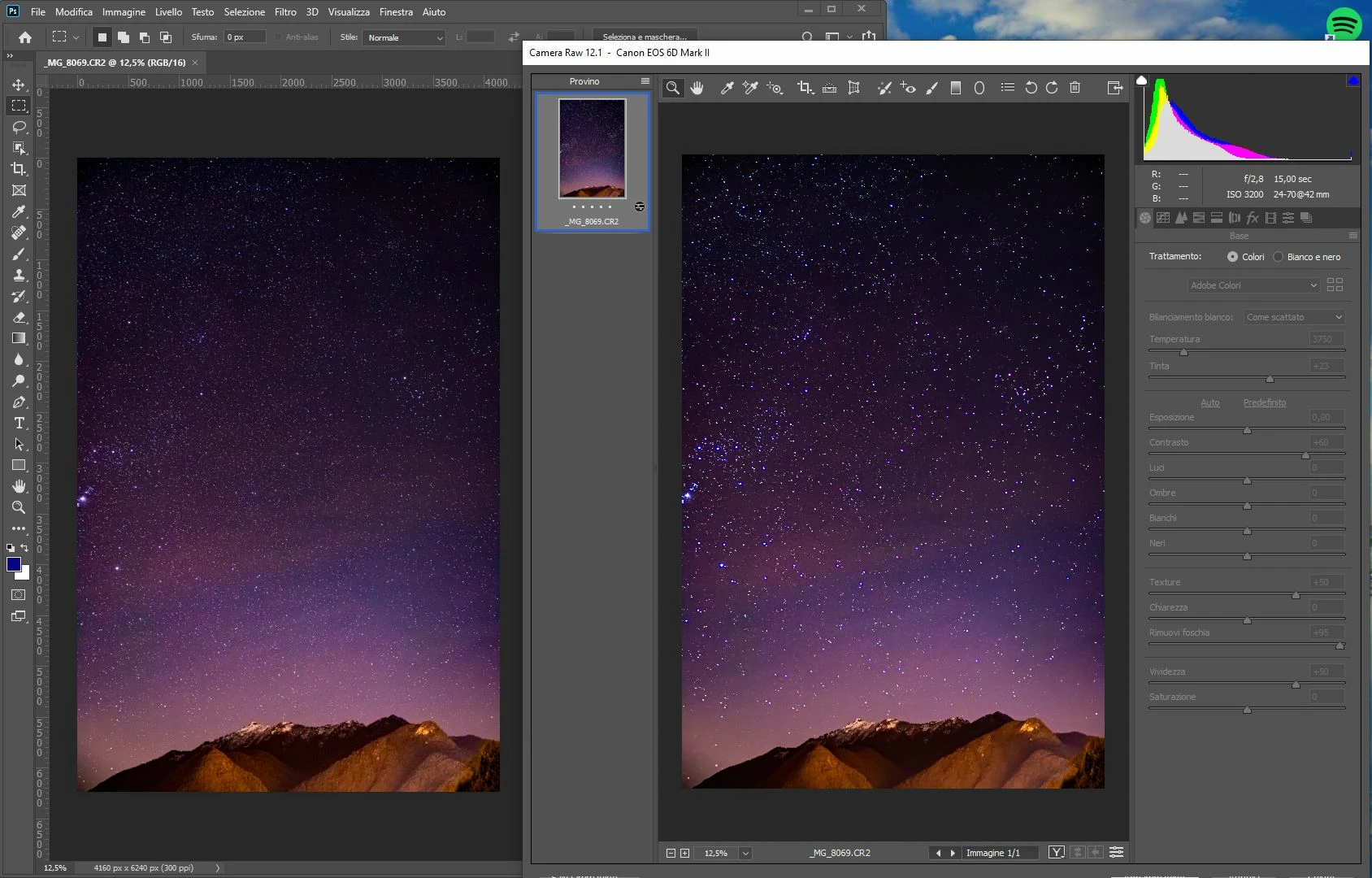

 AdChoices