
Inspiring
Sep 12, 2023 9:00 AM UTC
Answered

Photo Raw don't open i Photoshop 2024!!!

After working a raw photo in CAMERA raw 2024 (using radial filters, filter identifies figures, etc. ..) clicking on "OPEN" the image is not opened in Photoshop 2024, but closes as if you had pressed the "close" button .

I tried uninstalling and reinstalling Bridge 2024 and Photoshop 2024 ... but nothing to do.

To open the image in Photoshop 2024 I have to go back to Bridge 2024 and right click on the image and choose "open in photoshop.

Nothing serious, but it is very annoying.

Thi is the same problem tha I had with the suite 2023 until Adobe created a new update!

Bahhh....
AxelMattCorrect answer
Community Expert
Sep 12, 2023 1:58 PM UTC

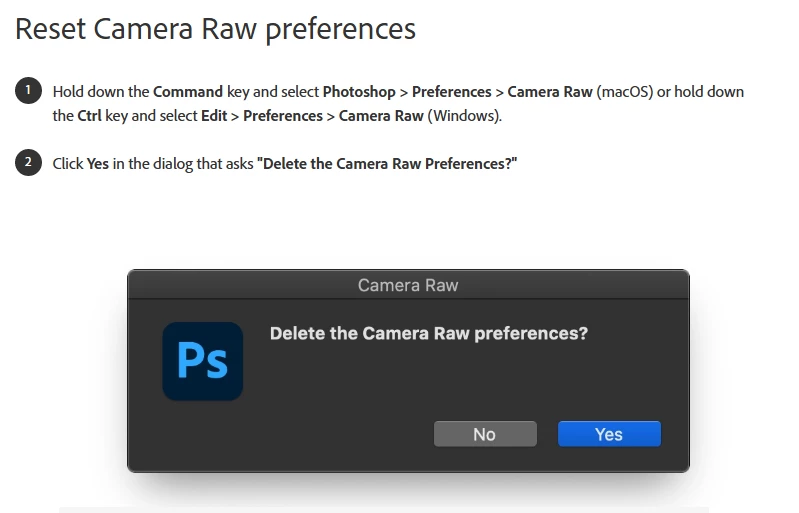
OK. In this case I would try in a first step to reset the preferences in Camera RAW


My System: Intel i7-8700K - 64GB RAM - NVidia Geforce RTX 3060 - Windows 11 Pro 26H2 -- LR-Classic 16 - Photoshop 28 - Nik Collection 9 - PureRAW 6 - Topaz Photo AI

12 replies

lenaapple1974
Participant
May 6, 2024 4:04 PM UTC

I am having this same issue when trying to open multiple images from camera raw to PS.  Not even a single image opens this way.  If I click on one image, I have to choose PS for it to open.  Opening in RAW doesn't do the trick.  SOMETIMES....   
It worked before the last update, so I am not sure what to do until this update.  It is super annoying.


Translate
Community Expert
Jan 19, 2024 9:24 AM UTC

@scara36 

< I keep seeing this suggestions "Press control key...." where???  ... >


You have to press the CTRL - key before you select the menu Edit - Preferences - Camera Raw (Windows) or Photoshop- Preferences - Camera Raw on a Mac.


Translate
My System: Intel i7-8700K - 64GB RAM - NVidia Geforce RTX 3060 - Windows 11 Pro 26H2 -- LR-Classic 16 - Photoshop 28 - Nik Collection 9 - PureRAW 6 - Topaz Photo AI
Participant
Jul 16, 2024 4:53 PM UTC

Thank you, you are the ONLY person who mentioned the CTRL key while talking about this problem with Camera Raw. It worked, you saved my day!

Translate
Participant
Jan 18, 2024 6:48 PM UTC

I keep seeing this suggestions "Press control key...." where???  does it magically open a menu so that I can select Photoshop preferences??  there's a lost of context missing from this suggestion.  Raw won't open for me in Photoshop 2024; when I try to open a raw file, Photoshop just freezes and the only way I can make it do anything is to close it in the task manager.

Translate
Known Participant
Sep 23, 2023 11:46 PM UTC

Am having same problem.  Had similar problem with ACR 2023 the last few weeks.  Am on a Mac; Ventura 13.5.2.   camera raw 15.5.1.1597.

I double-click on a thumbnail & the image opens in ACR.  After ACR closes (instead of opens in PS), I can go back to Bridge 14.0.0.102), right click, choose Open in PS 2025 which opens ACR, where I can (re)click Open & the image will then open in PS.


I have reset ACR Preferences; no change.  If initially, I right click on a thumbnail & choose Open in PS, the when I finish edits in ACR & click Open, the image will open in PS.

Why does Adobe have to break simple stuff like this every time they do an upgrade.  VERY frustrating; lousy QC!

Translate
davescm
Community Expert
Community Expert
Sep 12, 2023 9:32 PM UTC

Just tested and opening a raw file in camera raw and then pressing Open  works fine here in Windows with Photoshop 2024 (i.e v25.0) and camera raw 15.5.1.1597


However when I opened the raw file from Bridge using open with Camera Raw it opened in camera raw OK but pressing the Open button opened in the Photoshop Beta (v25.1). If Photoshop 2024 (v25.0) was already open though, it opened into that version.

Dave


Translate
Pete.Green
Adobe Employee
Sep 12, 2023 8:52 PM UTC

Which version of Camera Raw are you working with?

Translate
Inspiring
Sep 12, 2023 6:33 PM UTC

No changes!


Translate
AxelMattCommunity ExpertCorrect answer
Community Expert
Sep 12, 2023 1:58 PM UTC

OK. In this case I would try in a first step to reset the preferences in Camera RAW


Translate
My System: Intel i7-8700K - 64GB RAM - NVidia Geforce RTX 3060 - Windows 11 Pro 26H2 -- LR-Classic 16 - Photoshop 28 - Nik Collection 9 - PureRAW 6 - Topaz Photo AI
Participant
Aug 6, 2024 6:19 AM UTC

Resetting Camera Raw settings worked, but I did add 2 extra steps..


1. Increased Camer Raw Cache to 10 gigs

2. Purge existing cache

Translate
Inspiring
Sep 12, 2023 1:24 PM UTC

CAMERA RAW, non ON1 PHOTO RAW.

Translate
Community Expert
Sep 12, 2023 9:18 AM UTC

I think this is a problem with PhotoRaw 2024. Try to contact the ON1 support. 


Translate
My System: Intel i7-8700K - 64GB RAM - NVidia Geforce RTX 3060 - Windows 11 Pro 26H2 -- LR-Classic 16 - Photoshop 28 - Nik Collection 9 - PureRAW 6 - Topaz Photo AI