Participant
March 22, 2018
Answered

Photo Shop Text tool not working

  • March 22, 2018
  • 5 replies
  • 46707 views

HI,

I am having problem to type the text using text tool. I have selected 500x100px size image Text size coming some strange no, even I change the text size its not typing any thing. I have tried uninstalling and re installing PS and it works only once then I have same problem.

see the text size in image below

see the dots only when typing nothing else.

Best Regards,
    This topic has been closed for replies.
    Correct answer davescm

    Hi

    I notice the number --21474836 in the.font size There have been a few reports of that problem.

    Try the following:

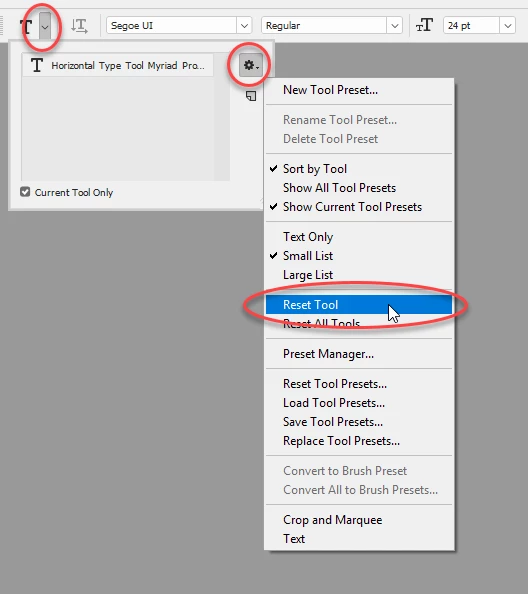
    1. Reset the text tool

    If that does not work

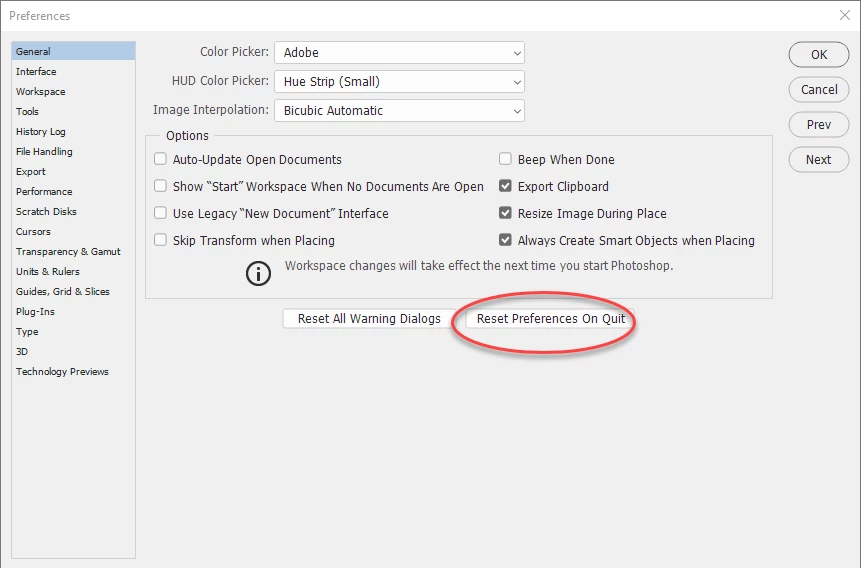
    2. Reset Preferences.

    Go to Preferences >General >then click reset preferences on quit. Then click OK and close and restart Photoshop.

    Dave

    5 replies

    Participant
    August 21, 2024


    Participant
    August 21, 2024

    Done everything as told but still unable to write. Sending sceenshot as asked by you.   

    Participant
    December 30, 2020

    The first solution worked perfectly for me.
    Oh my, I had this problem for weeks and I couldn't solve it.
    Thank you

    davescm
    Community Expert
    davescmCommunity ExpertCorrect answer
    Community Expert
    March 22, 2018

    Hi

    I notice the number --21474836 in the.font size There have been a few reports of that problem.

    Try the following:

    1. Reset the text tool

    If that does not work

    2. Reset Preferences.

    Go to Preferences >General >then click reset preferences on quit. Then click OK and close and restart Photoshop.

    Dave

    Participant
    July 13, 2021

    Thanks, Davescm! Resetting preferences did the trick. 

    Trevor.Dennis
    Community Expert
    Community Expert
    March 22, 2018

    Check the image size, and see what the units are.  What often happens is we forget that size is set to a linear unit like Inches, and we dial in a size thinking it is in pixels.  At 300dpi a 1000 x 1000 image is going to be huge.  If type is set top pixels, then it tends to get lost.

    Try a new Type layer, but specify a linear unit by typing in (for inch) or pt or mm.

    Alsop look at Preference units. I suspect that Rulers might be in Inches.  I like to to use pixels, but YMMV (it's a while since I last used that  olde worlde internet short hand )

    Participant
    March 22, 2018

    Thanks for your reply.

    I have checked image size and change the preference for Units & Rulers, restarted PS but still having same issue.