
Inspiring
October 23, 2018
Answered

Photoshop 2019 crop locked ratio

  • October 23, 2018
  • 14 replies
  • 62947 views

I can't seem to freeform crop, the aspect ratio is locked, I tried holding down shift, ctrl, or alt but it's still locked.

I went to crop options, it doesn't have a freeform or no restriction option.

Only way I can freeform crop now is select with marquee then crop....PLEASE help!
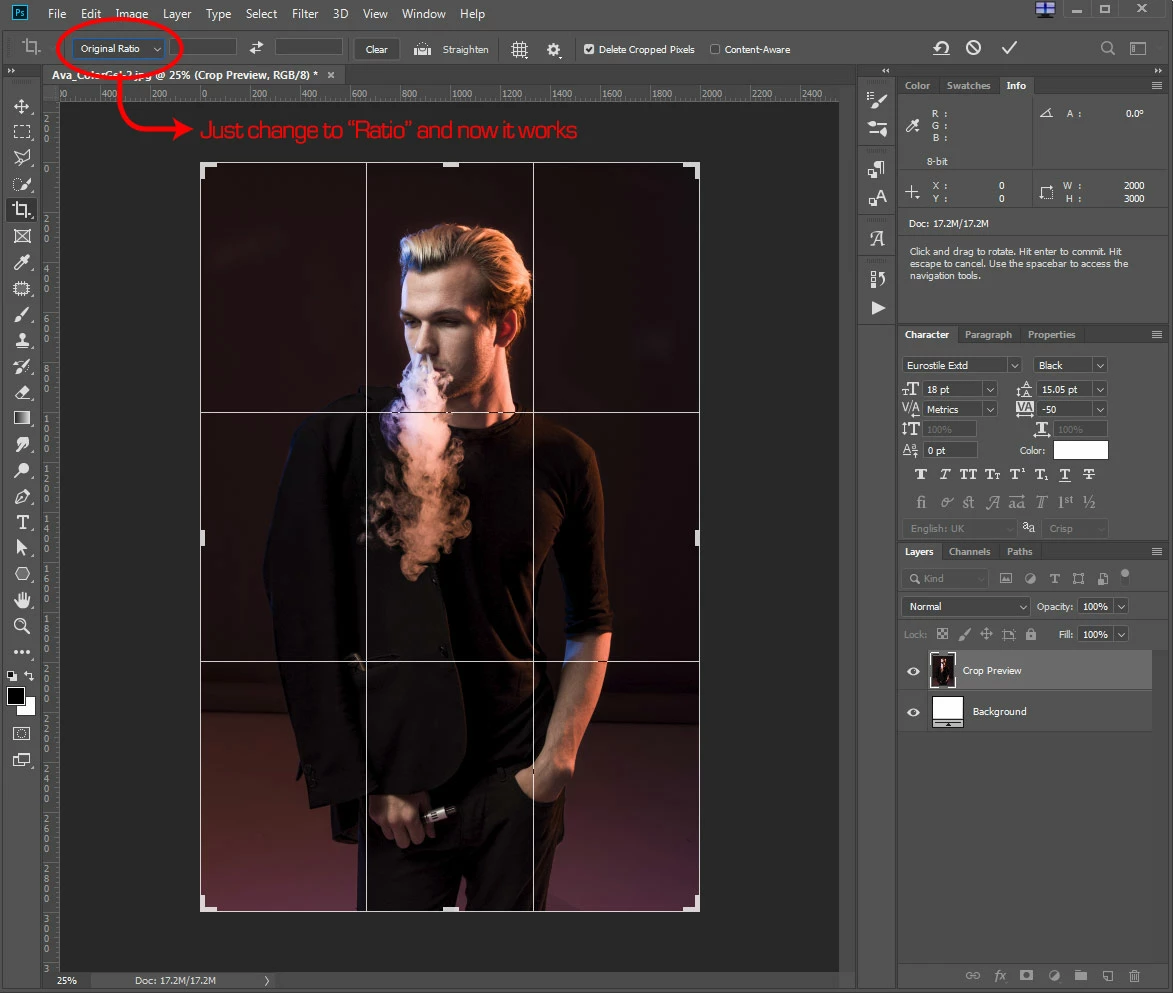
    Correct answer JamesHHL

    I don't have the problem anymore, during initial PS 2019 install the crop default to "Original Ratio". Thus I couldn't freeform transform the crop even holding down shift.  Just had to change it to "Ratio" and everything work as it should now.

    14 replies

    Participant
    August 4, 2021

    The change was completely unnecessary and, quite honestly, sucks. 

    Reset the tool to freestyle crop...which should be the default, but some "genius" at Adobe decided to fix something that wasn't broken.


    Known Participant
    April 23, 2021

    I've found that first I click clear, and then original ratio and then you can you the handles to resize the selection.

    Participating Frequently
    September 14, 2020

    Firstly, thanks for those who provided solutuions.


    (That should satisfy the “Be kind and respectful” and “give credit” guidelines).


    I read this entire thread. I’ve been using PS since around 1993. I don’t have time for these useless BS changes (they are not “upgrades” or “fixes”).


    Simply put, whoever forced this ridiculous change on PS users (and this reeks of a “Senior Team Member” pulling rank during a meeting), should be immediately told to clear their desk, and then be kicked to the curb.


    If I did anything like this to a client, I would lose that account.


    Lots of PS competition out there, today, and they’re looking pretty tempting.

    Participant
    August 16, 2020

    Clicking and selecting it to RATIO is sometimes not enough as I found out but if you then clear the two fields next to it (dimensions) that then allows for free unconstrained cropping

    Known Participant
    January 6, 2020

    Holding the shift key isn't working. I am beginning to loathe the damn changes that this company is making and providing no recourse. I don't like them to start with and I've been on PS since PS3... How do I control the crop tool if shift doesn't work?

    Participant
    January 7, 2020

    Try this, worked for me. 

    Crop tool drop down > New crop preset > 'Unconstrained' (enter) 

    Done. 

    Known Participant
    May 26, 2020

    No that is not working i am afraid


    Participant
    December 24, 2019

    I had the same problem.  Now I just have to figure out how to change it from pixels to inches - like it used to be.  I really wish they would quit "fixing" things that already work.

    Participant
    October 14, 2019

    Hi, I had the same problem in Clasic Mode Crop Tool. You should go to Preferences > General > and check the Use Legacy Free Transform option. It works for me.

    Thunderlizard68
    Participant
    November 25, 2019

    Select the crop tool, then hit the "clear" button to remove the preset parameters. Works the trick for me. 

    jhbradley610
    Participating Frequently
    December 17, 2018

    Why in god's name would they arbitrarily reverse the behavior ("shift for freeform" versus "shift for proportional") in so-called 'Classic Mode'. One would think the point of 'Classic Mode' is that it would be, you know, "the way it's always worked".

    I've been PS'ing for close to 20 years and this change bites me nearly every time. Now I have to switch to non-Classic mode and remember why I didn't like it in the first place...

    Participating Frequently
    December 18, 2018

    I agree 100 percent.

    Why, Adobe? What was the reason for this decision? I'm still using 2018 and won't be upgrading anytime soon, simply because of this BS.

    Known Participant
    November 19, 2018

    I can free crop initially, but when I go to modify the crop by dragging it down or left or whatever, it is expanding proportionally to whatever the ratio I cropped was - I don't want that, I want to freely crop by dragging one slider and not have the other dimension change.

    Inspiring
    November 13, 2018

    I was having the same issue in PS 2019 - normal crop tool locked into a ratio.  Thank you for pointing out the "shift after moving a corner" fix.  However in the work I do I am rarely cropping to a fixed ratio.  Is there a way to make free form cropping the default in PS 2019, i.e. the same as it was in PS 2018?

    Thank you

    Participating Frequently
    November 15, 2018

    thomaspalmer22  skrev

    However in the work I do I am rarely cropping to a fixed ratio.

    Yeah, same here. It annoyed me so much that I reverted back to 2018...

    Inspiring
    November 15, 2018

    So did I.