



mzampitelli
Known Participant
March 16, 2020
Answered

Photoshop 2020 - cannot click on Create New Layer button

  • March 16, 2020
  • 5 replies
  • 11654 views

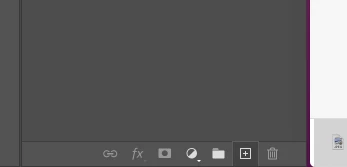
Hi! I have seen that the icon new layer has changed. Now it's a square with a + in the middle. The problem is that most of the time i can't click on it... i can't figure out why! Can you help? 

Also a COMPLETE (not just 10 or 11)  guide of the updates would be great....
 

[To find a forum for your program please start at https://community.adobe.com/]
[Moving from generic Start/Help forum to the specific Program forum... Mod]

This topic has been closed for replies.
Correct answer J453

This issue was fixed. Make sure you update to Photoshop 22.5.1

5 replies

Participant
October 17, 2021

Work around is to go to the layers menu, fist item and add it from there.  I have the same issue as well.


J453Correct answer
Legend
October 18, 2021

This issue was fixed. Make sure you update to Photoshop 22.5.1

Participant
October 19, 2021

Sir, I am sure that you think it is fixed, however I checked and my version is 22.5.1.  So Adobe needs to look again.  Myself and others are still having the issue periodically.  I have also noticed more frequent freezes in the program which require a restart of the program.  Thankfully Adobe can recover all my work after these freezes as long as I don't reboot the machine before I re-open Adobe.

Participant
February 22, 2021

Well, it's 2021 I'm using the newest version and got precisely the same problem just now...

Participant
April 9, 2021

same problem! sooo annoying! not even the shortcut works! I have to go to layer, new layer from the top menu everytime i want a clean layer. or i guess i could duplicate a layer then empty the contents of that layer, but that is too much work.

Not to mention that i am clicking the new layer button and i think it creates a new layer, so i start working, only to find that im still doing the work on the previous layer.

grrr.

stanleym9355223
Participant
September 25, 2020

Golly gee its not working again Oh Well......

Guess I won't get my work done today and miss my deadline.......

What is wrong with you people?

Every year this gets worse and worse, you care more about the $$$ you make in profit then putting out quality releases. Ive been using PS since the SGI days and as an art director for more years than I want to remember.

There are so many issues with the new version it is taking hours of production time and my $$$ to get anything done.

Really get your testing together and pay someone to test don't just throw it to the market and wait for us to do your job! You make enough money you should have dedicated staff testing, not in India but in the US, and have at least one person who knows and uses photoshop supervising.

You waste my time, the teams time, and our hard-earned $$$.

Not having the duplicate layer and all these other bugs are just inexcusable for what we pay for this product.

Come down from your S.F. pedestal and do your job finally.

War Unicorn
Community Expert
Community Expert
September 25, 2020

What's not working again? The "Create a new layer" icon in the Layers panel?

PECourtejoie
Community Expert
Community Expert
April 14, 2020

Hello, try to update to Ps 21.1.2, it has a fix for this very issue: https://helpx.adobe.com/photoshop/kb/fixed-issues.html#photoshop-desktop-fixed-issues

editbreath
Known Participant
December 3, 2020

I'm on 21.2.1 and it stopped working today. 

War Unicorn
Community Expert
Community Expert
March 16, 2020

Wasn't this logged as a bug? I recall seeing this a few days ago.


Meanwhile, use Shift + Ctrl (Cmd on Mac) + N or use Layer > New > Layer on the menu bar.

John Waller
Community Expert
Community Expert
March 16, 2020

>>>Wasn't this logged as a bug?


Not sure about a formal bug being submitted but here's a previous forum post on this issue:

https://community.adobe.com/t5/photoshop/add-layer-mask-and-add-layer-buttons-not-working/td-p/10942601