
bj95950686
Participant
May 31, 2024
Answered

Photoshop 2024 Autoselecting every layer even though Auto-Select is turned off

  • May 31, 2024
  • 4 replies
  • 3412 views

Hello, as title states, I have an issue where when using the move tool Photoshop continually highlights and tries to select whatever layer / asset the cursor is hovering over. Auto Select has been turned off and this still happens, It's very hard to work with this as I can't get to the layers I want without going into the layer menu. 

Any help to fix this would be greatly appreciated thanks, 
Correct answer Ged_Traynor

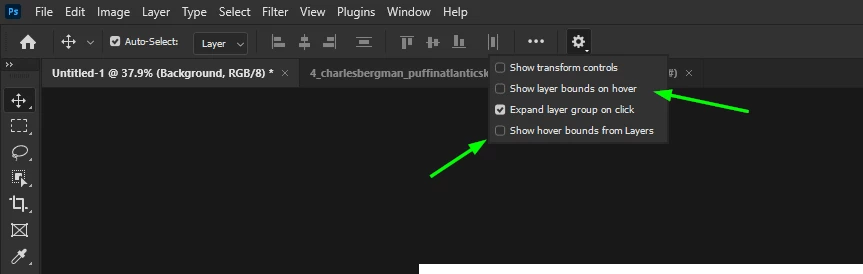
@D Fosse I'm wondering if the OP is referring to the "Show layer bounds on hover" and Show hover bounds from layers"


4 replies

Participating Frequently
November 7, 2024

I had the same problem and it was driving me up the wall. It just started happening in some recent upgrade. Similar to the other answer, I had the option called "show tranform controls" checked. 

D Fosse
Community Expert
Community Expert
May 31, 2024

Ah yes, of course 😉

Ged_Traynor
Community Expert
Ged_TraynorCommunity ExpertCorrect answer
Community Expert
May 31, 2024

@D Fosse I'm wondering if the OP is referring to the "Show layer bounds on hover" and Show hover bounds from layers"


Participant
June 17, 2024

The automatic layer selection problem that has troubled me for a while has finally been solved.
I don't know how it is triggered without a shortcut key, and I don't think I have ever turned on the second option, but anyway, your screenshots are useful help.

D Fosse
Community Expert
Community Expert
May 31, 2024

Sounds like corrupt preferences and you need to reset. Remember to save out actions, brushes etc.