Participant
Jan 31, 2024 3:39 AM UTC
Answered

Photoshop 2024 "Transfer" Brush Setting glitch

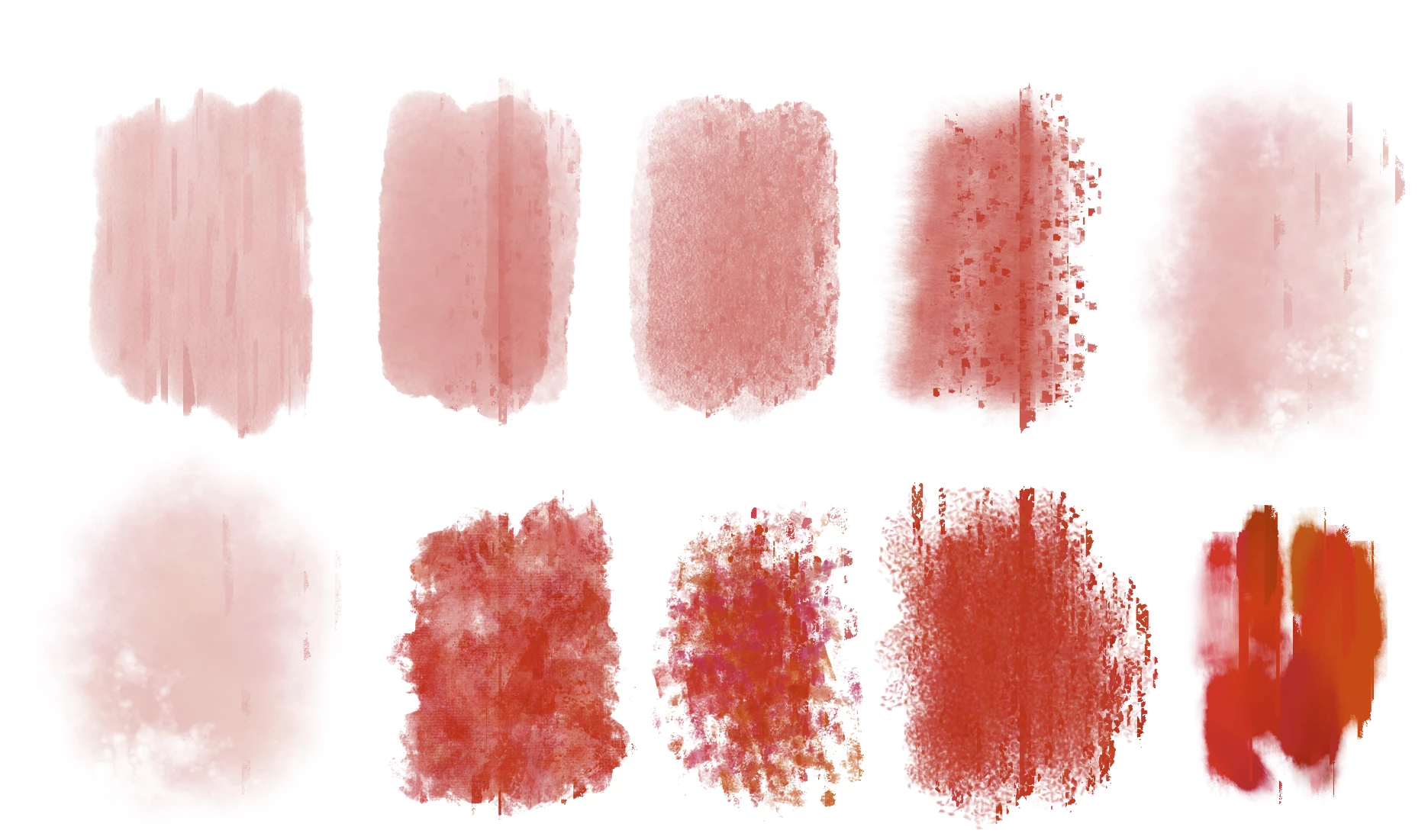
Hi there! This is a bug that has recently shown up on my copy of PS 2024. For some reason, some of my custom texture and soft brushes have these weird vertical and fragmented lines every time I use them. I've turned off "Transfer" on a few and it seems to fix the problem, but not for other brushes. And I want to keep Transfer on so that it retains the special texture. Does anyone else have this problem? Please let me know.

Btw, these brushes are by Kyle T. Webster.
 

This topic is closed to new replies. Start a new post to keep the conversation going.
veronicad72625465Correct answer
Participant
Jan 31, 2024 6:57 PM UTC

So it appears that the only way to resolve this issue is to reinstall a previous version. I'm currently using ver. 25.3.1. I hope the staff fixes this issue sooner than later!!

8 replies

chrisn99465008
Inspiring
Feb 9, 2024 8:29 AM UTC

Same issue, is anyone still painting in PS?

Translate
JaseHeeley
Inspiring
Feb 3, 2024 1:25 PM UTC

I'm using Photoshop 25.4 and having this problem specifically when Color Dynamics are enabled on a brush. I hope this issue is being worked on, because it's currently preventing the use of some of my favourite brushes.

Translate
FreeTime
Known Participant
Feb 2, 2024 12:49 PM UTC

I have exactly the same problem, this happened after the next Photoshop update. 

https://community.adobe.com/t5/photoshop-ecosystem-discussions/color-dynamics-in-photoshop-are-glitchy/m-p/14396217#M778298

Translate
veronicad72625465AuthorCorrect answer
Participant
Jan 31, 2024 6:57 PM UTC

So it appears that the only way to resolve this issue is to reinstall a previous version. I'm currently using ver. 25.3.1. I hope the staff fixes this issue sooner than later!!

Translate
Participant
Jan 31, 2024 6:33 PM UTC

Here are the names of the brushes 

And I am using Windows 11.

Translate
Jeff Arola
Community Expert
Community Expert
Jan 31, 2024 2:59 PM UTC

Yes i see it even with just a regular round soft brush with the settings below.

macOS Sonoma 14.3 with Photoshop 2024 (ps ver 25.4)


Translate
Inspiring
Jan 31, 2024 12:27 PM UTC

Look over on the photoshop beta discussion. It has been happening in beta version for a while. It is a known issue  in PS Beta version. It happens when turning on color dynamics and lowering the brush flow. Now with the new update, it is also happening in the regular photoshop. Check it out here. 

Translate
Jeff Arola
Community Expert
Community Expert
Jan 31, 2024 4:04 AM UTC

Can you give us the names of the brushes in question?


What operating system are you using?

Translate