Inspiring
Nov 2, 2025 2:44 PM UTC
Answered

Photoshop 2024 unavailable to install

Hello,


I had Photoshop 2024 (v25) installed and Creative Cloud proposed me to install Photoshop 27, which I did. I thought it would be in parallel with the other version, as usual.


But in the process, it removed Bridge 14 and Photoshop 2024 and now it's become impossible to install the version 25.


Only versions available in the "Other versions" menu are the 26.x series, the 27 and, for some reason, the 22.2


Where has Photoshop 2024 gone?

Ged_Traynor
Ged_TraynorCorrect answer
Community Expert
Nov 2, 2025 3:03 PM UTC

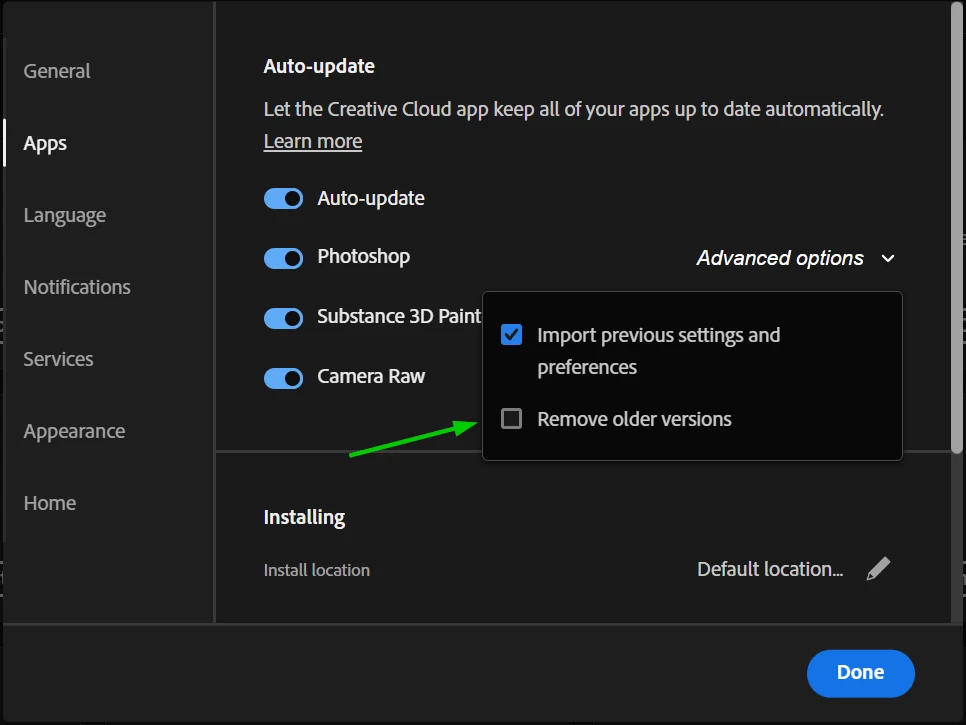
@Philippe5EA0 if you have auto update disabled in the CC preferences, you should have been given the option to keep or remove older versions when installing a new version, if you have auto update enabled which I don't recommend there's an option to remove older versions which I think is enabled by default.

I'm afraid there's no way to get version 2024 back, as Adobe no longer provide download links for older unsupported versions.

Version 22.2 is still available for people that want to use the 3D features that are no longer available in the current version.

4 replies

Divya_Chheda5436
Participant
Apr 14, 2026 10:22 AM UTC

hi, now as of 14/4/2026 the last oldest version possible available is 26.0 so according to you as u said 22.2 is still available but i cant find it in other version

Creative Cloud Photoshop other versions dashboard


Translate
Ged_Traynor
Community Expert
Community Expert
Apr 14, 2026 11:12 AM UTC

@Divya_Chheda5436 Adobe made version 22.2 available for a limited time, and that time is up

Translate
Inspiring
Nov 2, 2025 3:18 PM UTC

I'm pretty sure that option was unchecked, because I had 26 installed in parallel to 24. And it's still unchecked to this day.


But when I installed 27, it just removed everything else without question.


And yes, there's a way to get it back: my backups.


Since I backup my PC every day, I restored the Photoshop 2024 folder and I got it back.


I prefer the 2024 because the AI models are less wonky than the latest ones that hallucinate stuff or decide something is against the guidelines for unfathomable reasons.

Translate
Ged_Traynor
Community Expert
Ged_TraynorCommunity ExpertCorrect answer
Community Expert
Nov 2, 2025 3:03 PM UTC

@Philippe5EA0 if you have auto update disabled in the CC preferences, you should have been given the option to keep or remove older versions when installing a new version, if you have auto update enabled which I don't recommend there's an option to remove older versions which I think is enabled by default.

I'm afraid there's no way to get version 2024 back, as Adobe no longer provide download links for older unsupported versions.

Version 22.2 is still available for people that want to use the 3D features that are no longer available in the current version.

Translate