Known Participant
October 2, 2023
Answered

Photoshop 2024 [v25.1] - Color Sliders don't work [Color picker issue -merged]

  • October 2, 2023
  • 142 replies
  • 50838 views

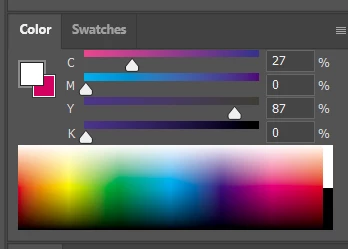
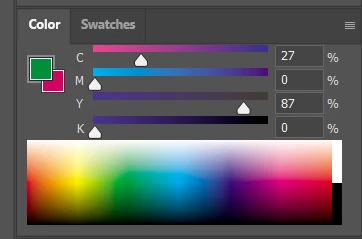
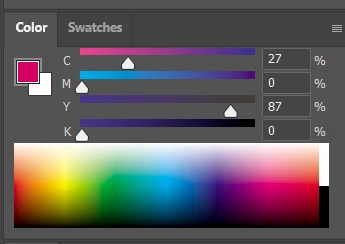
Color Sliders in my new Photoshop 2024 don't work at all - they don't change when i pick a color from the Spectrum or when i change Foreground/Bacground color with X key.

I reset Preferences, reinstaled PS and nothing works. Any ideas?

Photoshop 25.1.0, Windows 10.


This topic has been closed for replies.
Correct answer Kevin Stohlmeyer

@robzartworx there is a phased roll out for update 25.2 happening globally.

If you are in a managed environment (Enterprise/Teams/Edu) you may have to reach out to your plan admin to allow access to new updates within 30 days of release.

142 replies

Participating Frequently
October 31, 2023

Same issue here!

I installed the last version 25.0 and worked. I hope adobe fix.

davescm
Community Expert
Community Expert
October 31, 2023

I've merged your thread with an existing bug report thread on the same subject

IndigoWitch
Participant
October 30, 2023

I'm having the same issue, too (on Mac). I've reinstalled 25.0 for now.

Ged_Traynor
Community Expert
Community Expert
October 30, 2023

@JeffGoblivion nobody here can tell you when Adobe will roll out bug fixes, you best option is to downgrade to version 25.0 until they do

Participant
October 30, 2023

Do we have any idea when it's going to be fix? I can't work like this 😞 

Participant
October 29, 2023

Reading everything folks said below, I tried my old version (24.72) and it works just fine there.
So I went ahead to also tried reinstalling the 25.1 version and NOPE, not working, it didn't fix it. So I thought perhaps it's because I chose to KEEP the preferences when uninstalling. So I tried again, this time removing everything and NOPE, still not working. I'm sticking with the older version until this is fixed.


I really need to stop installing every update that rolls around so enthusiastically... 

Participant
October 29, 2023


위에 사진처럼 컬리피커(스포이드)로 색을 복사하면 컬러 윈도우에는 바뀌지 않고 그냥 빨간 값을 유지해요 물론 색은 지정한 색이 나오긴 하지만 제가 지정한 색이 어느 위치인지 알 수 가 없어서  그림을 그릴 수가 없는 상황입니다 도와주세요..

J E L
Community Expert
Community Expert
October 29, 2023

Hi @준영33241565rtjd, thanks for letting us know. Apparently, this is a bug that Adobe introduced with version 25.1.0. The immediate workaround is to revert to version 25.0 until it's fixed. Please note, your post may be combined into another thread with this issue.


See: https://community.adobe.com/t5/photoshop-ecosystem-bugs/color-picker-not-showing-correct-color-on-color-wheel/idi-p/14186280

Participant
October 29, 2023

Help me to. Thanks

Participant
October 29, 2023

Hi guys, help me, please!

My eyedropper tool is sampling the Correct color from the image, however, it's not showing on my color pallet.
For example: Let's say I used an orange color before, and my sampling circle is in the orange range in the color panel,
and now I have to pick a blue color from the image. So my eyedropper tool is sampling the correct color, but it is not showing on the color panel.
My colors are still in the orange range and not in the blue range.
It's so annoying! I just updated my Photoshop and encountered this problem.

kglad
Community Expert
Community Expert
October 29, 2023

in the future, to find the best place to post your message, use the list here, https://community.adobe.com/

p.s. i don't think the adobe website, and forums in particular, are easy to navigate, so don't spend a lot of time searching that forum list. do your best and we'll move the post (like this one has already been moved) if it helps you get responses.


<"moved from using the community">
Participant
October 28, 2023

Disappointing that a company like Adobe could introduce a bug like this in such a fundamental aspect of the program.