



practical_parent0D4C
Known Participant
August 2, 2025
Question

Photoshop 2025 encore

  • August 2, 2025
  • 1 reply
  • 138 views

Bonjour ! Pourquoi les fenêtres sont devenues flottantes ou que faire pour les forcer à rester ou nous les avons laissés ? Merci !

Aussi à la réouverture de ce logiciel (trop capricieux) pourquoi le carré des couleurs devient immense tout à coup ?

re Merci !
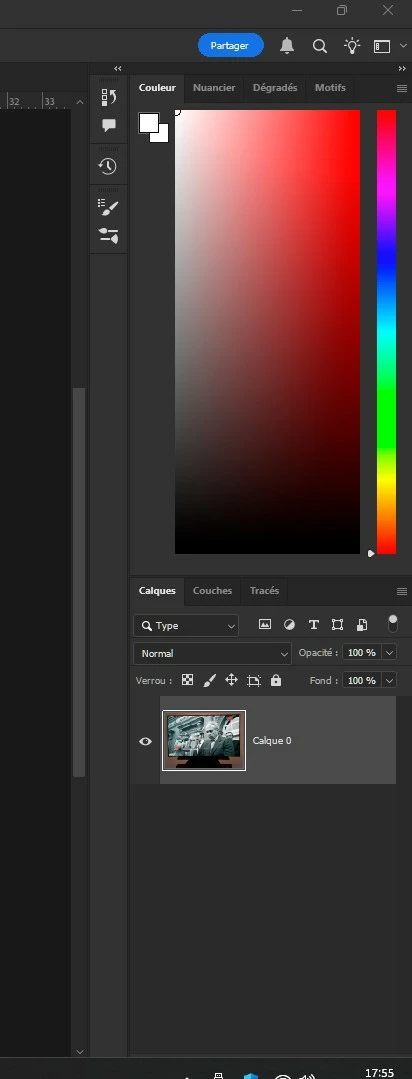
Ce message sera-t-il bien visible ?

À bientôt !

Tg

1 reply

creative explorer
Community Expert
Community Expert
August 2, 2025

@practical_parent0D4C Based on the image and your description, the floating panels in Photoshop are a result of being undocked from their default positions, which often happens with an accidental drag-and-drop. To fix this, you can simply click and drag the top bar of each panel (like Couleur or Calques) back to the side of the screen until a blue line appears, which indicates it will snap back into place. To address the issue of the windows and the oversized color square changing when you reopen Photoshop, the quickest and most effective solution is to reset the workspace. You can do this by going to the main menu at the top of the screen, navigating to Window > Workspace, and then selecting Reset (Your Current Workspace Name). This will force all panels and windows to return to their default positions and sizes for that specific layout.

m
practical_parent0D4C
Known Participant
August 13, 2025
Désolé de répondre seulement ce jour.
Pas d'accessibilité à cette messagerie.
Il m'a fallut un technicien pour pouvoir... enfin, vous répondre.
Cordialement
B
Adobe c'est vraiment magique ... lorsque cela fonctionne normalement