
Participating Frequently
April 25, 2025
Answered

Photoshop 2025 v26.6 Bug - cannot read/write workspaces

  • April 25, 2025
  • 12 replies
  • 994 views

After experiencing the "black canvas" bug and working around it, I am not stuck on not being able to use my workspaces - a pretty important piece for my workflow. Not sure why, but the newest updates to Photoshop and Illustrator are grayed out in my Security settings. I reverted to Indesign 2024 because 2025was a nightmare of bugs.


I assume full disk accesss has been granted, but it is grayed out, and there is no "+" button to re-add it. In fact, I can't remove it either. I have no abilityt to do anything.
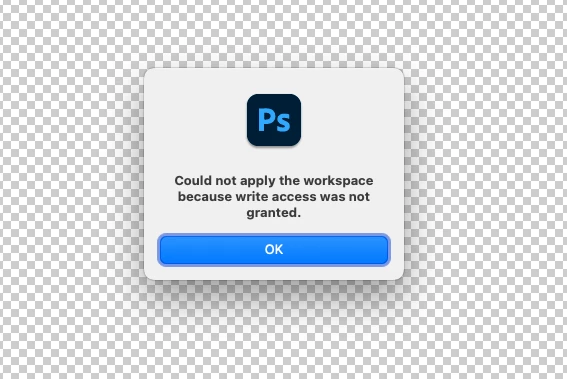
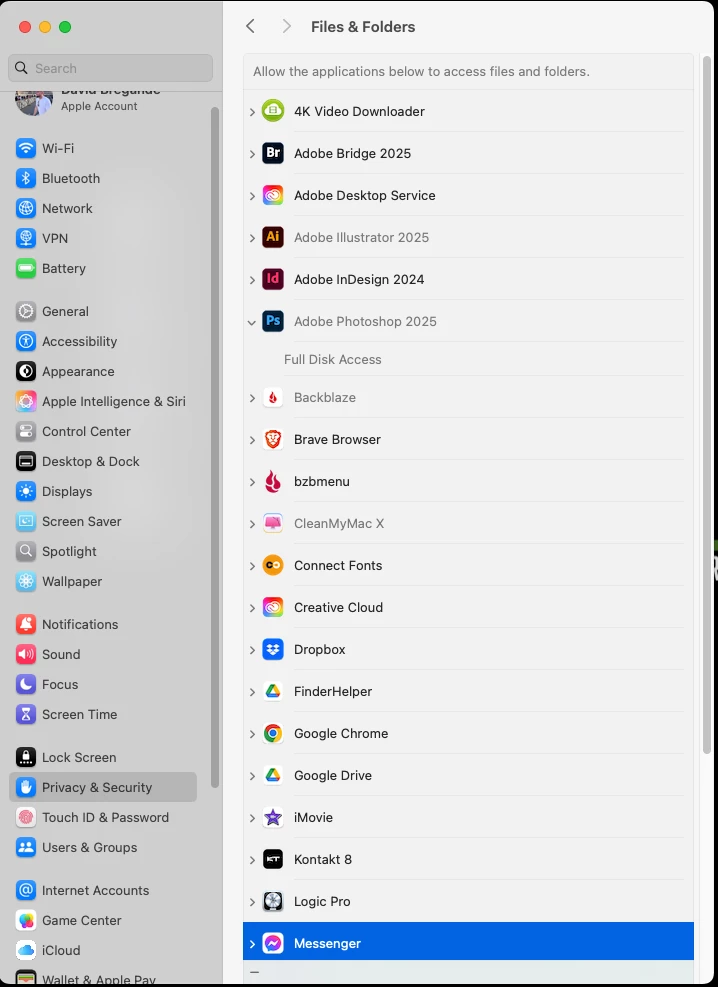
 

Mac OS Sequoia 15.4.1

Correct answer sprinklr-integration-user

Hi @usedave,

Thank you so much for reaching out! 

Could you please share the workaround you used for fixing the Black Screen issue? It's possible that the workaround might have caused the workspaces to not show up. Also, was the full disk access not greyed-out in the previous update?

While we wait for your reply, you can try these steps to see if they help:

  1. Reset Photoshop Preferences: Before you do this, please back up your preferences by referring to this Helpx article on Preferences in Photoshop. https://adobe.ly/44IHUKS

    • Press and hold Option + Command + Shift while Photoshop is starting.
    • This will delete your current preferences and create new ones on the next startup.
  2. Turn off the GPU: You can refer to this link for detailed steps. https://adobe.ly/3Gqp9C1

I hope these suggestions help! Please let us know how it goes.

Best, Noel

12 replies

usedaveAuthor
Participating Frequently
April 25, 2025

Turns out the workaround wasnt a workaround at all, it just started working. I was able to restore full disk access, but workspaces remain a problem. I was able to save a new workspace, but can't read it. Then it disappeared from the menu altogether. I somehow have 2 folders in Preferences called "Workspaces" and "Workspaces (Modified)" I can see th enew workspace in the "modified" folder, but not in the workspaces menu within photshop. If I drage it into the "workspaces" folder, it shows in the Photoshop menu, but I can't load it.


The example workspace is called "Dave 2025"


The One called "Dave's Workspace" is the one I attempted to salvage - my custom workspace - and it is a wildcard as to whether it appears. In fact, even the default workspaces are sometimes rejected.


I have deleted preferences several times and dragged in what I condsider essential preferences (tool presets and brushes) but Workspaces is not responding. 

Inspiring
April 25, 2025

Hi @usedave,

Thank you so much for reaching out! 

Could you please share the workaround you used for fixing the Black Screen issue? It's possible that the workaround might have caused the workspaces to not show up. Also, was the full disk access not greyed-out in the previous update?

While we wait for your reply, you can try these steps to see if they help:

  1. Reset Photoshop Preferences: Before you do this, please back up your preferences by referring to this Helpx article on Preferences in Photoshop. https://adobe.ly/44IHUKS

    • Press and hold Option + Command + Shift while Photoshop is starting.
    • This will delete your current preferences and create new ones on the next startup.
  2. Turn off the GPU: You can refer to this link for detailed steps. https://adobe.ly/3Gqp9C1

I hope these suggestions help! Please let us know how it goes.

Best, Noel