



PaulieDC
Inspiring
January 3, 2026
Answered

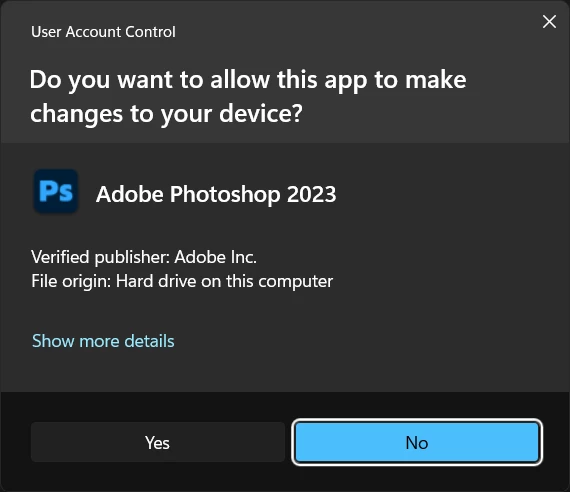
Photoshop 2026 User Account Control (UAC) prompt still says "Photoshop 2023"

  • January 3, 2026
  • 1 reply
  • 183 views

I always run Adobe software as Admin in Winodws because of the heavy reliance on the Registry. When you start any app that way, the UAC prompt pops up to confirm you are you, then the app starts. In Photoshop 2026, this is the UAC prompt:
 

2026 Photoshop Splash Screen.png

How do we get this info to the development team to fix? It doesn't break anything, just feels unfinished, and makes you wonder what else was overlooked. This is three versions old and still in the app.

Correct answer Claire H.

Hi @PaulieDC, thanks for reaching out! This might be a cache issue, but let's try a few troubleshooting steps to resolve the problem. 
1. Confirm you’re on Photoshop 2026 (Help > About Photoshop) and uninstall any older versions.
2. Clear your cache: https://adobe.ly/4sIJJRR.
3. Try manually resetting your Photoshop preferences: https://adobe.ly/3N4dtbm

Remember to back up your settings before doing the preference reset: https://adobe.ly/4ssbPR4.

Let's start here, and we can continue troubleshooting if you're still having problems. Thanks! ^CH

1 reply

Claire H.
Community Manager
Claire H.Community ManagerCorrect answer
Community Manager
January 5, 2026

Hi @PaulieDC, thanks for reaching out! This might be a cache issue, but let's try a few troubleshooting steps to resolve the problem. 
1. Confirm you’re on Photoshop 2026 (Help > About Photoshop) and uninstall any older versions.
2. Clear your cache: https://adobe.ly/4sIJJRR.
3. Try manually resetting your Photoshop preferences: https://adobe.ly/3N4dtbm

Remember to back up your settings before doing the preference reset: https://adobe.ly/4ssbPR4.

Let's start here, and we can continue troubleshooting if you're still having problems. Thanks! ^CH