
Fábio Lucas
Participating Frequently
November 21, 2022
Question

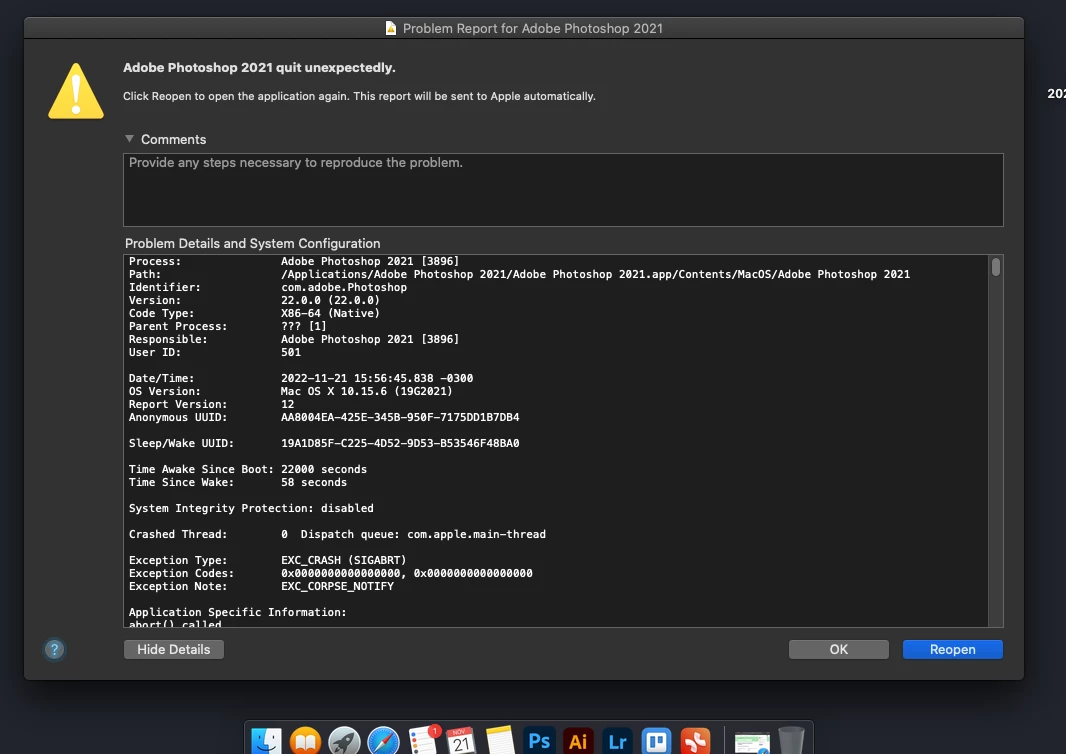
photoshop 22.0 quit unexpectedly

  • November 21, 2022
  • 2 replies
  • 1292 views

I recently subscribed to Creative Cloud and downloaded apps like illustrator version 27.0.1, Lightroom version 6.0 and Media Encoder version 23.0.1 only photoshop version 22.2 didn't work, I contacted them and they gave me a link with version 22.0 but it also didn't work like you can see in the subsequent print, the last version I had installed on my machine was 21.3
This topic has been closed for replies.

2 replies

Community Expert
November 22, 2022

Hi @Fábio Lucas,

Did the suggestion given by @kglad work for you? It would be nice if you provided some updates. In the meanwhile I have moved the post to a better suited Photoshop ecosystem forum for better support incase more help/ideas are needed.

-Manan

-Manan
Fábio Lucas
Participating Frequently
November 22, 2022

Hello, I contacted support, and what is happening is that my mac does not support this version of photoshop, but the biggest problem is that they do not provide the previous version that was running on my mac, it was version 21.2. I can't find it anywhere to download, can you help me with this?

NB, colourmanagement
Community Expert
Community Expert
November 25, 2022

I hope this may help: 

to install an earlier version, do disable auto-updates

https://helpx.adobe.com/au/download-install/using/install-previous-version.html


I hope this helps
neil barstow, colourmanagement net :: adobe forum volunteer:: co-author: 'getting colour right'
google me "neil barstow colourmanagement" for lots of free articles on colour management

kglad
Community Expert
Community Expert
November 21, 2022
Fábio Lucas
Participating Frequently
November 22, 2022

Hello, I contacted support, and what is happening is that my mac does not support this version of photoshop, but the biggest problem is that they do not provide the previous version that was running on my mac, it was version 21.2. I can't find it anywhere to download, can you help me with this??

kglad
Community Expert
Community Expert
November 22, 2022

yes,


for the current and one previous versions use the cc app:


https://helpx.adobe.com/download-install/using/install-previous-version.html#:~:text=Install%20Previous%20Versions%20of%20your%20Creative%20Cloud%20Apps,drop-down%20list%2C%20click%20Other%20Versions.%20Does...%20See%20More.


for cc 2019 and earlier use prodesigntools.com*


for everything else, you must use adobe support** (and it may take a few tries to find an agent to provide links).


*

adobe download links prior to cc 2020 are available from prodesigntools.com. https://prodesigntools.com/adobe-direct-download-links.html


follow the directions (esp, step 1)

save the install file.  it may not remain online.

thank jim @ prodesigntools.com


**

use a browser that allows popups and cookies and contact adobe support by clicking here, https://helpx.adobe.com/contact.html?rghtup=autoOpen
in the chat field (lower right), type AGENT
be patient, it can take quite a while to reach a human

p.s you can also use phone (but chat is usually quicker), https://helpx.adobe.com/contact/phone.html

p.p.s. you can also use twitter to tweet @AdobeCare

p.p.p.s. if you're contacted by anyone (via email or private message), it's much more likely to be a scammer than an adobe representative. ie, double check for an employee badge if contacted in the forums and look for an adobe.com domain in the email address if you click reply to an email. then check again and be very suspicious. any other method of contacting (or offering to contact you) is almost certainly a scam, https://community.adobe.com/t5/using-the-community-discussions/staying-safe-in-the-adobe-support-community/td-p/12919684/redirect_from_archived_page/true