

Photoshop 23.0.1 font size does not scale with Windows font sizing or with Photoshop Interface opts
This is a cross between a bug report and a feature request, as I'm not sure where it falls:
I am using Photshop 23.0.1 on Windows 11 system (AMD Ryzen 5600x CPU) on a larger display (3840x2160). I also use Lightroom Classic 11.0 on the same PC. When the system font size is set to the lowest setting, both programs have similar menu font sizes (which I would expect):

When I increase the Windows system font size, Lightroom Classic scales its font size appropriately, but Photoshop's font size remains the same (see below as an example):

My understanding (at least as of a few years ago) is that Photoshop's font size is meant to be able to be scaled with Windows font choices. Or perhaps with the options in the Interface. But the main menu and most of the text in Photoshop seems to correspond with neither.
I've tried modifying the interface values on Photoshop (checking and unchecking the "Scale UI to font" and restarting Photoshop but did not see any change.
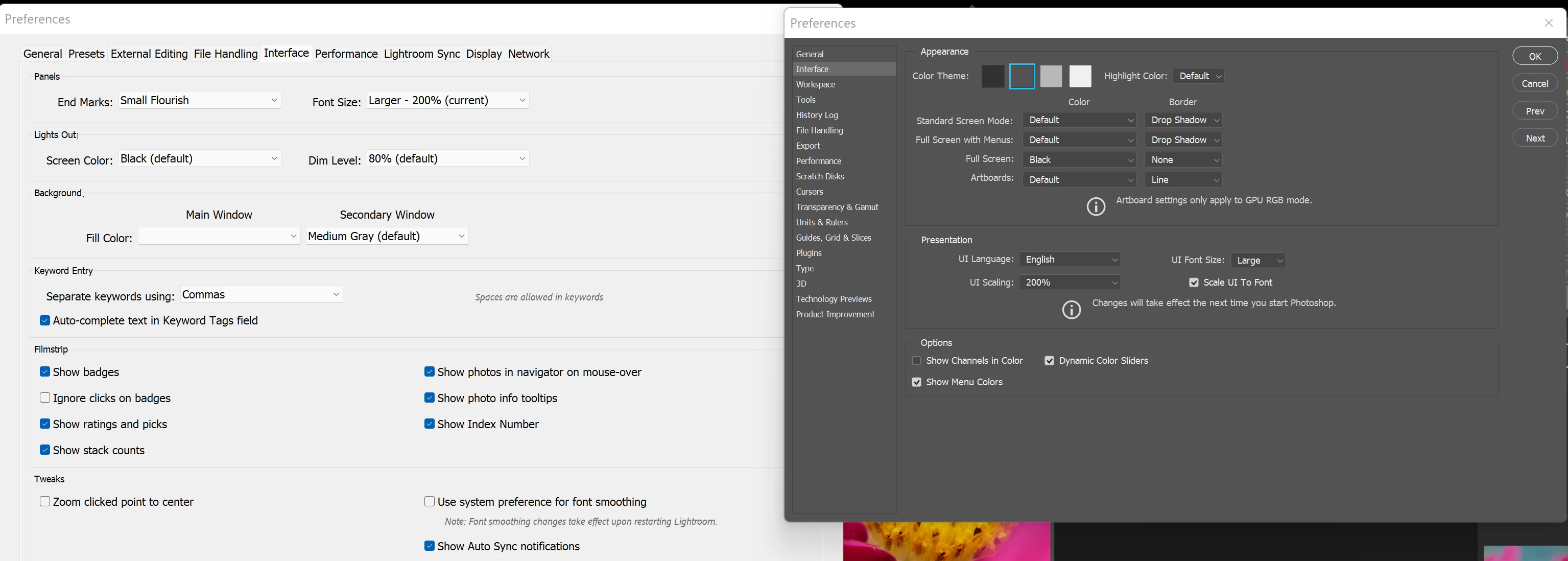
In photoshop, the standard menu options (File, Edit, Image, Layer, etc.) are still very small and hard to see. The sub menus (Edit->Undo, Edit->Redo, etc.) are very easy to see (I am guessing their scaling is handled differently, the sub menus behave more like what I expected.).
There are various search results that suggest to add a manifest file or to change the compatibility mode for high DPI systems, but the latter just seems to generate "Fail to call postMessage as webview is not initialized yet." Some have also suggested changing the resolution of the monitor to a lower resolution. But these are all hacks unbecoming of a professional program which I have just spent a small fortune building a PC to use it on.
The bug report is that Photoshop 23.0.1 when run with a high resolution monitor and Windows 11 has very small regular menu text that does not seem to be changeable, either by Windows font sizing or through the Photoshop Interface options. With Lightroom Classic 11.0 on the same machine it is very esay to change menu text size under Interface or have it be changed via Windows font sizing. If Photoshop could handle its menu text size changes the same way Lightroom Classic does all of my problems would be solved.
 AdChoices