Participant
Dec 10, 2022 10:03 PM UTC
Answered

Photoshop 24.0 default file location to local computer option

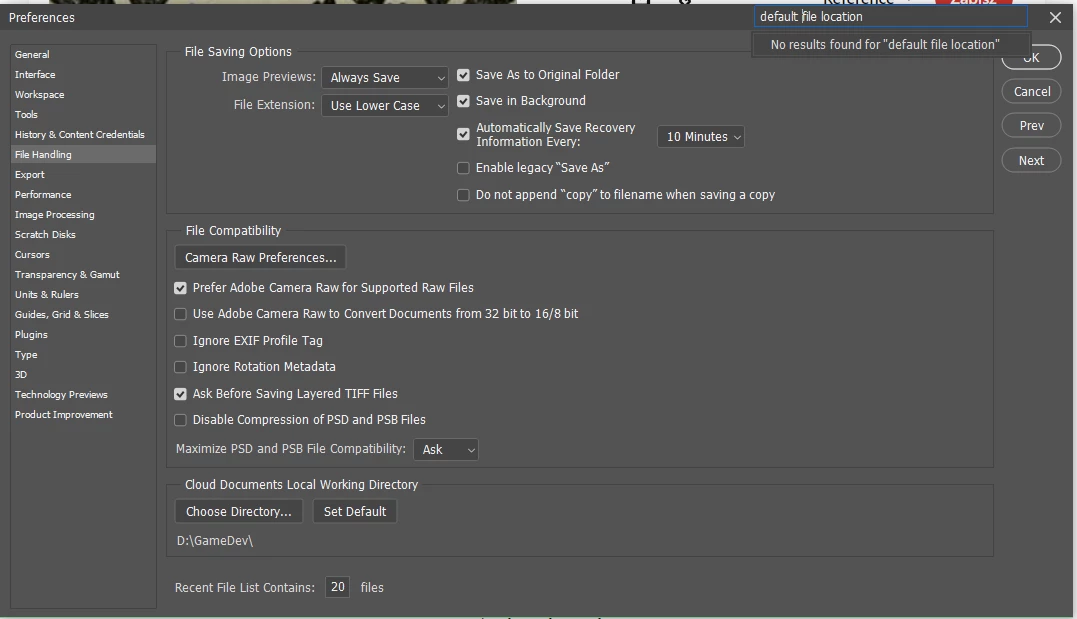
Hi, I'm trying to find the "Default File Location" in the options that enable save without ever seeing this annoying cloud save popup on Photoshop, but after updating to 24.0 I cannot find and change it to be able to save only locally without having to click "On your computer" button each time I want to save.

It's super annoying. I've checked other tabs but cannot find it. Is it named something different this time?

PS Version: 24.0.0, Windows 10

Thanks for help 


This topic is closed to new replies. Start a new post to keep the conversation going.
TheDigitalDog
TheDigitalDogCorrect answer
Inspiring
Dec 12, 2022 1:47 AM UTC

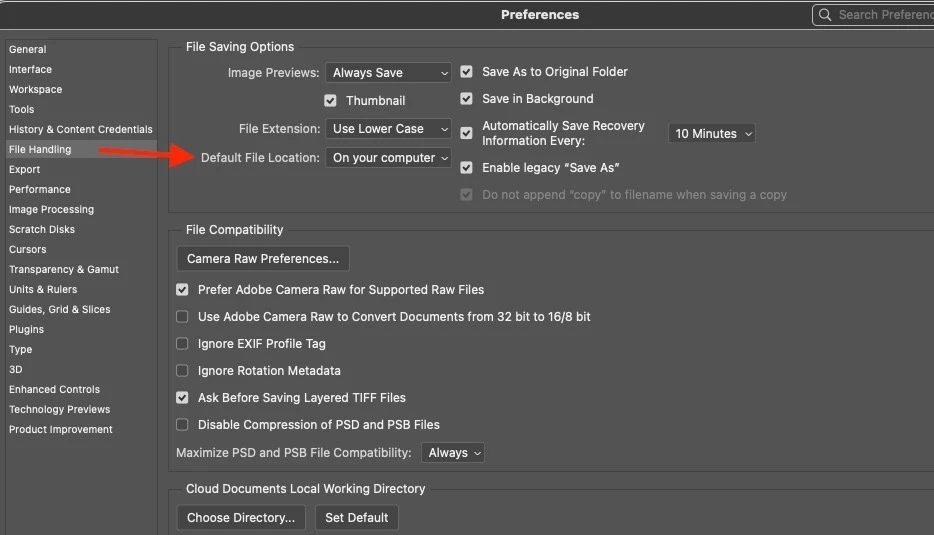
The issue is (and I don't know why) you don't see this:

If you select "Enable Legacy "Save As" do you see the option above? 

Author “Color Management for Photographers" & "Photoshop CC Color Management/pluralsight"

14 replies

TheDigitalDog
TheDigitalDogCorrect answer
Inspiring
Dec 12, 2022 1:47 AM UTC

The issue is (and I don't know why) you don't see this:

If you select "Enable Legacy "Save As" do you see the option above? 

Translate
Author “Color Management for Photographers" & "Photoshop CC Color Management/pluralsight"
Participant
Dec 15, 2022 11:32 PM UTC

Hi, after updating Photoshop and restarting the computer the option shows up. Really don't know what happened. I'm really glad that this option is still there. 

Still. If Adobe wouldn't force its cloud on us there wouldn't be multiple topics on forums. 

Translate
Participant
Dec 27, 2022 1:42 PM UTC

On 24.1 and have also been dealing with Adobe trying to push their cloud on me for the past couple of days. Also didn't see the  "Default file location" option in my preferences the past week until I came across this thread and rebooted my Mac (which is very strange as I shutdown my Mac daily so you would think the "Default file location" option would've shown up when I booted up my device; I have been looking for it for days...)

Translate
Nancy OShea
Community Expert
Community Expert
Dec 10, 2022 10:22 PM UTC

My computer defaults to whichever location was last opened.

If was a file opened from an external drive, it defaults to that when I save.  If it was opened from a folder on my primary HD, it defaults to that location.  And so on...


Translate
Nancy O'Shea— Product User & Community Expert
Participant
Dec 10, 2022 10:26 PM UTC

Hi! Can you elaborate on what you mean by having the last opened location? Do you have a popup like this or it goes straight to save as window?


Translate
Nancy OShea
Community Expert
Community Expert
Dec 12, 2022 1:03 AM UTC

That's showing Cloud Documents.  I typically save and open work files from local computer HD so they can be backed up nightly by my file backup/recovery service.


Click On Your Computer button.


Translate
Nancy O'Shea— Product User & Community Expert