


Photoshop 27.10.0 — Severe panning and selection lag with Intel Arc A770; disabling GPU acceleration resolves it
Hello Adobe Support Team,
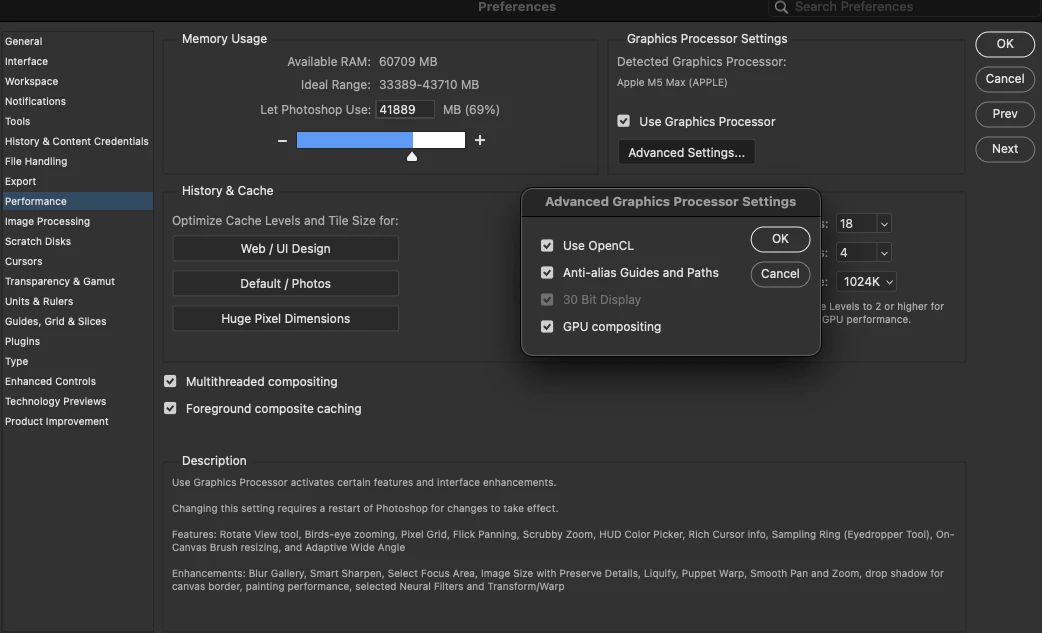
I am experiencing significant lag in Photoshop when “Use Graphics Processor” is enabled. Panning the canvas and drawing selections with the Lasso Tool feel choppy, even in a document containing only a single white layer.
My system:
-
Photoshop: 27.10.0 Release, licensed through Adobe
-
CPU: AMD Ryzen 9 5950X
-
GPU: Intel Arc A770, 16GB VRAM
-
Windows version: [Please add]
-
Intel graphics driver version: [Please add]
Troubleshooting results:
-
Disabling “GPU compositing” while keeping “Use Graphics Processor” enabled did not resolve the lag.
-
Disabling “Use Graphics Processor” entirely made panning and selection tools significantly smoother and faster.
To reproduce:
-
Enable “Use Graphics Processor” and restart Photoshop.
-
Open a document with a single white layer.
-
Pan the canvas and draw selections using the Lasso Tool.
-
Disable “Use Graphics Processor,” restart Photoshop, and repeat the same actions to compare responsiveness.
For comparison, my older office PC with an Intel Core i7-6700K and NVIDIA GTX 950 with 2GB VRAM handles these actions more smoothly. However, I have not yet confirmed whether both PCs have identical Photoshop versions and settings.
Could you help determine whether this is a Photoshop GPU acceleration issue, an Intel driver compatibility issue, or a configuration problem? I would like to use GPU acceleration without these slowdowns rather than keep it disabled.
I can provide Photoshop System Info, screenshots, and a short screen recording if needed.
Thank you,

 AdChoices