


Photoshop 27.11.0 – Command + Space + Right-Click Does Not Consistently Show the Zoom Menu on macOS
I’m experiencing an intermittent issue with the temporary Zoom Tool in Photoshop 2026 (27.11.0) on macOS.
Normally, holding Command + Space and right-clicking on the canvas brings up the Zoom Tool context menu, with options such as Fit on Screen, 100%, 200%, Print Size, Zoom In, and Zoom Out.
However, in newer versions of Photoshop, the same action frequently brings up a layer-related context menu (e.g., Background / Isolate Layers) instead of the Zoom menu.
Details:
- Pressing Z to activate the Zoom Tool and then right-clicking works correctly every time.
- Holding Command + Space correctly changes the cursor to the magnifying glass.
- However, right-clicking while holding these keys usually displays the wrong context menu.
- Occasionally, the correct Zoom menu appears, but the issue returns.
- The issue occurs regardless of which tool is currently selected.
- This behavior works correctly in Photoshop 27.5.0 but is inconsistent in the newer versions I’ve tested.
I’ve been using Photoshop professionally for around 10 years, and I’m confident that the keyboard shortcuts and mouse operations are correct.
Is this a known bug in recent Photoshop versions, or has the behavior of the temporary Zoom Tool changed? Is there a way to restore the previous functionality?
System Information:
- macOS Tahoe 26.5.1
- MacBook Pro M2 Max
- Adobe Photoshop 27.11.0
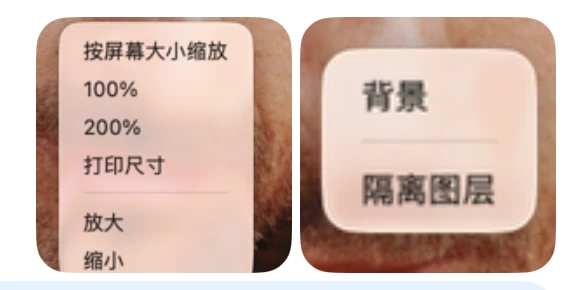
The left screenshot shows the correct Zoom Tool context menu, while the right screenshot shows the incorrect layer context menu.
Both screenshots were taken using the exact same action: holding Command + Space, then right-clicking on the canvas.

 AdChoices